


 本文介绍了MVC架构设计模式,它包含模型、视图和控制器,用于实现应用程序的用户界面层。详细说明了MVC的工作流程,以及各部分的作用。还讲解了在ASP.NET Core应用程序中设置和配置MVC中间件的方法,最后添加HomeController进行测试。
什么是MVC
MVC有三个基本部分——模型(Model)、视图(View)和控制器(Controller)。它是实现应用程序的用户界面层的架构设计模式🛠。
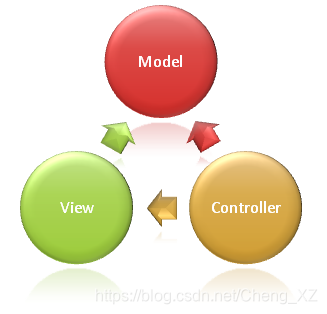
一个典型的实际应用程序通常具有以下3层,这是很多学生在学校或者初学的时候使用的分层形式。
- 用户展现层
- 业务逻辑处理层
- 数据访问读取层
我们称之为三层架构,而MVC设计模式通常位于实现应用程序的用户展现层中*。
MVC如何工作
让我们了解MVC设计模式是如何实现的。假设我们想要查询特定学生的详细信息(ID为1的学生信息),并在HTML网页的表格上显示这些信息,如图所示:
| Student Details | |
|---|---|
| ID | 1 |
| Name | 张三 |
| Major | 计算机科学与技术 |
从Web浏览器发出请求,URL为http://xxxx.com/students/details/1,从浏览器发起请求到响应的流程如图所示:
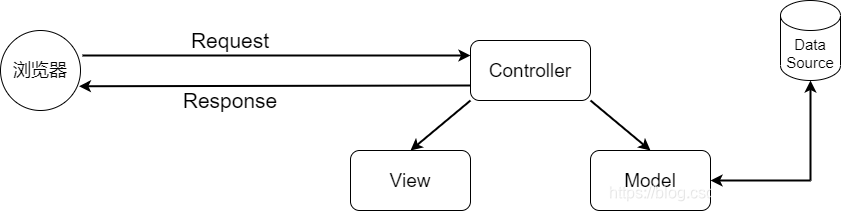
进一步分析上图所示的内容。
- 当我们的请求到达服务器时,MVC设计模式下的Controller会接收请求并且处理它。
- Controller会访问Model,该 模型是一个类文件,会进行数据的展示。
- 除了数据本身,Model还包含从底层数据源(如数据库)查询数据后的代码处理逻辑。
- 访问Model完成后,Controller还会继续选择View,并将Model对象传递给该View。
- View仅负责呈现Model的数据。
- View会根据Model数据生成所需的HTML页面代码以显示Model数据,简单来说就是Controller提供给View学生数据。
- 生成的HTML页面代码通过网络发送,最终呈现在发出请求的用户的浏览器中。
Model
要实现根据学生ID显示详情的信息,其Model由Student类和管理学生数据的StudentRepository类组成,如下所示:
 public class Student
    {
        public int ID { get; set; }
        public string Name { get; set; }
        public string  Major { get; set; }
    }

 public interface IStudentRepository
    {
        Student GetStudent(int id);
        void Save(Student student);
    }

   public class StudentRepository : IStudentRepository
    {
        public Student GetStudent(int id)
        {
            //写逻辑实现查询学生详细信息
            throw new NotImplementedException();
        }

        public void Save(Student student)
        {
            //写逻辑实现保存学生信息
            throw new NotImplementedException();
        }
    }
我们使用Student类来保存学生数据,而StudentRepository类则负责查询并将学生信息保存到数据库中。
如果要概括Model的作用,就是包含一组数据的类和管理该数据的逻辑信息。包含数据的是Student类,管理数据的就是StudentRepository类。
如果读者对这里的代码存在疑问,比如为什么要使用IStudentRepository接口,直接使用没有接口的StudentRepository类不是更简单吗❓
答案为是的,确实会更简单。但是这里使用接口是因为接口允许我们使用依赖注入,而依赖注入则可以帮助我们创建低耦合且易于测试的系统。
View
MVC中的View大多数情况下只显示Controller提供给它的Model数据的逻辑。读者可以将View视为HTML模板。假设我们希望在HTML表格中显示Student数据,则可以将View和Student对象放在一起。Student对象是将学生数据传递给View的模型。View的唯一作用是将学生数据显示在HTML表格中。下面是View中的代码:
@model StudentManagement.Model.Student
<!DOCTYPE html>
<html>
<head>
    <meta charset="utf-8" />
    <title>学生页面详情</title>
</head>
<body>
    <table>
        <tr>
            <td>ID</td>
            <td>@model.ID</td>
        </tr>
        <tr>
            <td>名字</td>
            <td>@model.Name</td>
        </tr>
        <tr>
            <td>主修科目</td>
            <td>@model.Major</td>
        </tr>
    </table>
</body>
</html>
在MVC中,View仅负责呈现模型数据,其中不应该具有复杂的逻辑。View中的逻辑尽量做到简单,并且它仅用于呈现数据。如果要处理逻辑过于复杂的内容,请考虑使用ViewModel或ViewComponent。ViewComponent是Core版本MVC中的新增功能。
Controller
当来自浏览器的请求到达我们的应用程序时,MVC中的控制器处理传入的HTTP请求并响应用户的操作。
在这种情况下,用户已向URL发出请求(/Student/details/1),因此该请求被映射到StudentController中的Details()方法,并向其传递Student的ID,在本例中为1。如图所示:
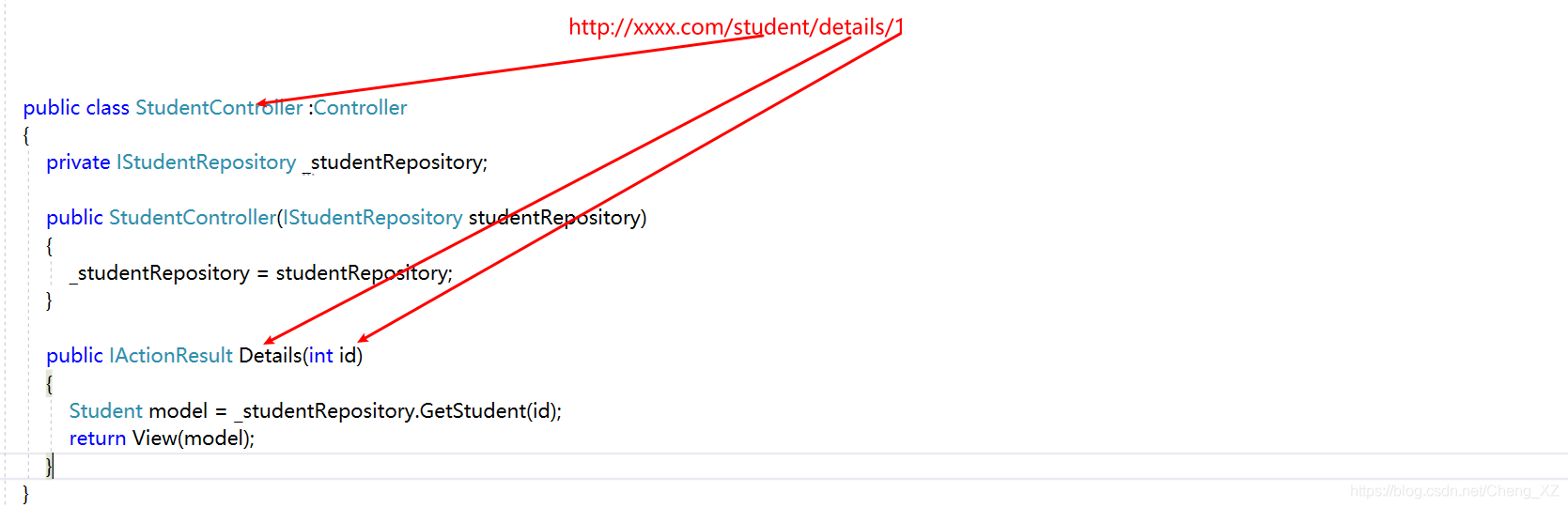
public class StudentController :Controller
    {
        private IStudentRepository _studentRepository;
        public StudentController(IStudentRepository studentRepository)
        {
            _studentRepository = studentRepository;
        }
        public IActionResult Details(int id)
        {
            Student model = _studentRepository.GetStudent(id);
            return View(model);
        }
    }
这个映射操作时由应用程序中定义的路由规则帮助我们完成的。
如读者所见,StudentController的Details()方法中的代码中声明了Model,而Model的类型是Student对象。因为要从数据源(如数据库)查询Student中的数据,所以在Controller的构造函数中注册了IStudentRepository类。
当Controller根据业务逻辑需要将数据将数据赋值到声明的Student模型对象时,它就会将该Student模型对象传递给View。然后,View根据Model生成所需的HTML代码,并显示从Controller中传递过来的Student数据,然后此HTML代码通过网络发送给发出请求的用户。
如果读者现在不是很理解,请不要担心,我们将在后续逐步创建Model、View和Controller来实现这一目标。接下来,我们将讨论如何在ASP.NET Core应用程序中设置MVC中间件。
在ASP.NET Core中设置MVC中间件
到目前为止,我们使用的ASP.NET Core项目是通过空项目模板生成的。这个项目还没有设置和安装MVC,现在在ASP.NET Core应用程序中设置MVC。
在ASP.NET Core中配置MVC
📃在Startup类Startup.cs文件中的ConfigureServices() 方法中有一行代码如下所示。这行代码将所需的MVC服务添加到ASP.NET Core的依赖注入容器中。
services.AddMvc(a => a.EnableEndpointRouting = false);
在这里将EnableEndpointRouting的值设置为false,是因为我们要使用MVC自带的路由。关于EnableEndpointRouting的内容,我们在以后再说。
📃在Configure()方法中,将**UseMvcWithDefaultRoute()**中间件添加到应用程序的请求处理管道中,代码如下所示:
  public void Configure(IApplicationBuilder app, IWebHostEnvironment env)
        {
            if (env.IsDevelopment())
            {
                app.UseDeveloperExceptionPage();
            }

            app.UseStaticFiles();

            app.UseMvcWithDefaultRoute();

            app.Run(async (context) =>
            {
                await context.Response.WriteAsync("Hello World!");
            });
        }
注意,我们在UseMvcWithDefaultRoute() 中间件之前放置了UseStaticFiles()中间件。此顺序很重要,因为如果请求是针对静态文件(如图像、CSS或Javascript文件),则UseStaticFiles()中间件将处理请求并使管道的其余部分短路。
因此,如果是针对静态文件,则不会执行UseMvcWithDefaultRoute()中间件,从而避免不必要的处理。
另外,如果请求是MVC请求,则UseStaticFiles()中间件将把请求传递给UseMvcWithDefaultRoute()中间件,它将处理请求并返回响应。
请注意,除UseMvcWithDefaultRoute()中间件以外,还有一个名为UseMvc()的中间件。现在先使用UseMvcWithDefaultRoute()中间件。在以后学习属性路由时,在讨论它们的区别。
现在,如果运行应用程序并导航到http://localhost:1983 (读者计算机端口号可能不同),我们会看到“Hello World!”消息显示在浏览器窗口中。
- 这是由于请求管道中配置了UseMvcWithDefaultRoute()中间件。当我们向URL发出请求http://localhost:1983时,由于请求内容不是访问静态文件,因此UseStaticFiles()中间件会将请求传递给UseMvcWithDefaultRoute()中间件。
- 由于我们尚未在URL中指定控制器名称和操作方法,因此UseMvcWithDefaultRoute()中间件会查询默认HomeController中的Index()方法。
- 但是由于当前应用程序没有HomeController,UseMvcWithDefaultRoute()中间件会查询失败,因此将请求传递给Run()方法注册的中间件,最后我们看到的“Hello World!”就是此中间件生成的信息。
如果删除Run()方法注册的中间件,我们再次向http://localhost:1983发出请求,则会看到浏览器的404错误页面。这是因为UseMvcWithDefaultRoute()中间件没有找到HomeController和Index()方法,并且当前管道中也没有其它中间件。
添加HomeController
在项目根目录下添加Controllers文件夹并在其中添加一个名为HomeController的类,然后复制并粘贴以下代码。
 public class HomeController
    {
        public string Index()
        {
            return "Hello from MVC";
        }
    }
运行项目,访问http://localhost:1983,会看到浏览器中显示👉"Hello from MVC"。
总结
总结一下MVC的特点:
- MVC:用于实现应用程序的用户界面层的架构设计模式。
- Model:包含一组数据的类和管理该数据的逻辑信息。
- View:包含显示逻辑,用于显示Controller提供给的Model的数据。
- Controller:处理HTTP请求,调用模型,并选择View来呈现该模型。





 扫一扫
扫一扫


 793
793

 被折叠的 条评论
为什么被折叠?
被折叠的 条评论
为什么被折叠?
 到【灌水乐园】发言





