


安装debian的时候无论是什么安装方式(网络安装或者DVD ISO刻录U盘安装),只要在安装过程中选择了网络更新都会体验到奇慢的内容下载速度甚至是安装失败,哪怕是在安装过程中使用了debian列出的中国大陆地区的认证的软件源。具体的原因是debian.org默认的软件源deb.debian.org用的是海外CDN供应商,边缘节点在中国大陆地区几乎没有,所以大陆用户访问很慢;此外默认情况下选择中国大陆地区的软件源默认只会加速非security内容,因为一般来说,为了更及时地获得安全更新,不推荐使用镜像站安全更新软件源,因为镜像站往往有同步延迟。
解决方案:
安装时不要连接网络!!!
这样可以避开网络更新这个步骤。
在安装过程中,在“Configure the package manager”时,选择“No”
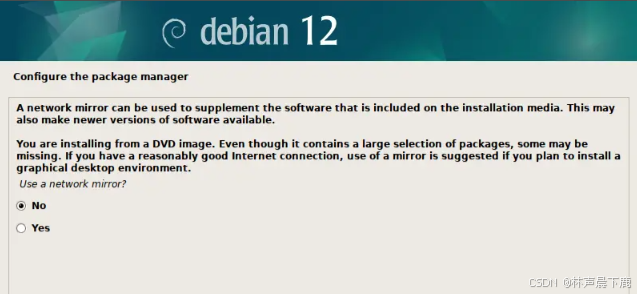
系统安装好后,修改/etc/apt/sources.list为国内源:
su
vi /etc/apt/sources.list
deb https://mirrors.tuna.tsinghua.edu.cn/debian/ bookworm main contrib non-free non-free-firmware
#deb-src https://mirrors.tuna.tsinghua.edu.cn/debian/ bookworm main contrib non-free non-free-firmware
deb https://mirrors.tuna.tsinghua.edu.cn/debian/ bookworm-updates main contrib non-free non-free-firmware
#deb-src https://mirrors.tuna.tsinghua.edu.cn/debian/ bookworm-updates main contrib non-free non-free-firmware
deb https://mirrors.tuna.tsinghua.edu.cn/debian/ bookworm-backports main contrib non-free non-free-firmware
#deb-src https://mirrors.tuna.tsinghua.edu.cn/debian/ bookworm-backports main contrib non-free non-free-firmware
deb https://mirrors.tuna.tsinghua.edu.cn/debian-security bookworm-security main contrib non-free non-free-firmware
#deb-src https://mirrors.tuna.tsinghua.edu.cn/debian-security bookworm-security main contrib non-free non-free-firmware
apt update





 扫一扫
扫一扫


 5917
5917

 被折叠的 条评论
为什么被折叠?
被折叠的 条评论
为什么被折叠?
 到【灌水乐园】发言





