一、下载并引入vue-codemirror
1、下载
npm install vue-codemirror
2、引入
<codemirror
ref="editor"
class="code"
v-model="data"
:options="mirrorOptions"
@focus="focusHandle"
@blur="blurHandle"
@changes="changeHandle"
@ready="readyHandle"
></codemirror>
import { codemirror } from 'vue-codemirror';
import CodeMirror from "codemirror";
require('codemirror/addon/hint/show-hint.css');
require('codemirror/addon/hint/show-hint.js');
require('codemirror/addon/hint/sql-hint.js');
require('codemirror/addon/hint/javascript-hint.js');
二、在ready事件中定义自动提示方法
private readyHandle(codemirror:CodeEditor) {
this.codemirror = codemirror;
this.codeEditor.on("keypress", () => {
const config = {
completeSingle: false,
hint: hint,
};
this.codeEditor?.showHint(config);
});
const hint = (editor: CodeEditor, callback: (str: Record<string, unknown>) => void) => {
const Pos = CodeMirror.Pos;
const cur = editor.getCursor();
const token = editor.getTokenAt(cur as unknown as { string: string; start: number; end: number });
let found: string[] = [];
const currentStr = token.string;
if (currentStr === "if") {
found = ["if ( ) {}", "other..."];
}
const result = {
list: found,
from: Pos(cur.line,token.start),
to: Pos(cur.line, token.end),
};
callback(result);
};
hint.async = true;
hint.supportsSelection = true;
},
三、结果展示
1、图片展示
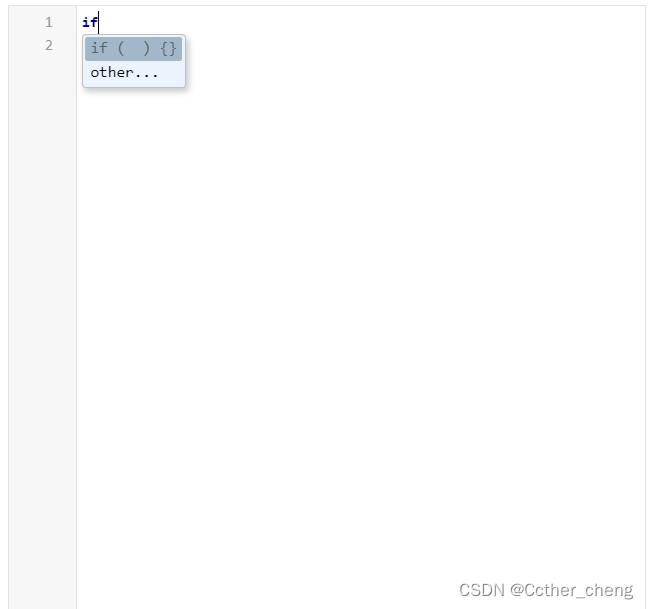



 本文介绍了如何在Vue应用中使用vue-codemirror插件,并展示了如何设置自动提示功能,以便于开发者实时获得JavaScript和SQL的代码建议。通过实例代码和配置,提升代码编辑体验。






 扫一扫
扫一扫


 552
552

 被折叠的 条评论
为什么被折叠?
被折叠的 条评论
为什么被折叠?
 到【灌水乐园】发言





