
git免密clone、fetch、push等远程仓库之ssh篇

git免密clone、fetch、push等远程仓库之ssh篇

业务需求:一般线上私有的gitlab、Gitee,GitHub等仓库都是需要验证登录权限的。本地开发环境拉取和推送分支时每次都需要输入账号密码就会显得不太智能

使用git的通讯协议ssh

先生成免密的ssh key(已有就不用生成),一直回车就行
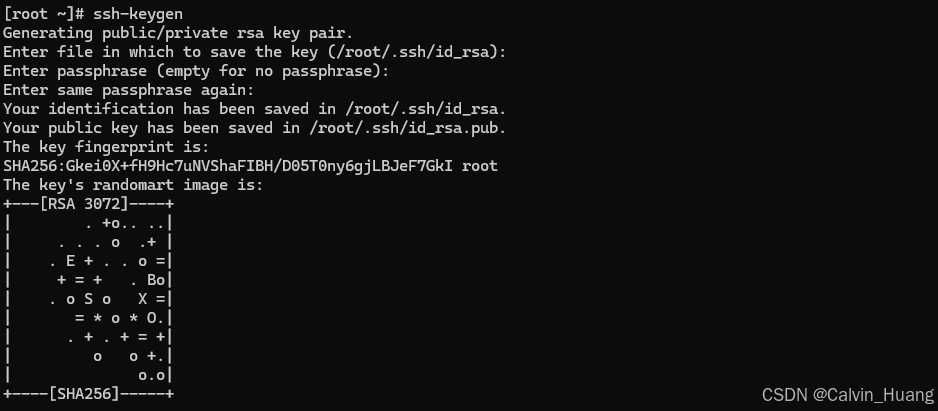
生成ssh-keygen
详细查考Linux 几个常用命令使用解析

git -c命令解析

git -c配置项可以临时覆盖配置,使用格式为git -c <name>=<value> 例如:

  • 临时设置作者名称,非修改全局或仓库级别的 user.name 配置
    git -c user.name='temp_user' commit -m "fix a bug than xxxxx"
  • 临时设置email
    git -c user.email='other@mial.com' commit -m "fix a bug than xxxxx"

git 环境变量 core.sshCommand

使用此环境变量可以改变一些默认行为,例如更改ssh验证密钥的配置登

  • 全新项目
git clone -c "core.sshCommand=ssh -i ~/.ssh/id_rsa_no_pass -F /dev/null" git@gitlab.com:test/test.git
cd test/
git pull
git push
  • 已存在的项目
# 更改配置
git config --local core.sshCommand "ssh -i ~/.ssh/id_rsa_no_pass -F /dev/null"
git pull
git push

究极大招,配置 ~/.ssh/config 文件

上面的方法还是比较啰嗦,直接配置~/.ssh/config可以进行统一管理
vim ~/.ssh/config

  • 模板
Host
        Port
        # 自定义的端口
        User
        # 自定义的用户名
        HostName
        # 真正连接的服务器地址
        PreferredAuthentications
        # 指定优先使用哪种方式验证,支持密码和秘钥验证方式
        IdentityFile
        # 指定本次连接使用的密钥文件
  • demo
Host gitlab.com
        Port 22
        User git
        HostName git.gitlab.com
        PreferredAuthentications publickey
        IdentityFile ~/.ssh/id_rsa_no_pass

Host 可以使用任意的字段或者通配符,匹配上之后就会,HostName作为真正的服务区地址,且对应的自定义配置项会覆盖/etc/ssh/ssh_config配置

至此就真解放双手了

### 获取 Git 仓库地址的方法 在使用 `git clone` 命令之前,需要明确远程仓库的地址。以下是几种获取远程仓库地址的方式: #### 查看当前配置的远程仓库地址 如果已经克隆了仓库或手动添加了远程仓库,则可以通过以下命令查看远程仓库的地址: - **列出所有远程仓库及其 URL** 使用 `git remote -v` 命令可以显示所有已配置的远程仓库名称(如 `origin`)以及对应的 fetchpush 的 URL: ```bash git remote -v ``` 输出示例: ``` origin https://github.com/username/repo.git (fetch) origin https://github.com/username/repo.git (push) ``` - **查看特定远程仓库的详细信息** 使用 `git remote show <remote-name>` 可以查看某个远程仓库的更多信息,包括其 URL: ```bash git remote show origin ``` 在输出中会包含类似 `Remote URL:` 的行,后面即为远程仓库的地址。 - **直接查看 .git/config 文件** Git 的本地配置信息存储在 `.git/config` 文件中。打开该文件后,在 `[remote "origin"]` 配置段下可以看到 `url` 字段,即远程仓库地址: ```ini [remote "origin"] url = https://github.com/username/repo.git fetch = +refs/heads/*:refs/remotes/origin/* ``` #### 获取尚未添加的远程仓库地址 如果尚未将远程仓库添加到本地配置中,则需要从项目托管平台(如 GitHub、GitLab 等)获取仓库地址。通常可以在项目的主页上找到如下格式的地址: - HTTPS 地址:`https://github.com/username/repo.git` - SSH 地址:`git@github.com:username/repo.git` 这些地址可以直接用于 `git clone` 命令来拉取代码: ```bash git clone https://github.com/username/repo.git ``` 或者使用 SSH 方式: ```bash git clone git@github.com:username/repo.git ``` #### 替换远程仓库地址 如果需要更改现有的远程仓库地址,可以使用以下方法之一: - **使用 `git remote set-url` 修改远程地址** ```bash git remote set-url origin https://github.com/newuser/newrepo.git ``` - **直接编辑 `.git/config` 文件** 打开 `.git/config` 文件并修改 `[remote "origin"]` 下的 `url` 字段为新的仓库地址。 --- ###
评论
成就一亿技术人!
拼手气红包6.0元
还能输入1000个字符
 
红包 添加红包
表情包 插入表情
 条评论被折叠 查看
添加红包

请填写红包祝福语或标题

红包个数最小为10个

红包金额最低5元

当前余额3.43前往充值 >
需支付:10.00
成就一亿技术人!
领取后你会自动成为博主和红包主的粉丝 规则
hope_wisdom
发出的红包

打赏作者

Calvin_Huang

你的鼓励将是我创作的最大动力

¥1 ¥2 ¥4 ¥6 ¥10 ¥20
扫码支付:¥1
获取中
扫码支付

您的余额不足,请更换扫码支付或充值

打赏作者

实付
使用余额支付
点击重新获取
扫码支付
钱包余额 0

抵扣说明:

1.余额是钱包充值的虚拟货币,按照1:1的比例进行支付金额的抵扣。
2.余额无法直接购买下载,可以购买VIP、付费专栏及课程。

余额充值



