



 本文介绍如何使用JavaScript重写Date对象的toJSON方法,使JSON.stringify输出本地时区的时间,而非UTC时间。通过修改Date.prototype.toJSON,实现自定义时间格式的输出。
<script>
    //var o = new Date();

    //console.log(o.toString())//中国时区时间,格式如“Wed Jun 11 2014 10:51:42 GMT+0800”

    //console.log(JSON.stringify(o)); //输出国际标准时间(ISO),减少了8个小时 格式如“2014-06-11T02:51:42.624Z”
</script>
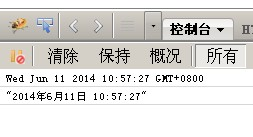
要想JSON.stringify转换日期对象Date返回当前所在国家的时区,而不是国际标准时间,可以重写Date对象的prototype的toJSON方法,返回自定义时间格式,因为JSON.stringify调用的就是Date对象的toJSON方法,示例如下:
<script>

    Date.prototype.toJSON = function () { return this.toLocaleString(); }

    var o = new Date();

    console.log(o.toString())//默认格式:“Wed Jun 11 2014 10:51:42 GMT+0800”

    console.log(JSON.stringify(o)); //输出自定义的本地时间:“2014年6月11日 10:57:27”

</script>





 扫一扫
扫一扫


 1861
1861

 被折叠的 条评论
为什么被折叠?
被折叠的 条评论
为什么被折叠?
 到【灌水乐园】发言





