



 本文详细介绍了在MapReduce框架下实现多表连接的具体方法,包括map-side join和reduce-side join,以及如何处理多表连接时的小表优化策略。此外,文章还探讨了二次排序的概念和实现方式,通过自定义数据类型进行排序处理。
多表的join连接
map-side join
reduce-side join
semi join
map - side join
核心思想 : 将小表进行分布式缓存 然后再map端取出缓存数据来进行连接查询
适用场景 : 大表和小表同时存在(最少需要一个小表)
优点 : 从缓存中取出数据,然后再map连接查找关系,减少到map到reduce端数据传输
缺点:只适合有小表的业务需求
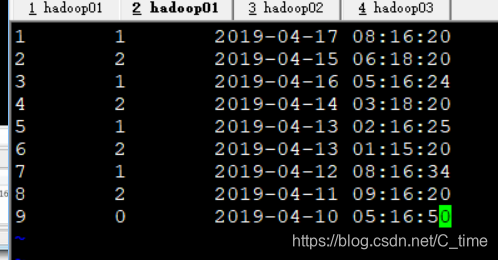
login:
uid sexid logindate
1 1 2019-04-17 08:16:20
2 2 2019-04-15 06:18:20
3 1 2019-04-16 05:16:24
4 2 2019-04-14 03:18:20
5 1 2019-04-13 02:16:25
6 2 2019-04-13 01:15:20
7 1 2019-04-12 08:16:34
8 2 2019-04-11 09:16:20
9 0 2019-04-10 05:16:50
sex sexMap
0 不知道
1 男
2 女
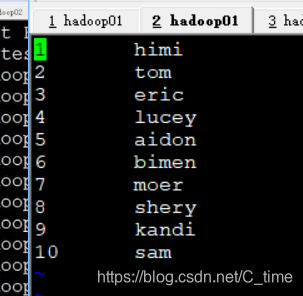
user uname userMap
1 himi
2 tom
3 eric
4 lucey
5 aidon
6 bimen
7 moer
8 shery
9 kandi
10 sam
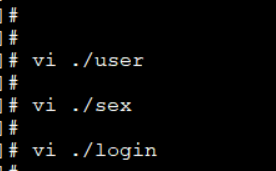

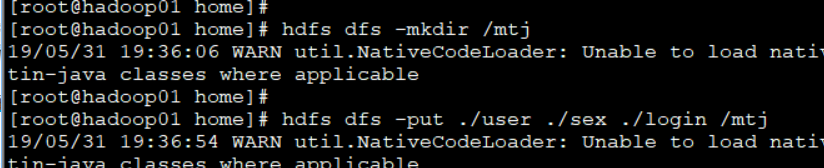
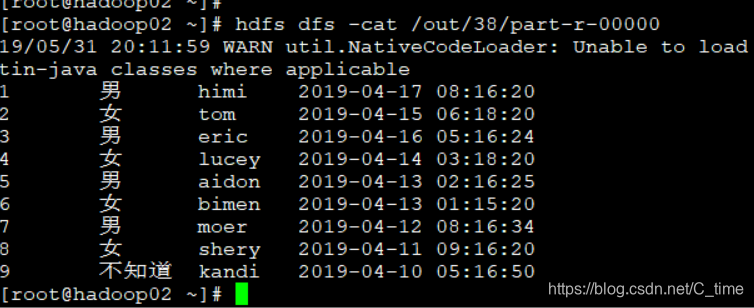
运行
yarn jar /home/wc.jar qf.com.mr.MultiTableJoinDemo /mtj/login /out/35 /mtj/sex /mtj/user
结果 完美的答案
不过你看都到38了 所以说遇到了很多错误
下面我记录一下
错误1:说我157行出错 还说空指针
没错 原因是我使用的模版Moudle01
代码没有填写主类



上面两个地方忘记改了
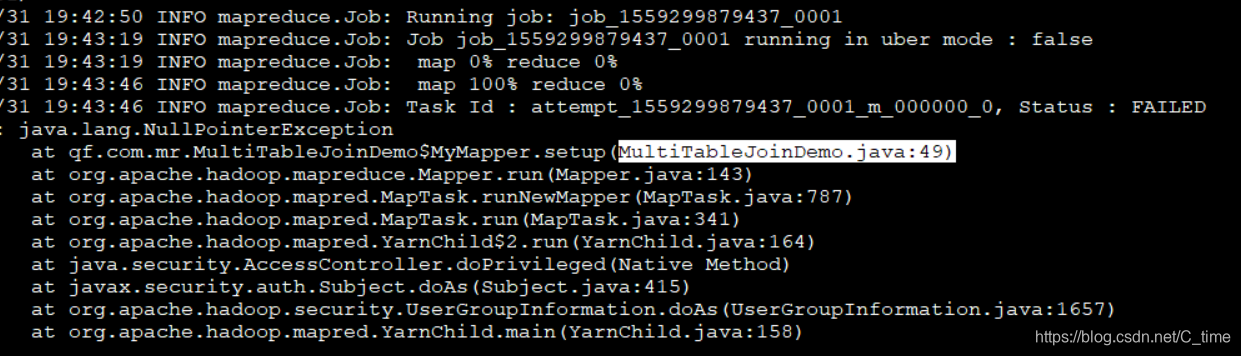
错误2:
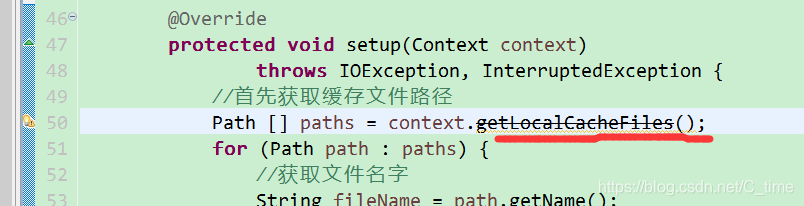
运行到一半 说49行出错 还是空指针问题
这个地方写错了 照着视频写成了别的类 粗心
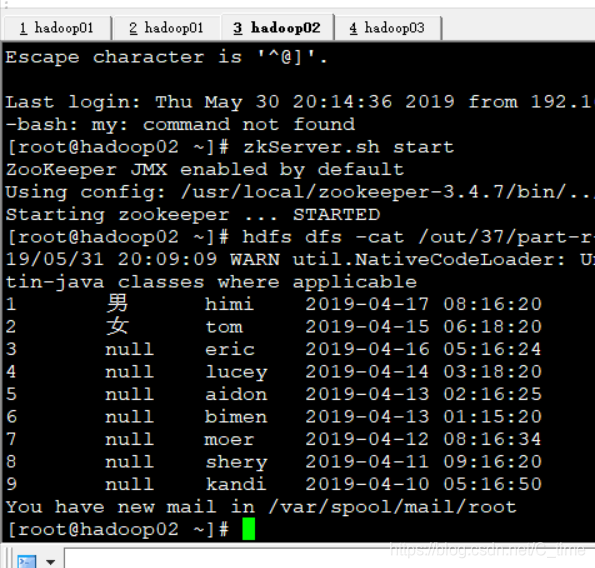
错误3:
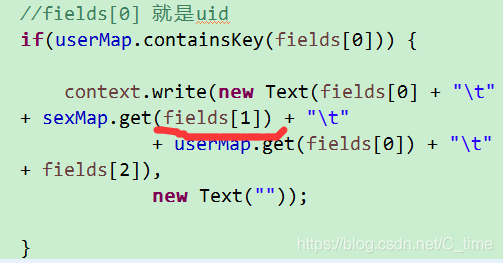
出现1 2 读取了性别 后面就null
原因是代码写错了 读的Fields[0] 读的uid 1 2 能识别是男女 那么往后3 4… 就识别不出来了
还有 我改完错之后导包还是这个问题
原因是 我改完代码 保存后
应该刷新一下再导包
右击项目Refresh一下
package qf.com.mr;

import java.io.BufferedReader;
import java.io.File;
import java.io.FileReader;
import java.io.IOException;
import java.net.URI;
import java.util.Map;
import java.util.concurrent.ConcurrentHashMap;

import org.apache.hadoop.conf.Configuration;
import org.apache.hadoop.fs.FileSystem;
import org.apache.hadoop.fs.Path;
import org.apache.hadoop.io.LongWritable;
import org.apache.hadoop.io.Text;
import org.apache.hadoop.mapreduce.Job;
import org.apache.hadoop.mapreduce.Mapper;
import org.apache.hadoop.mapreduce.lib.input.FileInputFormat;
import org.apache.hadoop.mapreduce.lib.output.FileOutputFormat;
import org.apache.hadoop.util.Tool;
import org.apache.hadoop.util.ToolRunner;

import com.google.common.collect.Multiset.Entry;


/*
*@author Shishuai E-mail:1198319583@qq.com
*@version Create time : 2019年5月28日下午5:42:34
*类说明:多表连接
....
*/
public class MultiTableJoinDemo implements Tool{


	/**
	 * map阶段
	 * @author HP
	 *
	 */
	public static class MyMapper extends Mapper<LongWritable, Text, Text, Text>{
		public Map<String, String> sexMap = new ConcurrentHashMap<String, String>();
		public Map<String, String> userMap = new ConcurrentHashMap<String, String>();

		@Override
		protected void setup(Context context)
				throws IOException, InterruptedException {
			//首先获取缓存文件路径
			Path [] paths = context.getLocalCacheFiles();
			for (Path path : paths) {
				//获取文件名字
				String fileName = path.getName();
				BufferedReader br = null;
				String str = null;
				if(fileName.equals("sex")) {//文件名为sex
					br = new BufferedReader(new FileReader(new File(path.toString())));
					while((str = br.readLine()) != null) {
						String strs[] = str.split("\t");
						sexMap.put(strs[0], strs[1]);
					}
					//关闭流
					br.close();

				}else if(fileName.equals("user")){
					br = new BufferedReader(new FileReader(new File(path.toString())));
					while((str = br.readLine()) != null) {
						String strs[] = str.split("\t");
						userMap.put(strs[0], strs[1]);
					}
					br.close();
				}
			}
		}

		@Override
		protected void map(LongWritable key, Text value, Context context)
				throws IOException, InterruptedException {
			String line = value.toString();
			String fields [] = line.split("\t");

			//fields[0] 就是uid
			if(userMap.containsKey(fields[0])) {

				context.write(new Text(fields[0] + "\t"
			+ sexMap.get(fields[1]) + "\t"
						+ userMap.get(fields[0]) + "\t"
			+ fields[2]),
						new Text(""));

			}
			/**
			 *
			 */
			/*for(Entry<String, String> S : sexMap.entrySet()) {
				context.getCounter("login sex key" + ":" + fields[1], "sexmap key" + S.)
			}*/
		}

	}
	/**
	 * reduce阶段
	 */
	/*public static class MyReducer extends Reducer<Text, Text, Text, Text>{

		@Override
		protected void reduce(Text key, Iterable<Text> values, Context context)
				throws IOException, InterruptedException {

		}

	}*/

	public void setConf(Configuration conf) {
		// 对conf的属性设置
		conf.set("fs.defaultFS", "hdfs://qf");
		conf.set("dfs.nameservices", "qf");
		conf.set("dfs.ha.namenodes.qf", "nn1, nn2");
		conf.set("dfs.namenode.rpc-address.qf.nn1", "hadoop01:9000");
		conf.set("dfs.namenode.rpc-address.qf.nn2", "hadoop02:9000");
		conf.set("dfs.client.failover.proxy.provider.qf", "org.apache.hadoop.hdfs.server.namenode.ha.ConfiguredFailoverProxyProvider");
	}

	public Configuration getConf() {
		return new Configuration();
	}

	public int run(String[] args) throws Exception {
		// 1.获取配置对象信息
				Configuration conf = new Configuration();
				// 2.对conf进行设置(没有就不用)
				// 3.获取job对象 (注意导入的包)
				Job job = Job.getInstance(conf, "job");
				// 4.设置job的运行主类
				job.setJarByClass(MultiTableJoinDemo.class);

				//set inputpath and outputpath
				setInputAndOutput(job, conf, args);


				// System.out.println("jiazai finished");
				// 5.对map阶段进行设置
				job.setMapperClass(MyMapper.class);
				job.setMapOutputKeyClass(Text.class);
				job.setMapOutputValueClass(Text.class);


				//设置缓存数据
				job.addCacheFile(new URI(args[2]));
				job.addCacheFile(new URI(args[3]));

				// System.out.println("map finished");
				// 6.对reduce阶段进行设置
			/*	job.setReducerClass(MyReducer.class);
				job.setOutputKeyClass(Text.class);
				job.setOutputValueClass(Text.class);*/


				return job.waitForCompletion(true) ? 0 : 1;
	}

	//主方法
		public static void main(String[] args) throws Exception {
			int isok = ToolRunner.run(new Configuration(), new MultiTableJoinDemo(), args);
			System.out.println(isok);
		}

		/**
		 * 处理参数的方法
		 * @param job
		 * @param conf
		 * @param args
		 */

		private void setInputAndOutput(Job job, Configuration conf, String[] args) {
			if(args.length != 4) {
				System.out.println("usage:yarn jar /*.jar package.classname /* /*");
				return ;
			}
			//正常处理输入输出参数
			try {
				FileInputFormat.addInputPath(job, new Path(args[0]));

				FileSystem fs = FileSystem.get(conf);
				Path outputpath = new Path(args[1]);
				if(fs.exists(outputpath)) {
					fs.delete(outputpath, true);
				}
				FileOutputFormat.setOutputPath(job, outputpath);
			} catch (Exception e) {
				e.printStackTrace();
			}

		}

}
二次排序
就是给你两列数据 先按第一列排序 第一列相同按第二列排
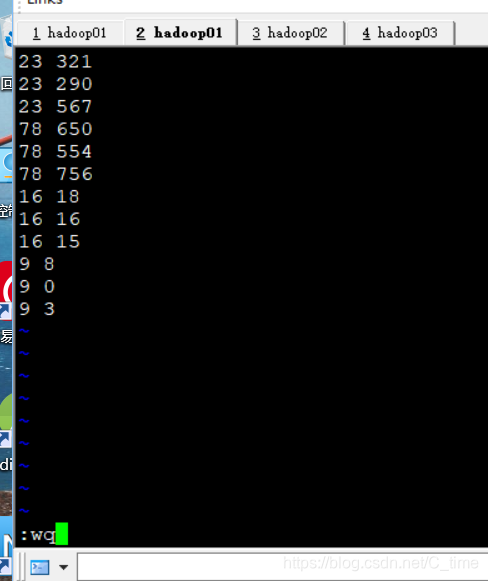
二次排序数据
23 321
23 290
23 567
78 650
78 554
78 756
16 18
16 16
16 15
9 8
9 0
9 3
预期输出
9 0
9 3
9 8
16 15
16 16
16 18
…
运行中出现过错误
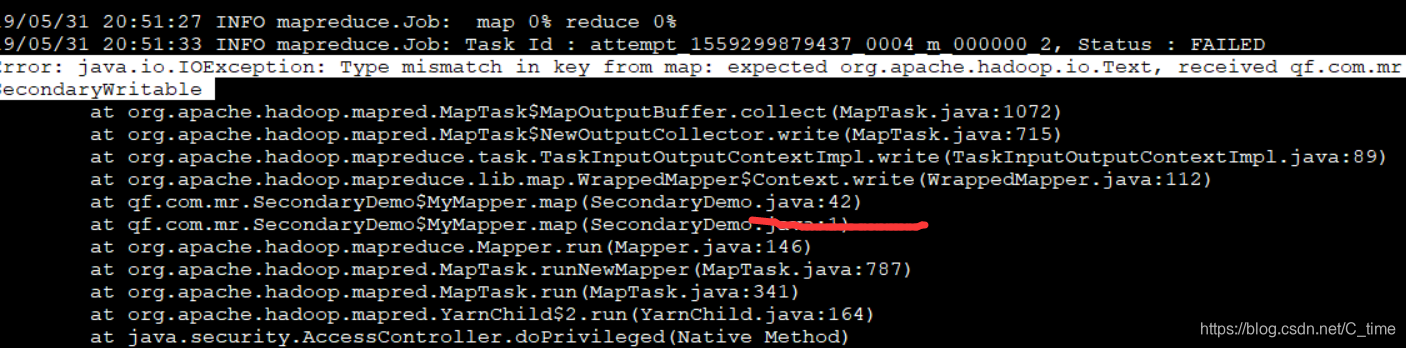
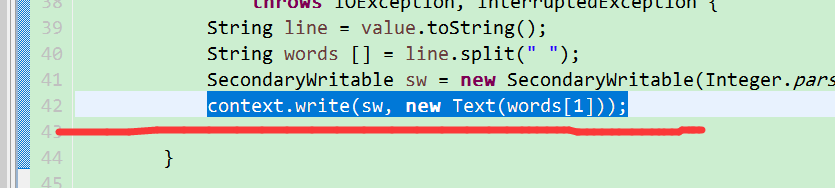
说是42行的错误
没找到错误
后来
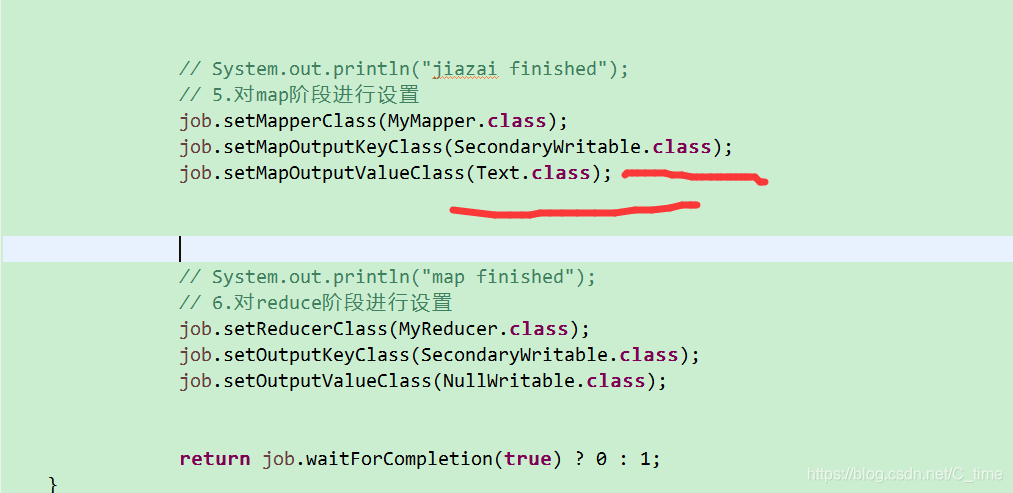
发现是下面的类型忘记改了
难受 一定要细心
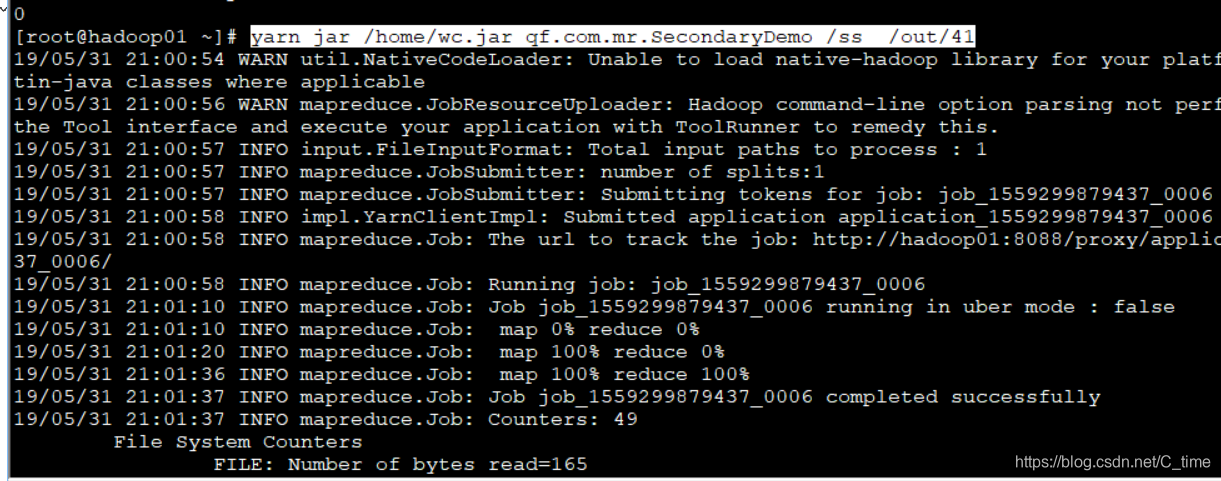
运行 结果正确

先自定义一个数据类型
package qf.com.mr;

import java.io.DataInput;
import java.io.DataOutput;
import java.io.IOException;


import org.apache.hadoop.io.WritableComparable;

/*
*@author Shishuai E-mail:1198319583@qq.com
*@version Create time : 2019年5月31日下午8:34:04
*类说明:
*/
public class SecondaryWritable implements WritableComparable<SecondaryWritable>{

	public int first;
	public int second;


	public SecondaryWritable(int first, int second) {
		super();
		this.first = first;
		this.second = second;
	}


	public SecondaryWritable() {

	}


	public int getFirst() {
		return first;
	}

	public void setFirst(int first) {
		this.first = first;
	}

	public int getSecond() {
		return second;
	}

	public void setSecond(int second) {
		this.second = second;
	}

	public void write(DataOutput out) throws IOException {
		out.writeInt(this.first);
		out.writeInt(this.second);
	}

	public void readFields(DataInput in) throws IOException {
		this.first = in.readInt();
		this.second = in.readInt();
	}

	public int compareTo(SecondaryWritable o) {
		int tmp = 0;
		tmp = this.first - o.first;//升序
		if(tmp != 0) {
			return tmp;
		}
		return this.second - o.second;
	}

	@Override
	public String toString() {
		return "SecondaryWritable [first=" + first + ", second=" + second + "]";
	}

	@Override
	public int hashCode() {
		final int prime = 31;
		int result = 1;
		result = prime * result + first;
		result = prime * result + second;
		return result;
	}

	@Override
	public boolean equals(Object obj) {
		if (this == obj)
			return true;
		if (obj == null)
			return false;
		if (getClass() != obj.getClass())
			return false;
		SecondaryWritable other = (SecondaryWritable) obj;
		if (first != other.first)
			return false;
		if (second != other.second)
			return false;
		return true;
	}


}
然后
package qf.com.mr;

import java.io.IOException;

import org.apache.hadoop.conf.Configuration;
import org.apache.hadoop.fs.FileSystem;
import org.apache.hadoop.fs.Path;
import org.apache.hadoop.io.LongWritable;
import org.apache.hadoop.io.NullWritable;
import org.apache.hadoop.io.Text;
import org.apache.hadoop.mapreduce.Job;
import org.apache.hadoop.mapreduce.Mapper;
import org.apache.hadoop.mapreduce.Reducer;
import org.apache.hadoop.mapreduce.lib.input.FileInputFormat;
import org.apache.hadoop.mapreduce.lib.output.FileOutputFormat;
import org.apache.hadoop.util.Tool;
import org.apache.hadoop.util.ToolRunner;


/*
*@author Shishuai E-mail:1198319583@qq.com
*@version Create time : 2019年5月28日下午5:42:34
*类说明:
....
*/
public class SecondaryDemo implements Tool{


	/**
	 * map阶段
	 * @author HP
	 *
	 */
	public static class MyMapper extends Mapper<LongWritable, Text, SecondaryWritable, Text>{

		@Override
		protected void map(LongWritable key, Text value, Context context)
				throws IOException, InterruptedException {
			String line = value.toString();
			String words [] = line.split(" ");
			SecondaryWritable sw = new SecondaryWritable(Integer.parseInt(words[0]),Integer.parseInt(words[1]));
			context.write(sw, new Text(words[1]));

		}

	}
	/**
	 * reduce阶段
	 */
	public static class MyReducer extends Reducer<SecondaryWritable, Text, SecondaryWritable, Text>{

		@Override
		protected void reduce(SecondaryWritable key, Iterable<Text> values, Context context)
				throws IOException, InterruptedException {
			//输出分隔符
			context.write(new SecondaryWritable(), new Text("----------"));
			//直接输出
			context.write(key, new Text(""));
		}

	}

	public void setConf(Configuration conf) {
		// 对conf的属性设置
		conf.set("fs.defaultFS", "hdfs://qf");
		conf.set("dfs.nameservices", "qf");
		conf.set("dfs.ha.namenodes.qf", "nn1, nn2");
		conf.set("dfs.namenode.rpc-address.qf.nn1", "hadoop01:9000");
		conf.set("dfs.namenode.rpc-address.qf.nn2", "hadoop02:9000");
		conf.set("dfs.client.failover.proxy.provider.qf", "org.apache.hadoop.hdfs.server.namenode.ha.ConfiguredFailoverProxyProvider");
	}

	public Configuration getConf() {
		return new Configuration();
	}

	public int run(String[] args) throws Exception {
		// 1.获取配置对象信息
				Configuration conf = new Configuration();
				// 2.对conf进行设置(没有就不用)
				// 3.获取job对象 (注意导入的包)
				Job job = Job.getInstance(conf, "job");
				// 4.设置job的运行主类
				job.setJarByClass(SecondaryDemo.class);

				//set inputpath and outputpath
				setInputAndOutput(job, conf, args);


				// System.out.println("jiazai finished");
				// 5.对map阶段进行设置
				job.setMapperClass(MyMapper.class);
				job.setMapOutputKeyClass(Text.class);
				job.setMapOutputValueClass(Text.class);


				// System.out.println("map finished");
				// 6.对reduce阶段进行设置
				job.setReducerClass(MyReducer.class);
				job.setOutputKeyClass(SecondaryWritable.class);
				job.setOutputValueClass(Text.class);


				return job.waitForCompletion(true) ? 0 : 1;
	}

	//主方法
		public static void main(String[] args) throws Exception {
			int isok = ToolRunner.run(new Configuration(), new SecondaryDemo(), args);
			System.out.println(isok);
		}

		/**
		 * 处理参数的方法
		 * @param job
		 * @param conf
		 * @param args
		 */

		private void setInputAndOutput(Job job, Configuration conf, String[] args) {
			if(args.length != 2) {
				System.out.println("usage:yarn jar /*.jar package.classname /* /*");
				return ;
			}
			//正常处理输入输出参数
			try {
				FileInputFormat.addInputPath(job, new Path(args[0]));

				FileSystem fs = FileSystem.get(conf);
				Path outputpath = new Path(args[1]);
				if(fs.exists(outputpath)) {
					fs.delete(outputpath, true);
				}
				FileOutputFormat.setOutputPath(job, outputpath);
			} catch (Exception e) {
				e.printStackTrace();
			}

		}

}
MapReduce中的依赖执行
依赖执行
过滤数据
第一个job : 过滤
第二个job : 统计
hello qianfeng hello qianfeng qianfeng is best qianfeng better
hadoop is good
spark is nice
运行过程中可查看192.168.37.111:8088端口
查看过程
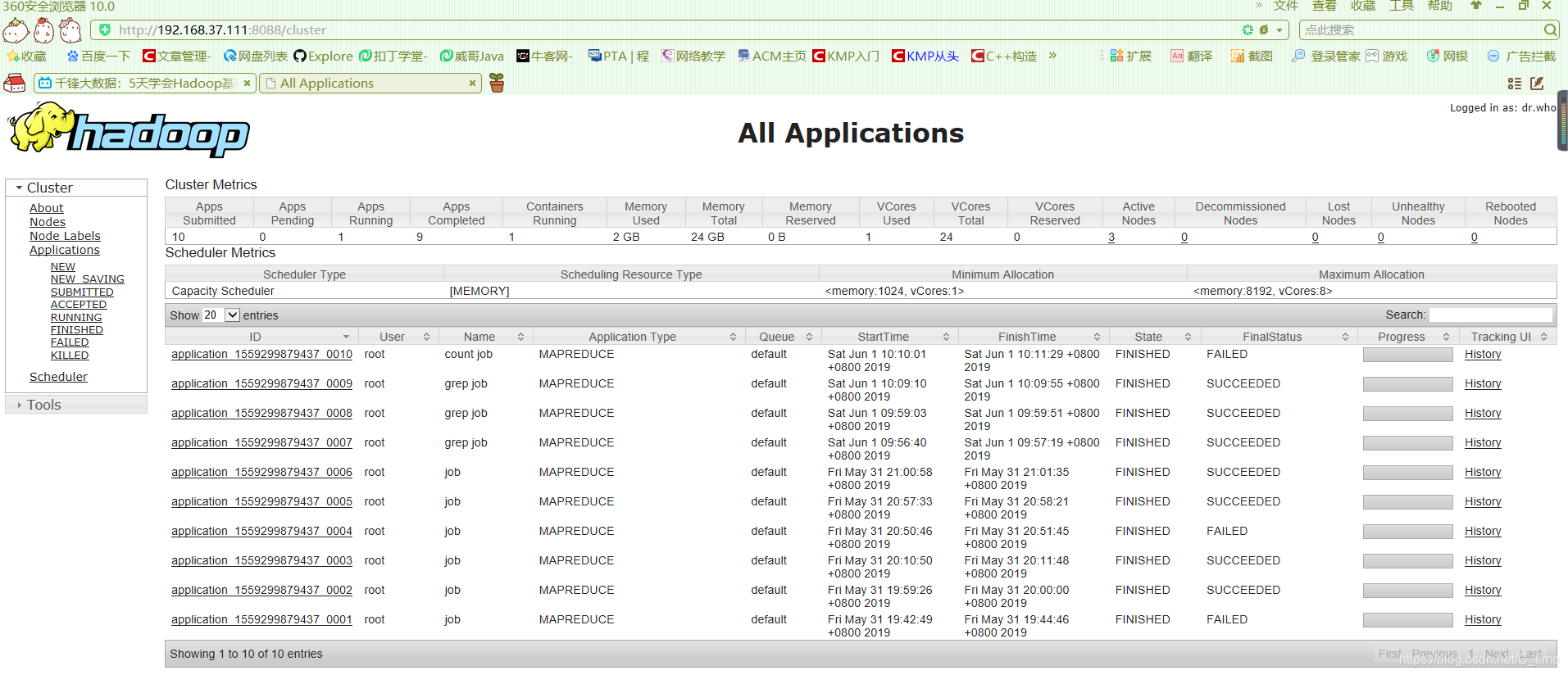
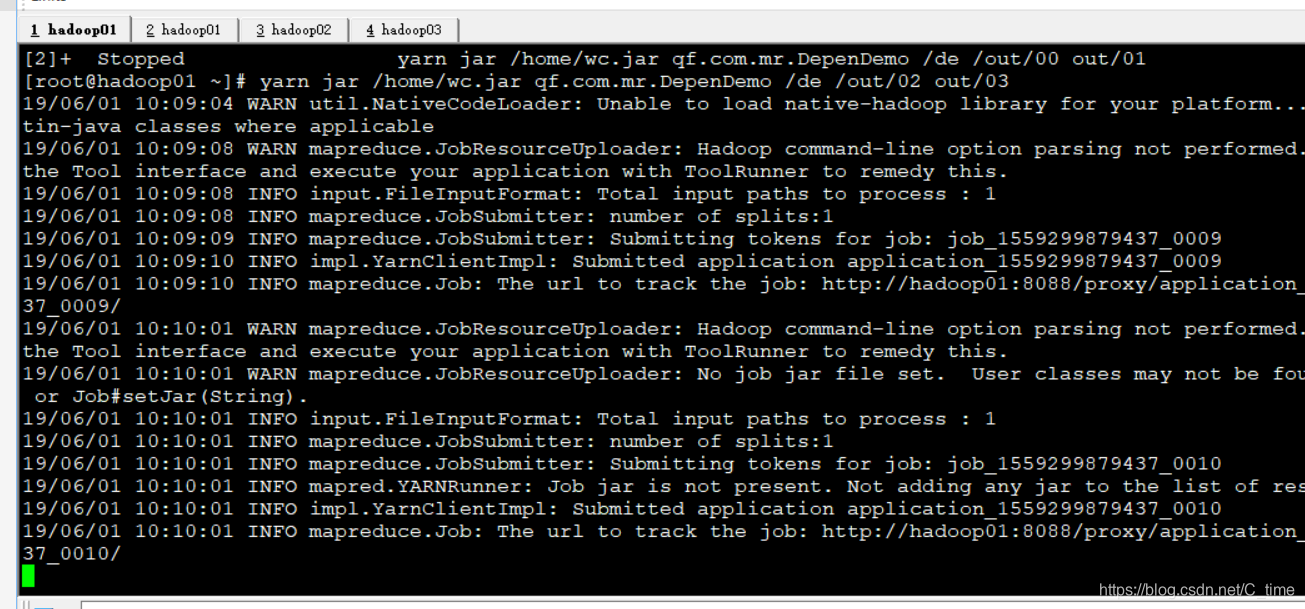
看网页上那些进度都完成就行了
这个shell运行也没有错误
就可以了
然后我们查看结果
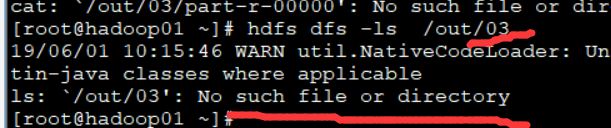
没有输出目录
卧槽
看吧
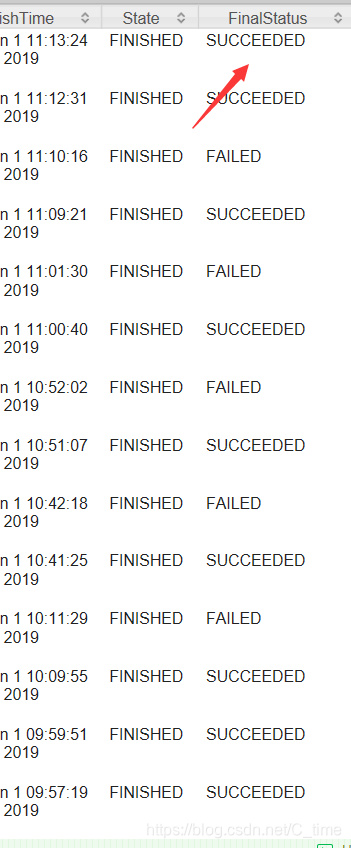
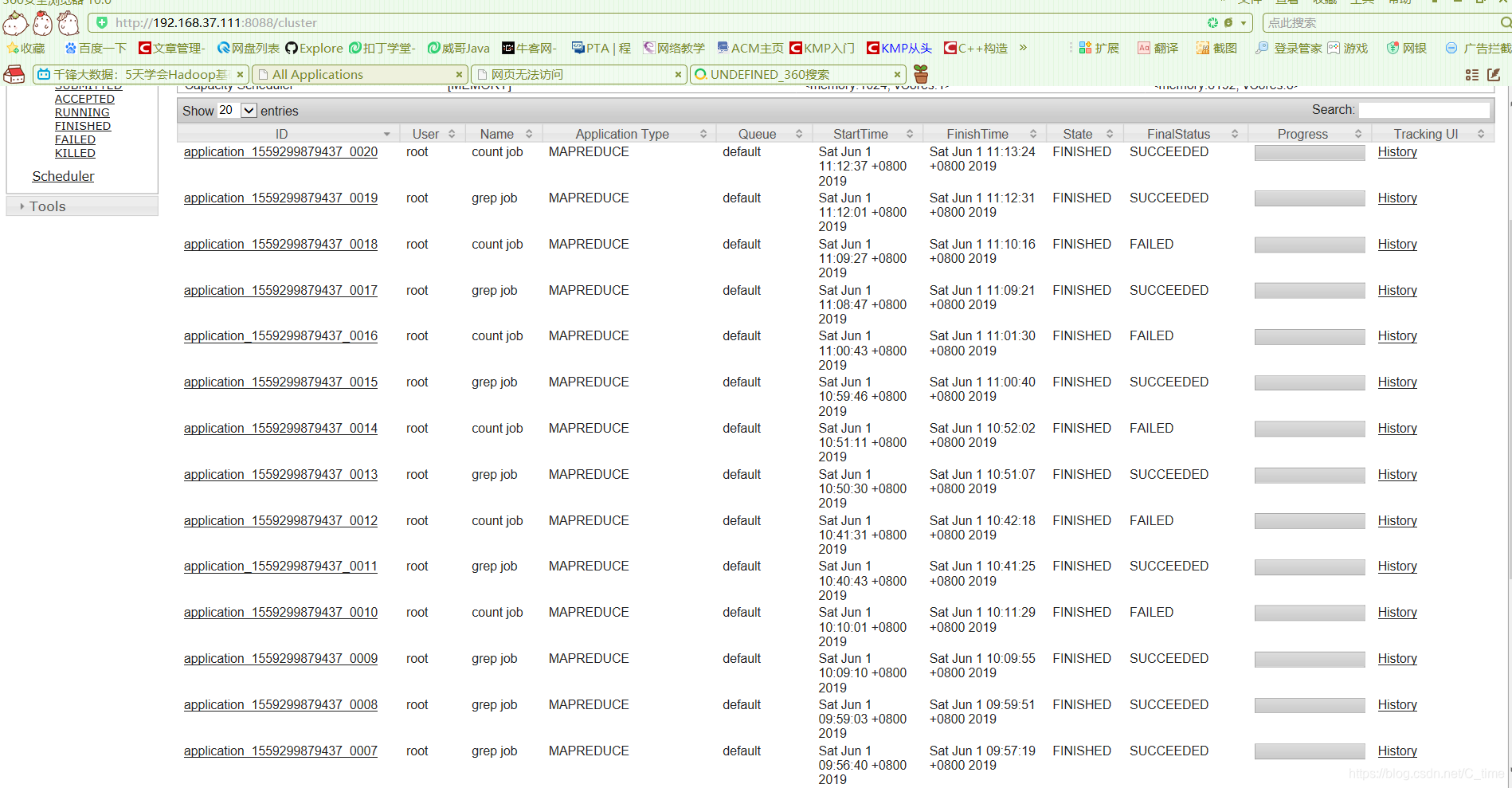
搞了一上午
我来分析一下
没有输出目录
name代表
我的Countjob这部分出错了
找代码 看了半天没看出来什么东西
然后看网页
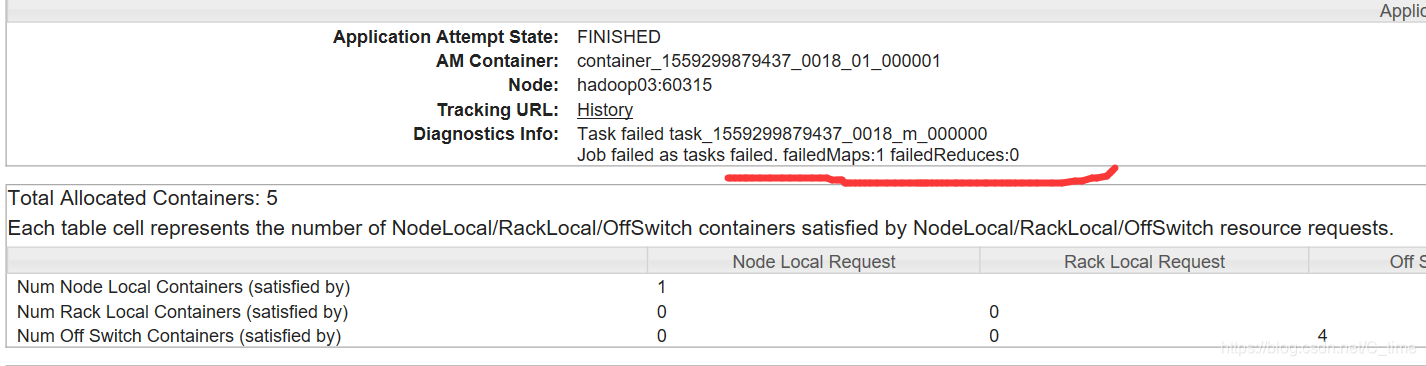
点Failed那一行 找到看是 Mapper出错了
找到CountMap的代码 没看出来错误 然后看countjob的设置
我想 就是想 GrepMapper的输出的路径是这个 out/XX
那么我的CountMapper输出路径是一样的 但是这个路径下面有好几个文件吧 Success文件 还有part-r-00000 是不是光写out/XX找不到结果文件呢
所以我就把代码加上

运行了一遍还是不对 那么不是这个的问题
而且视频上也没加路径 就只写了args[1] 即out/XX
所以改回来 删掉
继续
看shell的输出
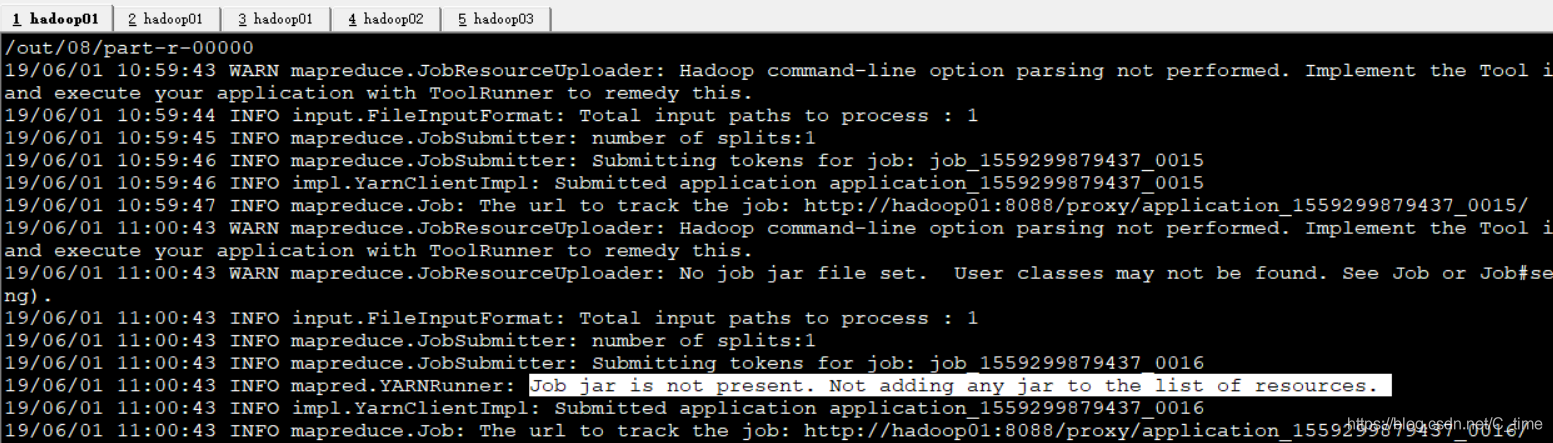
找到这一行 job的问题?
那么我也看不懂 百度
找了半天终于找到一个帖子
http://www.voidcn.com/article/p-mbvnkoog-nx.html
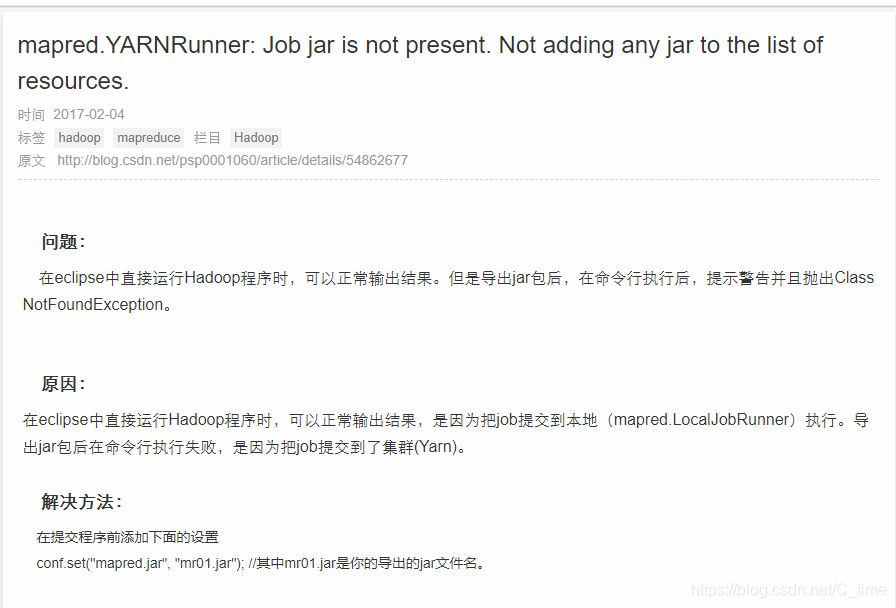
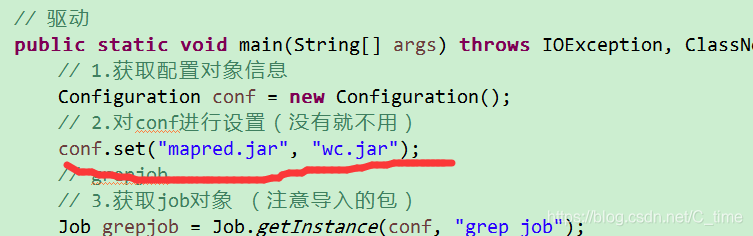
加一句这个
卧槽
竟然运行通过了
哇哇哇
厉害
虽然不太懂
不过视频上没有啊!!!!
坑!!!也不知道它怎么通过的
看结果吧
emmm白高兴了
还是没有输出目录
难受
emmmm
放弃了
让笔记本待机 睡眠 吃饭
艹
重新打开服务后
竟然又好了
难受
不
高兴
不过这个东西是不是搞我呢!!!!
emmm
总之搞定了
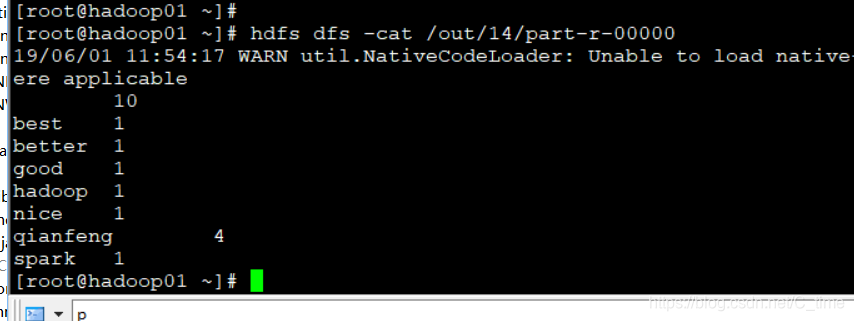
看结果
第一行是空 就是GrepMapper的每一行输出是
"" xxx
这10个是引号里的空 也统计上了
无关大雅
哦了
再下面是 一些小错误 看看吧 很快就解决了
以下是普通的错误----
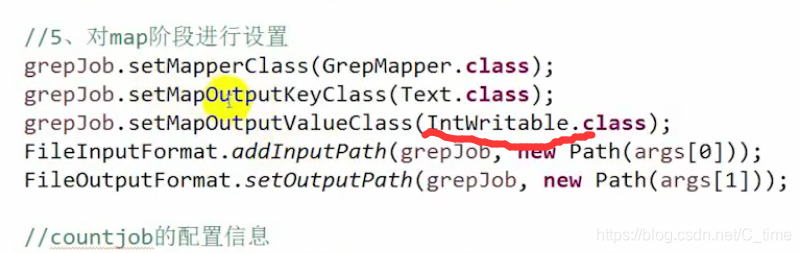
出错
这里改成Text

还有这里 最终结果 is hello没有过滤
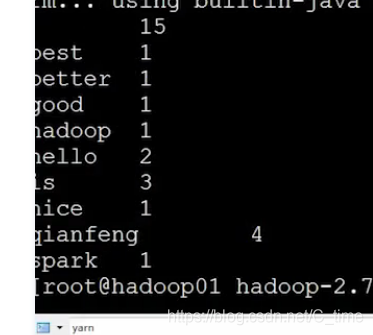
原因 用了|| 这样不管是is 还是hello 都是正确的 总是通过 没有过滤
不能用或 要用与
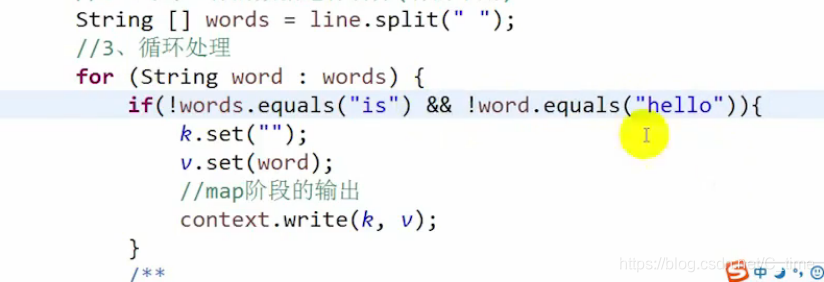
最终视频还是没有过滤掉is
上面这个截图代码有问题的
想想
上面两个是视频出的错误
我这里还有我出现的错误
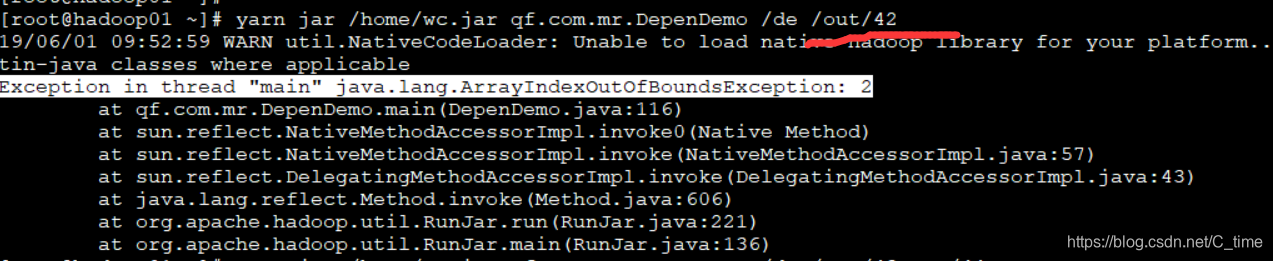
1.out的错误
原来我就写了一个输出目录 应该写两个 一共要写三个目录 args[0] args[1] args[2]

2.我写上两个输出目录后还是出错了
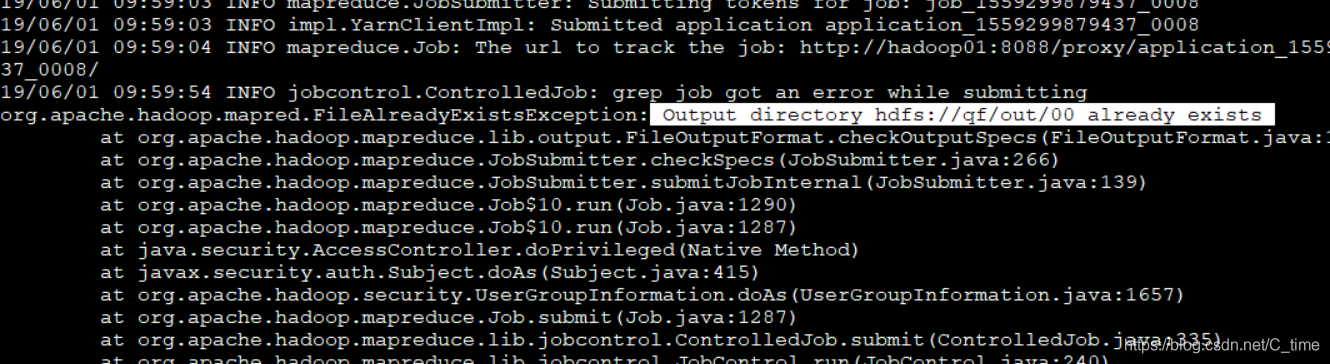
告诉我输出目录已存在 可是我运行前查看了已存在的文件 没有重名
找了半天怎么也找不出来
原来是我写下面代码第二行的时候 复制的
没改
应该是countjob

最后贴代码
package qf.com.mr;

import java.io.IOException;
import org.apache.hadoop.conf.Configuration;
import org.apache.hadoop.fs.Path;
import org.apache.hadoop.io.IntWritable;
import org.apache.hadoop.io.LongWritable;
import org.apache.hadoop.io.Text;
import org.apache.hadoop.mapreduce.Job;
import org.apache.hadoop.mapreduce.Mapper;
import org.apache.hadoop.mapreduce.Reducer;
import org.apache.hadoop.mapreduce.lib.input.FileInputFormat;
import org.apache.hadoop.mapreduce.lib.jobcontrol.ControlledJob;
import org.apache.hadoop.mapreduce.lib.jobcontrol.JobControl;
import org.apache.hadoop.mapreduce.lib.output.FileOutputFormat;

/**
 * 依赖执行
 *
 * @author HP
 *
 */
public class DepenDemo {
	public static class GrepMyMapper extends Mapper<LongWritable, Text, Text, Text> {
		public static Text k = new Text();
		public static Text v = new Text();

		@Override
		protected void map(LongWritable key, Text value, Context context) throws IOException, InterruptedException {
			// 1.从输入数据中获取每一个文件中的每一行的值
			String line = value.toString();
			// 2.对每一行的数据进行切分(有的不用)
			String[] words = line.split(" ");
			// 3.循环处理
			for (String word : words) {
				if (!word.equals("is") && !word.equals("hello")) {
					k.set("");
					v.set(word);
					// map阶段的输出 context上下文环境变量
					context.write(k, v);// 这个输出在循环里面 有一个输出一个
				}
			}
		}

	}

	// =======================================================
	public static class CountMapper extends Mapper<LongWritable, Text, Text, IntWritable> {
		public static Text k = new Text();
		public static IntWritable v = new IntWritable();

		@Override
		protected void map(LongWritable key, Text value, Context context) throws IOException, InterruptedException {
			System.out.println("我能进来 ");
			// 1.从输入数据中获取每一个文件中的每一行的值
			String line = value.toString();
			// 2.对每一行的数据进行切分(有的不用)
			String[] words = line.split("\t");
			// 3.循环处理
			System.out.println("我能拆分 ");
			for (String word : words) {
				k.set(word);
				v.set(1);
				System.out.println(word);
				// map阶段的输出 context上下文环境变量
				context.write(k, v);// 这个输出在循环里面 有一个输出一个
			}
			System.out.println("我运行完了 ");
		}


	}

	public static class CountReducer extends Reducer<Text, IntWritable, Text, IntWritable> {

		@Override
		protected void reduce(Text key, Iterable<IntWritable> values, Context context)
				throws IOException, InterruptedException {
			// 1.自定义一个计数器
			int counter = 0;
			for (IntWritable i : values) {
				counter += i.get();
			}
			// 2.reduce阶段的最终输出
			context.write(key, new IntWritable(counter));
			// 这个输出在循环外面 等统计完了这一个容器再输出
		}

	}

	// 驱动
	public static void main(String[] args) throws IOException, ClassNotFoundException, InterruptedException {
		// 1.获取配置对象信息
		Configuration conf = new Configuration();
		// 2.对conf进行设置(没有就不用)
		conf.set("mapred.jar", "wc.jar");
		// grepjob
		// 3.获取job对象 (注意导入的包)
		Job grepjob = Job.getInstance(conf, "grep job");
		// 4.设置job的运行主类
		grepjob.setJarByClass(DepenDemo.class);
		// 5.对map阶段进行设置
		grepjob.setMapperClass(GrepMyMapper.class);
		grepjob.setMapOutputKeyClass(Text.class);
		grepjob.setMapOutputValueClass(Text.class);
		FileInputFormat.addInputPath(grepjob, new Path(args[0]));// 具体路径从控制台输入
		FileOutputFormat.setOutputPath(grepjob, new Path(args[1]));

		// =========
		// countjob
		Job countjob = Job.getInstance(conf, "count job");

		countjob.setMapperClass(CountMapper.class);
		countjob.setMapOutputKeyClass(Text.class);
		countjob.setMapOutputValueClass(IntWritable.class);
		System.out.println("我在运行");
		FileInputFormat.addInputPath(countjob, new Path(args[1]));// 具体路径从控制台输入
		System.out.println(new Path(args[1]+"/part-r-00000"));
		System.out.println(new Path(args[2]+"/part-r-00000"));
		countjob.setReducerClass(CountReducer.class);
		countjob.setOutputKeyClass(Text.class);
		countjob.setOutputValueClass(IntWritable.class);
		FileOutputFormat.setOutputPath(countjob, new Path(args[2]));

		// 创建单个作业控制器
		ControlledJob gcj = new ControlledJob(grepjob.getConfiguration());
		ControlledJob ccj = new ControlledJob(countjob.getConfiguration());

		// 再添加依赖
		ccj.addDependingJob(gcj);
		// 定义一个总的作业控制器
		JobControl jc = new JobControl("grebjob and countjob");
		// 将单个作业控制器放入总的作业控制器中
		jc.addJob(gcj);
		jc.addJob(ccj);
		// 获取一个线程
		Thread th = new Thread(jc);
		// 启动线程
		th.start();
		// 判断job是否完全运行完成
		if (jc.allFinished()) {
			th.sleep(2000);
			th.stop();
			jc.stop();
			System.exit(0);

		}

	}
}





 扫一扫
扫一扫


 274
274

 被折叠的 条评论
为什么被折叠?
被折叠的 条评论
为什么被折叠?
 到【灌水乐园】发言





