



 本文介绍如何使用PropertyGrid控件来展示和修改数据。通过设置属性如ReadOnly,并使用Student类实例进行演示,包括如何设置、读取数据及获取属性特性。
简介:
使用PropertyGrid控件展示和更改数据。
使用:
1.设置只读可以使用ReadOnly属性。
    public class Student
    {
        [CategoryAttribute("学生信息"), DisplayName("姓名")]
        public string Name { get; set; }
        [CategoryAttribute("学生信息"), DisplayName("性别")]
        public string Sex { get; set; }
        [CategoryAttribute("学生信息"), DisplayName("分数")]
        public int Score { get; set; }
    }
2.写
Student stu = new Student();
propertyGrid1.SelectedObject = stu;
3.读
Student stu = (Student)propertyGrid1.SelectedObject;4.属性值读取
// 获取属性
AttributeCollection attributes =TypeDescriptor.GetProperties(typeof(Student))["Name"].Attributes;

//获取Category
CategoryAttribute myAttribute1 =  (CategoryAttribute)attributes[typeof(CategoryAttribute)];
//获取DefaultValue
DefaultValueAttribute myAttribute2 = (DefaultValueAttribute)attributes[typeof(DefaultValueAttribute)];
效果:
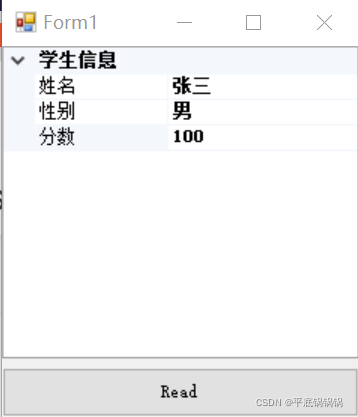
注意: DefaultValueAttribute不会导致成员使用特性的值自动初始化。 必须在代码中设置初始值。





 扫一扫
扫一扫


 812
812

 被折叠的 条评论
为什么被折叠?
被折叠的 条评论
为什么被折叠?
 到【灌水乐园】发言





