


 本文介绍了如何在SSM(Spring、SpringMVC、MyBatis)项目中结合Maven和PageHelper实现高效的分页查询。步骤包括在pom.xml中导入PageHelper依赖,在applacationContext.xml中配置,controller层处理分页参数,service层调用PageHelper并获取PageInfo,最后在jsp页面上展示和处理分页,以及通过Ajax实现动态分页更新。
1.导入jar包
在pom配置文件中,引入jar包,如果是分模块的可以在总的pom文件下引入。
<dependency>
    <groupId>com.github.pagehelper</groupId>
    <artifactId>pagehelper</artifactId>
    <version>5.1.2</version>
</dependency>
2.在applacationContext.xml中配置PageHelper
加在<bean id="sqlSessionFactory" class="org.mybatis.spring.SqlSessionFactoryBean">... ...</bean>中
<property name="plugins">
	 <array>
       <bean class="com.github.pagehelper.PageInterceptor">
           <property name="properties">
               <props>
                   <prop key="helperDialect">mysql</prop>
                   <prop key="resonable">true</prop>	//最后页的下一页或者首页的上一页时,自动处理错误
               </props>
           </property>
       </bean>
   </array>
</property>
3.在controller层请求时候传递2个参数:当前页,每页的条数
@RequestMapping("/findAll.do")
public String  getAllDoctor(@RequestParam(defaultValue = "1") int page, @RequestParam(defaultValue = "5") int size) {
 	List<Doctor> all = docService.getAllDoctor(page, size);	//得到所有信息
  //...
}
@RequestParam(defaultValue = "1")、@RequestParam(defaultValue = "5") 设置没有参数的时候默认值
4.在service层,调用dao的查询所有记录前添加PageHelper
  @Override
  public List<Doctor> getAllDoctor(int page, int size) {
       PageHelper.startPage(page,size);
       return iDoctorDao.getAllDoctor(page,size);
  }
5.根据controller调用service得到的list生成一个PageInfo对象
@RequestMapping( value = "/ajaxGetAllDoctor.do",produces = "application/json; charset=utf-8")
@ResponseBody
public String  getAllDoctor(@RequestParam(defaultValue = "1") int page, @RequestParam(defaultValue = "5") int size) {
 	List<Doctor> all = docService.getAllDoctor(page, size);	//得到所有信息
  //...
    PageInfo pageInfo = new PageInfo(all);
  //...
}
6.jsp页面处理分页
PageInfo 对象要添加在Model中,可以直接页面中通过PageInfo 对象设置请求的 页号和条数
<div class="box-tools pull-right">
	<ul class="pagination">
		<li><a href="${pageContext.request.contextPath}/user/findAll.do?page=1&size=5" aria-label="Previous">首页</a></li>
		<li><a href="${pageContext.request.contextPath}/user/findAll.do?page=${pageInfo .pageNum-1}&size=5">上一页</a></li>
		<c:forEach begin="1" end="${pageInfo .pages}" var="pageNumber">
			<li><a href="${pageContext.request.contextPath}/doctor/findAll.do?page=${pageNumber}&size=5">${pageNumber}</a></li>
		</c:forEach>
		<li><a href="${pageContext.request.contextPath}/user/doctor.do?page=${pageInfo .pageNum+1}&size=5">下一页</a></li>
		<li>
			<a href="${pageContext.request.contextPath}/user/doctor.do?page=${pageInfo .pages}&size=5" aria-label="Next">尾页</a>
		</li>
	</ul>
</div>
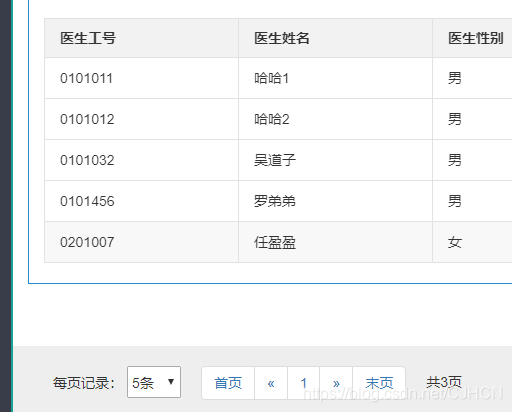
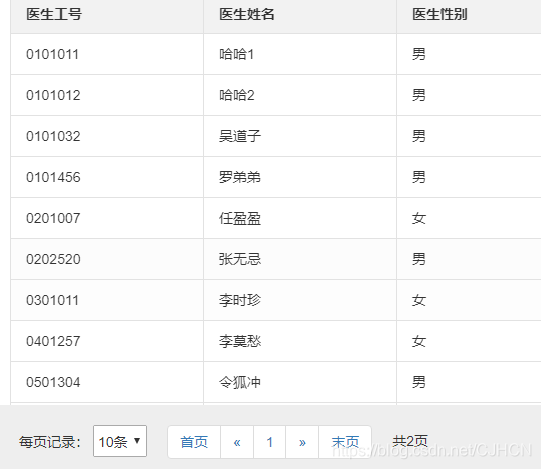
ajax请求的分页
导航条标签和样式
<div id="paged" class="page">
<nav aria-label="Page navigation">
<div style="height: 32px; line-height: 32px;float: left;margin: 20px;">
<span>每页记录:</span>
<select name="size-select" id="size-select" style="height: 100%;">
<option value="5">5条</option>
<option value="8">8条</option>
<option value="10">10条</option>
<option value="20">20条</option>
</select>
</div>
<ul class="pagination" style="float: left;">
<li><a href="#" id="first-page">首页</a></li>
<li>
<a href="#" aria-label="Previous" id="pre-page">
<span aria-hidden="true">«</span>
</a>
</li>
<li><a href="#" id="current-page">1</a></li>
<li>
<a href="#" aria-label="Next" id="next-page">
<span aria-hidden="true">»</span>
</a>
</li>
<li><a href="#" id="last-page">末页</a></li>
</ul>
<span style="display: inline-block; height: 32px; line-height: 32px;float: left;margin: 20px;">共<span id="pages">1</span>页</span>
</nav>
</div>
controller中需要传回来 当前页号 和 总页数
 @RequestMapping( value = "/ajaxGetAllDoctor.do",produces = "application/json; charset=utf-8")
 @ResponseBody
 public String  getAllDoctor(@RequestParam(defaultValue = "1") int page, @RequestParam(defaultValue = "5") int size) {
      List<Doctor> all = docService.getAllDoctor(page, size);
      PageInfo pageInfo = new PageInfo(all);
      int pageNum = pageInfo.getPageNum();    //获取当前分页页号
      int pages = pageInfo.getPages();        //获取总的页数

      JSONArray array = new JSONArray();

      List<Doctor> list = pageInfo.getList(); //得到分页的结果
      for (Doctor doctortemp:   list ) {
            JSONObject jsonItem = new JSONObject();
       		//..处理数据

            array.put(jsonItem);    //将一个医生信息的json对象加入到array中
        }
        JSONObject json = new JSONObject();
        json.put("doctorList",array);   //将医生的信息列表加入到json
        json.put("pageNum",pageNum);    //将当前页号传入到json
        json.put("pages",pages);        //将总的页数传入到json
        return json.toString();
    }
请求函数,成功的时候清除掉分页按钮之前绑定的事件,重新添加事件
function getDoctorList(page,size) {
		page=page||1;
		size=size||5;	//设置默认第一页,每页5条记录
		$.ajax({
			url : "/Administrator/ajaxGetAllDoctor.do",
			type : "POST",
			data : {
				page:   page,
				size:  size
			},
			dataType : "json",
			//处理后端返回的数据
			success : function(result) {
				var doctorList = result.doctorList;		//得到结果
				var pageNum = result.pageNum;		//当前页数
				var pages = result.pages;					//总页数
				//处理doctorList
                $("#content").html("");
				$.each(doctorList,function (index, item) {

				});
			/************************************************************************/
				if(pageNum>0 && pages>0) {

					//***重要:清除之前绑定的,不然绑定多个,就会触发多个
                    $("#first-page").unbind("click");
                    $("#pre-page").unbind("click");
                    $("#next-page").unbind("click");
                    $("#last-page").unbind("click");

                    $("#pages").text(pages);					//设置总页数
                    $("#first-page").click(function () {	//首页
                        getDoctorList(1,size)
                    });
                    $("#current-page").text(pageNum);//设置当前页
                    $("#pre-page").click(function () {	//上一页
                        getDoctorList(pageNum-1,size)
                    });
                    $("#next-page").click(function () {	//下一页
                        if(pageNum<pages) {
                            getDoctorList(pageNum+1,size)
						}
                    });
                    $("#last-page").click(function () {	//最后一页
                        getDoctorList(pages,size)
                    });
				}
			},
			error : function(result) {
			}
		});
	}
下拉框改变的时候调用请求函数
 $("#size-select").change(function(){
       var size = $("#size-select option:selected").val();
       getDoctorList(1,size);
   });





 扫一扫
扫一扫


 441
441

 被折叠的 条评论
为什么被折叠?
被折叠的 条评论
为什么被折叠?
 到【灌水乐园】发言





