


 本文是个人学习Python的笔记,重点介绍了列表的基本操作,包括访问数据、增加数据、删除数据、改变元素、排序、查找索引、浅拷贝与深拷贝、列表运算、嵌套列表以及列表推导式的应用,特别是多级嵌套推导式。
文章目录
写在前面
文章内容为个人学习笔记,学习类容源自“小甲鱼”-《零基础入门学习Python》
1、访问数据
>>> hello = ['one', 'two', 'three', 'foure']
>>> hello[0]
'one'
>>> hello[1]
'two'
>>> hello[len(hello) - 1]
'foure'
>>> hello[-1]  # 最后一个元素
'foure'
>>> hello[-2]  # 倒数第二个元素
'three'

# 列表切片,切片返回值是“list”类型
>>> print(type(hello[0:1]))
<class 'list'>
>>> hello[0:3]
['one', 'two', 'three']
>>> hello[:3]
['one', 'two', 'three']
>>> hello[3:]
['foure']
>>> hello[2:]
['three', 'foure']
>>> hello[:]
['one', 'two', 'three', 'foure']

# 切片支持步长
>>> hello[0:3:2]
['one', 'three']
>>> hello[::2]  # 全部输出,步长2
['one', 'three']
>>> hello[::-1]  # 倒序输出
['foure', 'three', 'two', 'one']
2、增加数据
# append方法,在列表末尾插入一个元素
>>> hello.append("你好")
>>> hello
['one', 'two', 'three', 'foure', '你好']

# extend方法,在列表后加入一个可迭代对象
>>> hello.extend(hello[0:3])
>>> hello
['one', 'two', 'three', 'foure', '你好', 'one', 'two', 'three']

# insert方法,在列表任意位置插入
>>> s = ['one', 'two', 'three', 'foure', 'five']
>>> s.insert(1,'insert'); s  # insert(插入位置下标,插入的元素)
['one', 'insert', 'two', 'three', 'foure', 'five']
>>> s.insert(0,'haha'); s  # 插入到列表开头
['haha', 'one', 'insert', 'two', 'three', 'foure', 'five']
>>> s.insert(len(s),'hai'); s  # 插入到列表结尾
['haha', 'one', 'insert', 'two', 'three', 'foure', 'five', 'hai']

# 利用切片增加数据,切片操作的是“list”类型数据
>>> s = ['one', 'two', 'three', 'foure', 'five']
>>> s[len(s):]=['six'];s  # 类似s.exttend(['six'])
['one', 'two', 'three', 'foure', 'five', 'six']
>>> s[len(s):]=['six,six,six', 'six,six,six'];s
['one', 'two', 'three', 'foure', 'five', 'six', 'six,six,six', 'six,six,six']
3、删除数据
# remove方法,删除指定的元素
# 注意:
# 1、列表同时存在多个相同的元素,remove只删除匹配到的第一个。
# 2、remove中指定的元素,在列表中必须存在,否则报错。
>>> s = ['one', 'two', 'three', 'foure', 'five','two', 'two']
>>> s.remove('two'); s
['one', 'three', 'foure', 'five', 'two', 'two']
>>> s.remove('seven');
Traceback (most recent call last):
  File "<pyshell#34>", line 1, in <module>
    s.remove('seven');
ValueError: list.remove(x): x not in list

# pop方法,使用元素的下标进行删除。
# 注意:pop方法具有返回值,放回被下标匹配中的元素,同时在列表中移除该元素。
>>> s.pop(3); s
'five'
['one', 'three', 'foure', 'two', 'two']

# clear方法,清空列表
>>> s.clear(); s
[]
4、改变列表中元素
# 单个元素变更
>>> s = ['one', 'two', 'three', 'foure', 'five']
>>> s[0] = 'change!'; s
['change!', 'two', 'three', 'foure', 'five']

# 利用切片,提换元素。
# 列表进行切片,将选中的对象从列表中去除,将赋值的对象插入到切片位置,选中对象和插入对象的元素数量可以不同。
>>> s[3:] = ['Xiaoming', 'Zhangshan', 'Lisi', 'Wangwu']; s
['change!', 'two', 'three', 'Xiaoming', 'Zhangshan', 'Lisi', 'Wangwu']

>>> s = ['one', 'two', 'three', 'foure', 'five']
>>> s[1:3] = ['Xiaoming', 'Zhangshan', 'Lisi', 'Wangwu']; s
['one', 'Xiaoming', 'Zhangshan', 'Lisi', 'Wangwu', 'foure', 'five']
5、排序
# sort方法,列表元素排序,默认从小到大
# sort(*, key=None, reverse=False)
>>> num = [5,4,7,2,3,8,4,5,6]
>>> num.sort(); num
[2, 3, 4, 4, 5, 5, 6, 7, 8]

>>> num = [5,4,7,2,3,8,4,5,6]
>>> num.sort(reverse = True); num  # reverse参数默认为“False”
[8, 7, 6, 5, 5, 4, 4, 3, 2]

# key参数,干预排序结果的方法
>>> x = ["China", "Canada", "Amarica", "England"]
>>> x.sort()  # 默认字符串比较发小,比较字符串每个字符的ASCII码
>>> x
['Amarica', 'Canada', 'China', 'England']
>>> x.sort(key=len)  # 优先以长度排序
>>> x
['China', 'Canada', 'Amarica', 'England']

# reverse方法,翻转列表的所有元素
>>> num = [5,4,7,2,3,8,4,5,6]
>>> num.reverse(); num
[6, 5, 4, 8, 3, 2, 7, 4, 5]
6、查元素索引
# count方法,查询指定元素在列表中出现的次数
>>> s = ['one', 'two', 'three', 'foure', 'five','two', 'two']
>>> s.count('two')
3

# index方法,查询指定元素在列中第一次出现的索引
>>> s.index('two')
1
>>> s.index('two', 3, len(s))  # 指定查询的范围,起始索引,和结束索引
5
7、拷贝
7.1、浅拷贝
# copy方法
>>> s = ['one', 'two', 'three', 'foure', 'five','two', 'two']
>>> s_copy = s.copy()
>>> s_copy
['one', 'two', 'three', 'foure', 'five', 'two', 'two']

# 利用切片,拷贝
>>> s_copy_2 = s[:]
>>> s_copy_2
['one', 'two', 'three', 'foure', 'five', 'two', 'two']

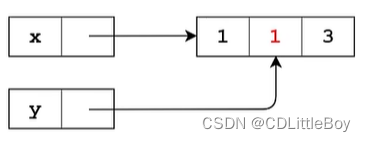
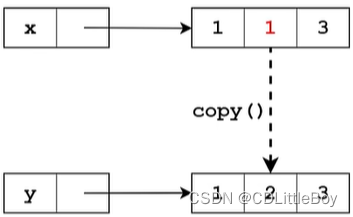
# 拷贝和直接赋值的区别
# 拷贝,开辟一个新的地址空间,复制数据到新的地址空间
# 直接复制,列表所在变量空间不变,只是多了一个引用它的变量名,本质是多个变量名在应用同一个地址空间
>>> x = [1, 2, 3]
>>> y = x; y
[1, 2, 3]
>>> x [1] = 666  # 区别点!!!
>>> y
[1, 666, 3]
>>> x
[1, 666, 3]

>>> x = [1, 2, 3]
>>> y = x.copy()
>>> x [1] = 666  # 区别点!!!
>>> y
[1, 2, 3]
>>> x
[1, 666, 3]
直接赋值
copy()方法
7.2、深拷贝,列表嵌套使用
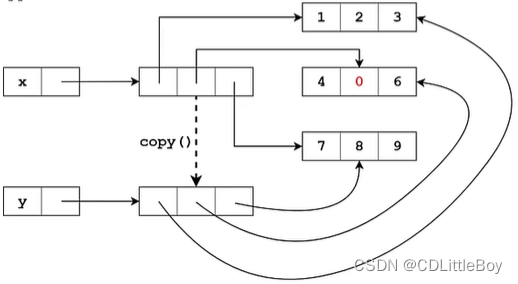
# copy方法和切片拷贝,均不适用于嵌套列表的拷贝,问题演示
>>> x = [['one', 'two', 'three'], ['foure', 'five', 'six'], ['seven', 'eight', 'nine']]
>>> y = x.copy()
>>> x[0][1] = '6666666'
>>> x
[['one', '6666666', 'three'], ['foure', 'five', 'six'], ['seven', 'eight', 'nine']]
>>> y
[['one', '6666666', 'three'], ['foure', 'five', 'six'], ['seven', 'eight', 'nine']]

>>> x = [['one', 'two', 'three'], ['foure', 'five', 'six'], ['seven', 'eight', 'nine']]
>>> y = x[1:]
>>> y
[['foure', 'five', 'six'], ['seven', 'eight', 'nine']]
>>> x[1][1] = '6666666666666'
>>> y
[['foure', '6666666666666', 'six'], ['seven', 'eight', 'nine']]

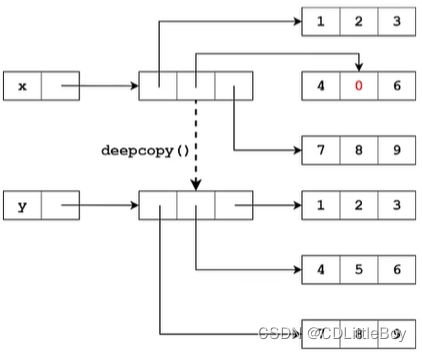
# copy模块的深拷贝方法deepcopy(target)
# copy模块有两个方法,一个是浅拷贝copy.copy(target),和列表的copy方法一样
# 另一个是深拷贝deepcopy(target),适用于多层嵌套
>>> import copy
>>> x = [['one', 'two', 'three'], ['foure', 'five', 'six'], ['seven', 'eight', 'nine']]
>>> y = copy.deepcopy(x)
>>> x [0][1] = '666'
>>> x
[['one', '666', 'three'], ['foure', 'five', 'six'], ['seven', 'eight', 'nine']]
>>> y
[['one', 'two', 'three'], ['foure', 'five', 'six'], ['seven', 'eight', 'nine']]
copy()方法拷贝嵌套列表
copy.deepcopy(target)深拷贝方法
8、列表运算
# “+”运算
>>> list_one = ['one', 'two', 'three']
>>> list_tow = ['Zhangsan', 'Lisi', 'Wangwu']
>>> list_one + list_tow
['one', 'two', 'three', 'Zhangsan', 'Lisi', 'Wangwu']

# “*”运算
>>> list_one = ['one', 'two', 'three']
>>> list_one * 3
['one', 'two', 'three', 'one', 'two', 'three', 'one', 'two', 'three']
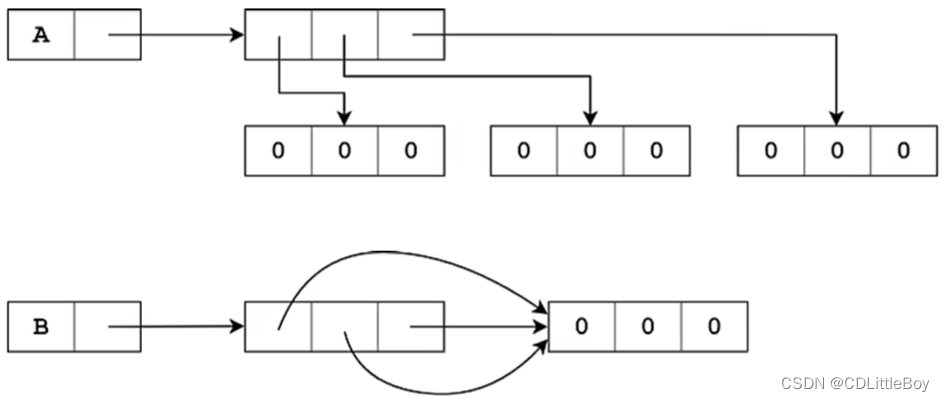
9、列表嵌套,注意生成方法
>>> matrix = [['one', 'two', 'three'], ['foure', 'five', 'six'], ['seven', 'eight', 'nine']]
>>> matrix
[['one', 'two', 'three'], ['foure', 'five', 'six'], ['seven', 'eight', 'nine']]

>>> matrix_2 = [['one', 'two', 'three'],
				['foure', 'five', 'six'],
				['seven', 'eight', 'nine']]
>>> matrix_2
[['one', 'two', 'three'], ['foure', 'five', 'six'], ['seven', 'eight', 'nine']]

>>> for i in matrix:
        for each in i:
            print(each, end=' ')
        print()

one two three
foure five six
seven eight nine

>>> matrix[0][1]
'two'

# 创建嵌套列表的问题,嵌套列表找那个每个元素需要有独立的存储空间。
# 也可使用列表推导式生成。
>>> A = [''] * 3
>>> for i in range(3):
	A[i] = ['zero'] * 3
>>> A
[['zero', 'zero', 'zero'], ['zero', 'zero', 'zero'], ['zero', 'zero', 'zero']]

# 错误写法!!!
>>> B = [['zero'] * 3] * 3  #B的每个子列表,存储空间相同
>>> B
[['zero', 'zero', 'zero'], ['zero', 'zero', 'zero'], ['zero', 'zero', 'zero']]

>>> A[0] is A[1]
False
>>> B[0] is B[1]
True
10、列表推导式
# 列表推导式使用的基本原则:Keep It Simple & St
# 列表每个元素承3,传统办法使用for循环
>>> num = [1, 2, 3]
>>> for i in range(len(num)):
	num[i] = num[i] * 3
>>> num
[3, 6, 9]

# 推导式,比循环语句快很多很多
>>> num = [1, 2, 3]
>>> num = [i * 3 for i in num]
>>> num
[3, 6, 9]

# 提取嵌套列表中的数据,保存为新的列表
>>> x = [['one', 'two', 'three'],
         ['foure', 'five', 'six'],
         ['seven', 'eight', 'nine']]
>>> y = [row[1] for row in x]
>>> y
['two', 'five', 'eight']

# 初始化生成二维嵌套列表
>>> A = [['zero'] * 3 for i in range(3)]
>>> A
[['zero', 'zero', 'zero'], ['zero', 'zero', 'zero'], ['zero', 'zero', 'zero']]

# 推导式,for循环+if判断
>>> num = [i for i in range(10) if i % 3 ==0]
>>> num
[0, 3, 6, 9]

# 推导式可进行for循环嵌套
# 举例,将一个二维列表降维
>>> x = [['one', 'two', 'three'], ['foure', 'five', 'six'], ['seven', 'eight', 'nine']]
>>> y = [data for row in x for data in row]
>>> y
['one', 'two', 'three', 'foure', 'five', 'six', 'seven', 'eight', 'nine']

# 推导式比循环执行快很多,上面嵌套推导式的结果等效的表达式:
>>> y = []
>>> for row in x:
	for data in row:
		y.append(data)
>>> y
['one', 'two', 'three', 'foure', 'five', 'six', 'seven', 'eight', 'nine']

# 多级嵌套推导式
>>> num = [str(x) + ':' + str(y) for x in range(10) if x % 2 == 0 for y in range(10) if y % 3 == 0]
>>> num
['0:0', '0:3', '0:6', '0:9', '2:0', '2:3', '2:6', '2:9', '4:0', '4:3', '4:6', '4:9', '6:0', '6:3', '6:6', '6:9', '8:0', '8:3', '8:6', '8:9']

>>> y
['one', 'two', 'three', 'foure', 'five', 'six', 'seven', 'eight', 'nine']
多级嵌套推导式
>>> num = [str(x) + ':' + str(y) for x in range(10) if x % 2 == 0 for y in range(10) if y % 3 == 0]
>>> num
['0:0', '0:3', '0:6', '0:9', '2:0', '2:3', '2:6', '2:9', '4:0', '4:3', '4:6', '4:9', '6:0', '6:3', '6:6', '6:9', '8:0', '8:3', '8:6', '8:9']





 扫一扫
扫一扫


 被折叠的 条评论
为什么被折叠?
被折叠的 条评论
为什么被折叠?
 到【灌水乐园】发言





