



 本文介绍了一种通过Ajax技术从JSON文件中获取数据的方法,并展示了如何利用jQuery库简化这一过程。具体包括设置HTML页面结构、定义按钮点击事件来触发数据请求、以及如何解析并展示JSON数据内容。
html代码
<!DOCTYPE html>
<html lang="en">
<head>
    <meta charset="UTF-8">
    <title>Ajax显示JSON内容</title>
    <script src="http://code.jquery.com/jquery-1.4.1.min.js" type="text/javascript"></script>
</head>
<body>
    <div style="margin-top:100px;">
        <div style="width:800px;height:40px;border:1px solid red;display: block;margin:0 auto;text-align: center" >标题 :
            <span id="tit"></span>
        </div>
        <div style="width:800px;height:600px;border:1px solid red;display: block;margin:0 auto;">内容 :</br>
            <span id="con"></span>
        </div>
        <button id="getContent1" style="margin:0 auto;margin-top:30px;display: block;">获取JSON文件内容</button>
        <button id="getContent2" style="margin:0 auto;margin-top:30px;display: block;">获取JSON文件内容</button>
        <button id="getContent3" style="margin:0 auto;margin-top:30px;display: block;">获取JSON文件内容</button>

    </div>

    <a href="test.php?act=0" name="title1" id="content1">JSON1</a>
    <a href="test.php?act=1" name="title2" id="content2">JSON2</a>
    <a href="test.php?act=2" name="title3" id="content3">JSON3</a>


    <script>
       $("#getContent1").click(function(){
           $.getJSON("file.json",function(json){
               $("#tit").text(json.sites[0].title);
               $("#con").text(json.sites[0].content);
           });
       })
       $("#getContent2").click(function(){
           $.getJSON("file.json",function(json){
               $("#tit").text(json.sites[1].title);
               $("#con").text(json.sites[1].content);
           });
       })
       $("#getContent3").click(function(){
           $.getJSON("file.json",function(json){
               $("#tit").text(json.sites[2].title);
               $("#con").text(json.sites[2].content);
           });
       })
    </script>

</body>
</html>
php代码
<!DOCTYPE html>
<html lang="en">
<head>
    <meta charset="UTF-8">
    <title>Ajax显示JSON内容</title>
    <script src="http://code.jquery.com/jquery-1.4.1.min.js" type="text/javascript"></script>
</head>
<body>
<div style="margin-top:100px;">
    <div style="width:800px;height:40px;border:1px solid blue;display: block;margin:0 auto;text-align: center" >标题 :
        <span id="tit"></span>
    </div>
    <div style="width:800px;height:600px;border:1px solid blue;display: block;margin:0 auto;">内容 :</br>
        <span id="con"></span>
    </div>
</div>


<script>
    $.getJSON("file.json",function(json){
        $("#tit").text(json.sites[<?php
                print_r($_GET["act"]);
            ?>].title);
        $("#con").text(json.sites[<?php
                print_r($_GET["act"]);
            ?>].content);
    });
</script>
</body>
</html>
file.json文件
{
  "sites": [
    { "title":"JSON文件标题1" , "content":"JSON文件内容  JSON文件内容1 " },
    { "title":"JSON文件标题2" , "content":"JSON文件内容  JSON文件内容2 " },
    { "title":"JSON文件标题3" , "content":"JSON文件内容  JSON文件内容3 " }
  ]
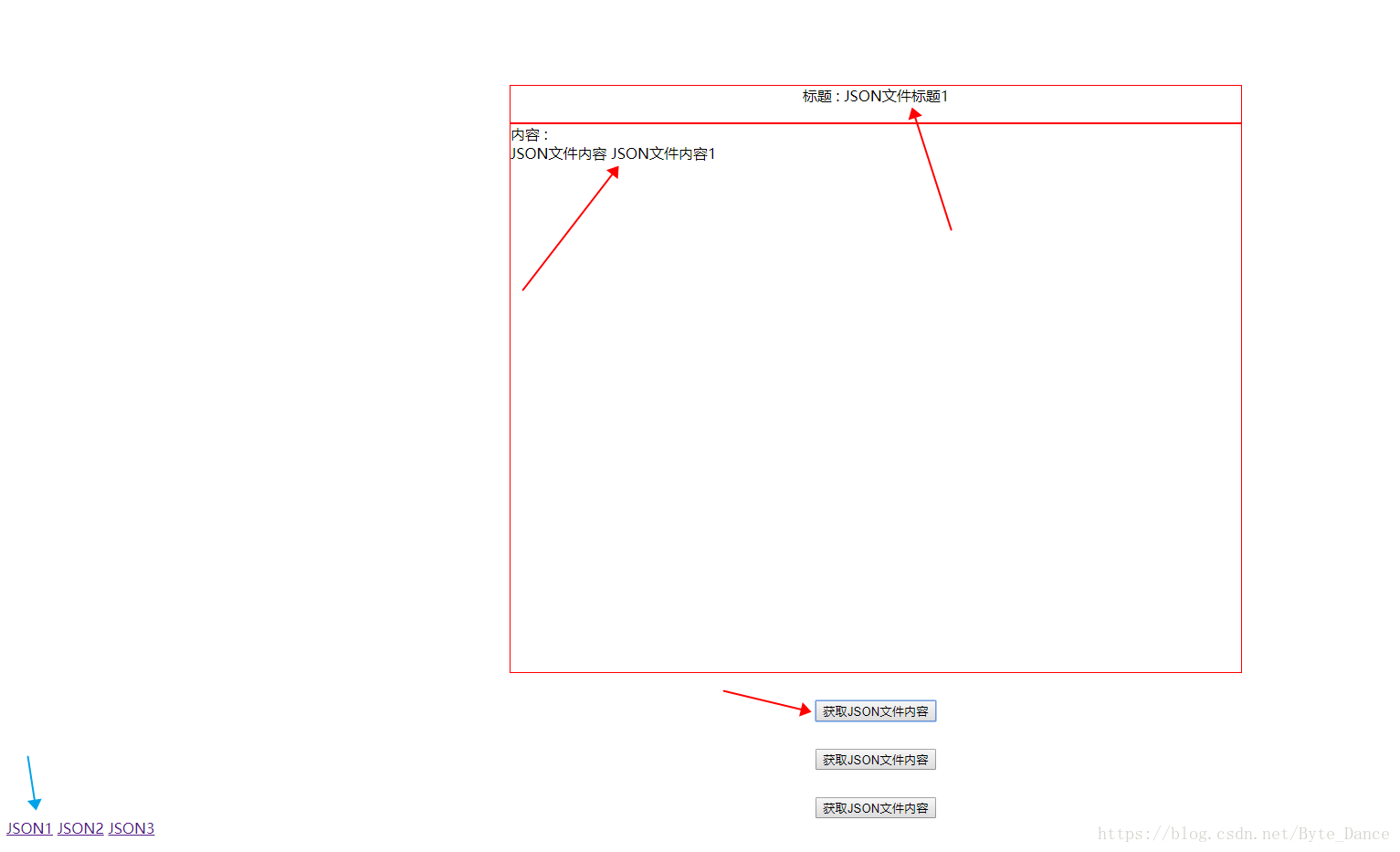
}
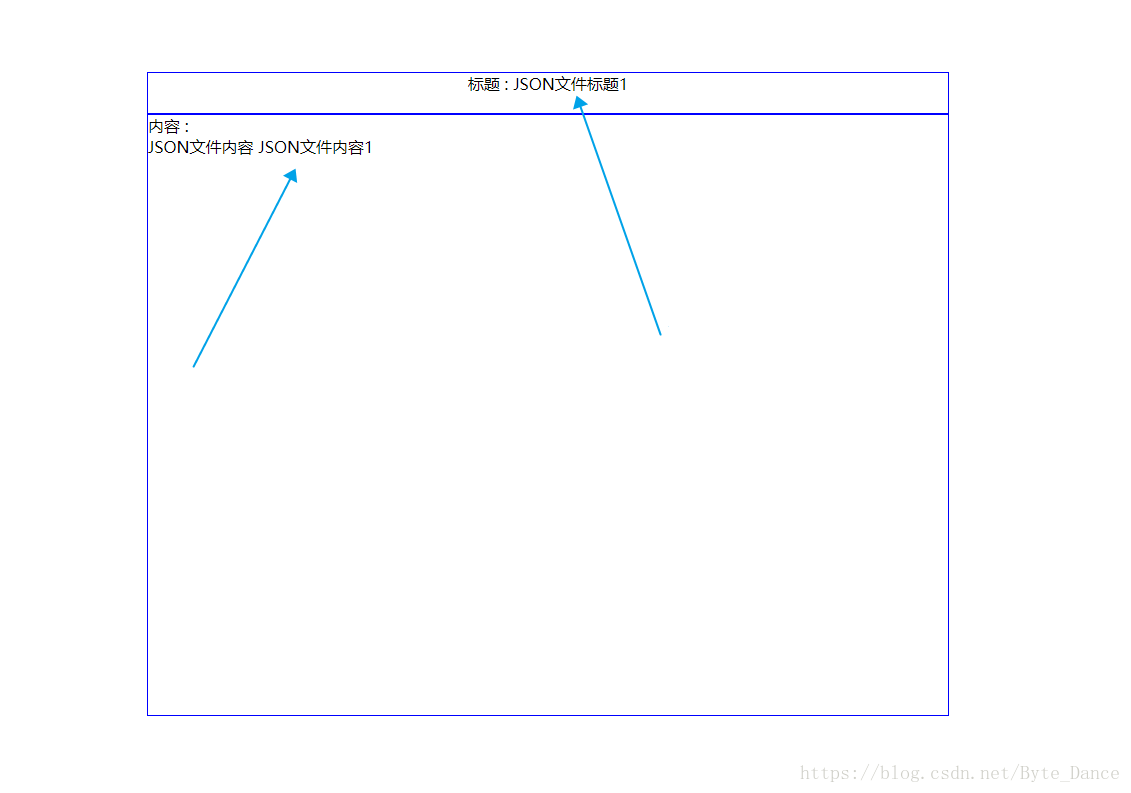
使用AJAX获取到JSON文件
<!DOCTYPE html>
<html lang="en">
<head>
    <meta charset="UTF-8">
    <title>Title</title>
    <script src="http://code.jquery.com/jquery-1.4.1.min.js" type="text/javascript"></script>
    <!-- 最新版本的 Bootstrap 核心 CSS 文件 -->
    <link rel="stylesheet" href="https://cdn.bootcss.com/bootstrap/3.3.7/css/bootstrap.min.css" integrity="sha384-BVYiiSIFeK1dGmJRAkycuHAHRg32OmUcww7on3RYdg4Va+PmSTsz/K68vbdEjh4u" crossorigin="anonymous">
    <!-- 最新的 Bootstrap 核心 JavaScript 文件 -->
    <script src="https://cdn.bootcss.com/bootstrap/3.3.7/js/bootstrap.min.js" integrity="sha384-Tc5IQib027qvyjSMfHjOMaLkfuWVxZxUPnCJA7l2mCWNIpG9mGCD8wGNIcPD7Txa" crossorigin="anonymous"></script>


</head>
<body>
    <div id="wp"></div>
    <script>
        $.ajax({
            type: "GET",
            url: "inde.json",
            dataType: "json",
            success: function(msg){
                alert(msg.德莱文.name)
            }
        });
    </script>
</body>
</html>
{
  "德莱文": { "name":"德莱文" , "age":20},
  "武器大师": { "name":"武器大师" , "age":"30" },
  "暴走萝莉": { "name":"德莱文" , "age":20},
  "剑圣": { "name":"武器大师" , "age":"30" },
  "龙龟": { "name":"德莱文" , "age":20},
  "机器人": { "name":"武器大师" , "age":"30" },
  "德拉斯": { "name":"德莱文" , "age":20},
  "尼古拉斯": { "name":"武器大师" , "age":"30" }
}





 扫一扫
扫一扫


 920
920

 被折叠的 条评论
为什么被折叠?
被折叠的 条评论
为什么被折叠?
 到【灌水乐园】发言





