



 在SpringBoot应用中集成Redis时遇到'io.lettuce.core.RedisConnectionException: Unable to connect to X.X.X.X:6379'错误。通过检查配置文件、禁用Redis的保护模式、重启服务并指定配置文件、开放6379端口及调整防火墙规则,成功解决了远程连接问题。注意避免直接将Redis暴露于公网,并根据需求考虑设置身份验证密码。
使用SpringBoot集成Redis的时候出现如下错误:
org.springframework.data.redis.connection.PoolException: Could not get a resource from the pool;
nested exception is io.lettuce.core.RedisConnectionException: Unable to connect to X.X.X.X:6379
。。。
。。。
Caused by: io.netty.channel.ConnectTimeoutException: connection timed out: /X.X.X.X:6379
。。。
第一想法是不是配置文件出错,检查发现不是。X.X.X.X 为本人服务器地址。
yml配置如下:
spring:
	redis: # redis配置
	        database: 0         # Redis数据库索引(默认为0)
	        host: X.X.X.X     # Redis服务器地址
	        password:
	        port: 6379           # Redis服务器连接端口
	        timeout: 30000
	        lettuce:
	            pool:
	                max-active: 8   # 连接池最大连接数(使用负值表示没有限制)
	                max-idle: 8     # 连接池中的最大空闲连接
	                min-idle: 0     # 连接池中的最小空闲连接
	                max-wait: -1      # 连接池最大阻塞等待时间(使用负值表示没有限制)
	```
然后进入服务器,查看Redis服务,是否开启,检查配置。然后是开启的,使用./redis-server进去服务,没有选择Ctrl+Z挂起进程,而是选择另开一个窗口,进入redis客户端。

```bash
[root@bogon bin]# ./redis-cli -h X.X.X.X -p 6379
进行简单操作出现如下错误:
XXXXX:6379> set s1 1
(error) DENIED Redis is running in protected mode because protected mode is enabled, no bind address was specified, no authentication password is requested to clients. In this mode connections are only accepted from the loopback interface. If you want to connect from external computers to Redis you may adopt one of the following solutions: 1) Just disable protected mode sending the command ‘CONFIG SET protected-mode no’ from the loopback interface by connecting to Redis from the same host the server is running, however MAKE SURE Redis is not publicly accessible from internet if you do so. Use CONFIG REWRITE to make this change permanent. 2) Alternatively you can just disable the protected mode by editing the Redis configuration file, and setting the protected mode option to ‘no’, and then restarting the server. 3) If you started the server manually just for testing, restart it with the ‘–protected-mode no’ option. 4) Setup a bind address or an authentication password. NOTE: You only need to do one of the above things in order for the server to start accepting connections from the outside.
(错误)拒绝Redis是在受保护模式下运行的,因为受保护模式是启用的,没有指定绑定地址,没有向客户端请求身份验证密码。在这种模式下,连接只接受环回接口。如果你想从外部计算机连接到复述,你可能采取的解决方案:1)只是禁用保护模式发送命令的配置设置保护模式没有从loopback接口连接到复述同一主机服务器正在运行,然而确保复述,不是公开从互联网访问如果你这样做。使用配置重写使此更改永久。2)或者,您可以通过编辑Redis配置文件,将protected模式选项设置为“no”,然后重新启动服务器,从而禁用受保护模式。3)如果您只是为了测试而手动启动服务器,请使用“——protected-mode no”选项重新启动它。设置绑定地址或身份验证密码。注意:为了让服务器开始接受来自外部的连接,您只需要执行上面的一项操作。
查阅了网上的资料加上思考,最后解决了问题:
1.如信息提示,redis.conf取消保护模式
protected-mode no
2.重启服务,注意,./redis-server后面需要指定你的配置文件,不然不会生效的。如
./redis-server /usr/local/src/redis-4.0.10/redis.conf
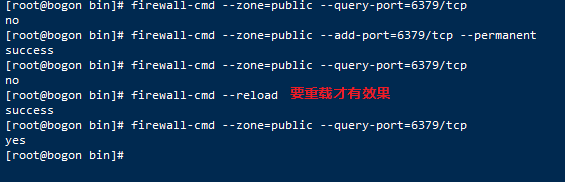
3.要想远程访问,还得开放6379端口(这里就是配置文件的port值)。
查看6379防火墙状态
firewall-cmd --zone=public --query-port=6379/tcp

开放端口
[root@bogon bin]# firewall-cmd --zone=public --add-port=6379/tcp --permanent
重载
[root@bogon bin]# firewall-cmd --reload
再次查看
firewall-cmd --zone=public --query-port=6379/tcp
提示:这里不需要选择bind 0.0.0.0或者注释掉bind,可以直接bind自己服务器的ip地址,对于是否设置验证密码因人而异。
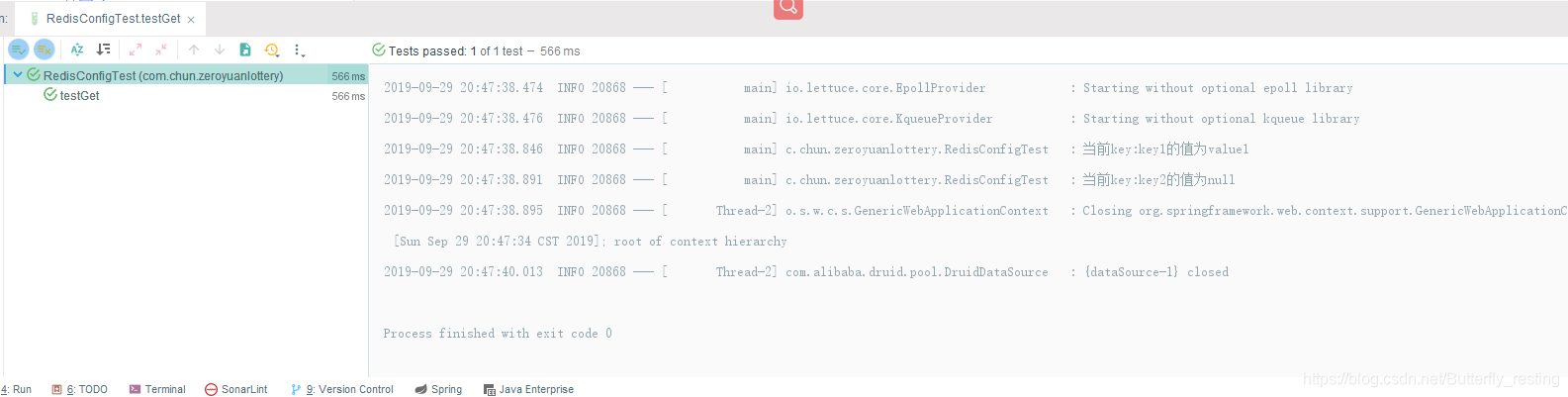
结果图:





 扫一扫
扫一扫


 9337
9337


 到【灌水乐园】发言



