


 本文介绍了一种电信运营商宽带DNS服务的问题,如何通过程序检查线路性能,当查询次数超过限制导致上网卡顿,提供了解决方案和检查方法。
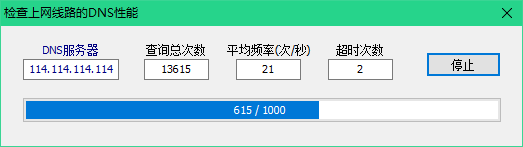
说明:近期发现某个电信运营商上网宽带的DNS服务的一个问题:DNS查询频率有限制, 而且使用其他DNS服务器不解决问题。如果这种宽带只是在家庭里面使用,DNS的查询频度还没达到上限,但如果是在单位里面使用,当使用人数较多时,DNS查询频率会大于限制的频率,造成上网卡顿的问题。在遇到上网卡顿,但Ping又正常时,可以用此程序检查上网线路的DNS性能。需用运营商提供的DNS服务器的ip地址替换上图中的DNS服务器ip地址。让查询次数达到1万次以上,看看有没有超时的现象。如果超时较多,就应该联系运营商解决了。
uMain.pas:
unit uMain;
interface
uses
Winapi.Windows, Winapi.Messages, System.SysUtils, System.Variants,
System.Classes, Vcl.Graphics, Vcl.Controls, Vcl.Forms, Vcl.Dialogs,
Vcl.StdCtrls, Vcl.ComCtrls, Vcl.ExtCtrls, RzPrgres;
type
TForm1 = class(TForm)
ButtonQuery: TButton;
EditCount: TLabeledEdit;
EditDNS: TLabeledEdit;
EditFreq: TLabeledEdit;
ProgressBar: TRzProgressBar;
EditTimeOut: TLabeledEdit;
procedure ButtonQueryClick(Sender: TObject);
procedure FormCreate(Sender: TObject);
private
TotalCnt, TimeOutCnt: Integer;
StartTime: TDateTime;
procedure WmProc(var Msg: TMessage); message WM_User;
public
end;
var
Form1: TForm1;
implementation
{$R *.dfm}
uses uDNSQueryThread;
procedure TForm1.FormCreate(Sender: TObject);
begin
ReportMemoryLeaksOnShutDown := True;
end;
procedure TForm1.ButtonQueryClick(Sender: TObject);
begin
if ButtonQuery.Caption = '查询' then
begin
TotalCnt := 0;
TimeOutCnt := 0;
EditCount.Text := '';
EditFreq.Text := '';
EditTimeOut.Text := '0';
StartTime := Now;
ProgressBar.PartsComplete := 0;
DNSQueryThread := TDNSQueryThread.Create(EditDNS.Text);
ButtonQuery.Caption := '停止'
end
else
begin
DNSQueryThread.Terminate;
ButtonQuery.Caption := '查询';
end;
end;
procedure TForm1.WmProc(var Msg: TMessage);
var
P: Integer;
Seconds: Real;
begin
Inc(TotalCnt);
EditCount.Text := TotalCnt.ToString;
Seconds := 86400 * (Now - StartTime);
if Seconds <> 0 then
EditFreq.Text := Round(TotalCnt/Seconds).ToString;
if Msg.LParam = -1 then
begin
Inc(TimeOutCnt);
EditTimeOut.Text := TimeOutC 最低0.47元/天 解锁文章






 扫一扫
扫一扫


 161
161

 被折叠的 条评论
为什么被折叠?
被折叠的 条评论
为什么被折叠?
 到【灌水乐园】发言





