


 本文详细介绍了如何在Android应用中集成微信支付,包括添加权限、引入依赖、创建微信包名、配置Activity和实体类,以及解决Android 11和MIUI 12支付问题的解决方案。
此文主要讲集成、不包含如何申请Appid等信息、
官方链接:https://pay.weixin.qq.com/wiki/doc/api/app/app.php?chapter=8_5
主要步骤:
1、添加权限
 <uses-permission android:name="android.permission.INTERNET" />
 //写入权限参考官方demo
 <uses-permission android:name="android.permission.WRITE_EXTERNAL_STORAGE" />
2、引入依赖
implementation 'com.tencent.mm.opensdk:wechat-sdk-android-without-mta:+'

 // 手机工具类 非支付相关依赖、用于GsonUtils、ToastUtils等、若已引用Gson 可以忽略
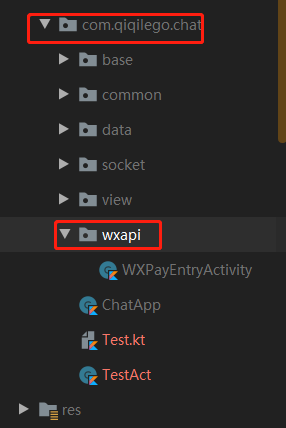
implementation 'cn.finalteam:toolsfinal:1.1.5'3、创建微信包名、(必须为:自己的包名.wxapi、否则收不到回调 )如图:
4、创建相关Activity
class WXPayEntryActivity : Activity(), IWXAPIEventHandler {

    private var wxApi: IWXAPI? = null

    private val PAY_SUCCESS = 0

    private val PAY_FAIL = -1

    private val PAY_CANCEL = -2

    override fun onCreate(savedInstanceState: Bundle?) {
        super.onCreate(savedInstanceState)
        actionBar?.hide()
        val appId = "wxAppId"
        wxApi = WXAPIFactory.createWXAPI(this, appId)
        wxApi?.handleIntent(intent, this)
        val paramsJson = intent.getStringExtra(INTENT_WX_PAY)
        if (!paramsJson.isNullOrEmpty() && wxApi != null) {
            WeiChatUtils.wxPay(
                this,
                wxApi!!,
                GsonUtils.fromJson(paramsJson, WXPayParamBean::class.java)
            )
        } else finish()
    }

    override fun onNewIntent(intent: Intent?) {
        super.onNewIntent(intent)
        setIntent(intent)
        wxApi?.handleIntent(intent, this)
    }


    override fun onReq(baseResp: BaseReq?) {

    }

    override fun onResp(baseResp: BaseResp?) {
        val errCode = baseResp?.errCode

        when (errCode) {
            PAY_SUCCESS -> {
                // 成功
                ToastUtils.showToast(getString(R.string.pay_success))
                EventBus.getDefault().post(PayEvent())
            }
            PAY_FAIL -> {
                // 失败
                ToastUtils.showToast(getString(R.string.pay_fail))
            }
            PAY_CANCEL -> {
                // 取消
                ToastUtils.showToast(getString(R.string.pay_cancel))
            }
            else -> ToastUtils.showToast(getString(R.string.pay_error))
        }
        finish()
    }


}
相关字段及实体类
val INTENT_WX_PAY = "wx_pay"data class WXPayParamBean(
var appId: String = "",
var nonceStr: String = "",
var packageValue: String = "",
var partnerId: String = "",
var prepayId: String = "",
var sign: String = "",
var timeStamp: String = ""
)字符资源
<string name="pay_success">支付成功</string>
<string name="pay_fail">支付失败</string>
<string name="pay_cancel">支付取消</string>
<string name="pay_error">支付异常</string>
提示:支付参数一般由后端返回(此处 WXPayParamBean)
5、支付工具类
object WeiChatUtils {

    /**
     * 微信支付
     */
    fun wxPay(context: Context, param: WXPayParamBean) {
        val wxAppId = StoreConfigUtils.getStoreConfig().wxAppId
        val wxApi = WXAPIFactory.createWXAPI(context, wxAppId)
        PayReq().apply {
            appId = param.appId
            partnerId = param.partnerId
            prepayId = param.prepayId
            nonceStr = param.nonceStr
            timeStamp = param.timeStamp
            packageValue = param.packageValue
            sign = param.sign
            if (wxApi.wxAppSupportAPI >= Build.PAY_SUPPORTED_SDK_INT)
                wxApi.sendReq(this)
            else ToastUtils.showToast(context.getString(R.string.wx_not_support))
        }
    }

    fun wxPay(context: Context, wxApi: IWXAPI, param: WXPayParamBean) {
        PayReq().apply {
            appId = param.appId
            partnerId = param.partnerId
            prepayId = param.prepayId
            nonceStr = param.nonceStr
            timeStamp = param.timeStamp
            packageValue = param.packageValue
            sign = param.sign
            if (wxApi.wxAppSupportAPI >= Build.PAY_SUPPORTED_SDK_INT)
                wxApi.sendReq(this)
            else {
                ToastUtils.showToast(context.getString(R.string.wx_not_support))
                if (context is Activity) {
                    context.finish()
                }
            }
        }
    }

}
6、AndroidManifest 注册
//若在小米等手机上出现、Toast不显示问题、 可删除android:launchMode="singleTop"、
//但是要保证支付成功、失败 WXPayEntryActivity都要被正常finish
 <activity
            android:name=".wxapi.WXPayEntryActivity"
            android:exported="true"
            android:launchMode="singleTop"
            android:theme="@android:style/Theme.Translucent.NoTitleBar" />
至此Over、 注意注意注意:步骤三命名规范
android 11 、 MIUI12 无法支付分享? 解决方案:https://blog.youkuaiyun.com/BirdEatBug/article/details/117702117?spm=1001.2014.3001.5501





 扫一扫
扫一扫


 1243
1243

 被折叠的 条评论
为什么被折叠?
被折叠的 条评论
为什么被折叠?
 到【灌水乐园】发言





