



 这篇博客探讨了在Vue项目中使用Treeselect组件时遇到的两种情况:一是新建时下拉框显示'unknown',解决方案是初始化时将关联变量设为null;二是编辑时值已知但伴随'unknown',需要通过id找到对应label显示。同时,还提到当需要禁止选择一级节点时,可以设置:disable-branch-nodes属性。
一种是初始加载的时候 unknown ,比如新建的时候,需要走接口获取 treeselect 中的数据,下拉框会显示unknown
data里面 与之相关联的变量设为 null ,. 比如 我用 type 关联,那么data中的type 为: type: null,
第二种是 有值 后面还有unknown,比如编辑的时候,从接口获取到了type的值,由于这种下拉选择是根据key来选择的,这里用 id 作为 key, 也就是从接口中获取到的 type 是 treeselect 中的某条数据的 id, 需要判断是哪一条id, 把这条 id 的value 或者label
展示到 下拉框那里,如图:
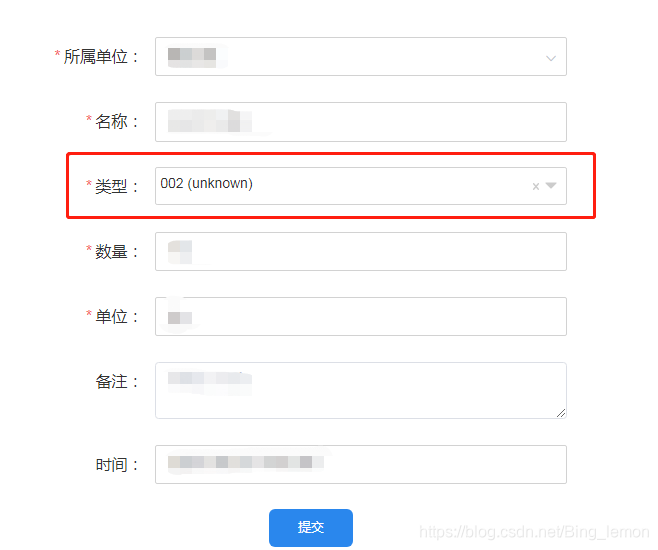
我取到了接口返回的type 是tree 里面 label 为002 的这条数据, 但是他后面有 unknown , 解决:
          <treeselect
            :disable-branch-nodes="true"
            class="treeselects"
            :multiple="false"
            placeholder="请选择"
            v-model="ruleForm.type"
            @select="changeSelect"
            :options="trees"
            :load-options="loadOptions"
            :default-expand-level="Infinity"
          />
import { Treeselect, LOAD_CHILDREN_OPTIONS } from "@riophae/vue-treeselect";
import "@riophae/vue-treeselect/dist/vue-treeselect.css";


 components: {
    Treeselect,
  },


data() {
    return {
      ruleForm: {
        type: null,
      },
      props: {
        label: "name",
        children: "zones",
      },
      defaultProps: {
        children: "children",
        label: "label",
      },
      trees: [],
    };

 //  methods:
  //   获取treeselect类型
    getType() {
      this.get("/system/category/list?code=equipment_type").then((res) => {
        let nodes = res.data;
        let arr = [];
        nodes.forEach((node) => {
          arr.push(this.normalizer(node));
        });
        this.trees = arr;
      });
    },
    /** 转换category数据结构 */
    normalizer(node) {
      //null表示有子节点  or表示没有子节点
      let children = node.hasChildren ? null : "or";
      return {
        id: node.id,
        label: node.name,
        children: children,
      };
    },
    loadOptions({ action, parentNode, callback }) {
      if (action === LOAD_CHILDREN_OPTIONS) {
        var data = {
          pid: parentNode.id,
        };
        this.get("/system/category/list", data).then((res) => {
          let nodes = res.data;
          let arr = [];
          nodes.forEach((node) => {
            arr.push(this.normalizer(node));
          });
          parentNode.children = arr;
          callback();
        });
      }
    },
    //获取tree树  点击tree 的某项 得到其id
    changeSelect(e) {
      this.ruleForm.type = e.id;
    },
 // 获取详情的信息  编辑
     detaInfo() {
      this.get("/business/equipment/" + this.infoId).then((res) => {
        if (res.code == 200) {
            this.trees.forEach((item) => {
              if (item.children != 'or') {
                item.children.forEach((items) => {
                  if (
                    item.id == res.data.eqmType ||
                    items.id == res.data.eqmType
                  ) {
                    this.changeSelect(items);
                    //  这里调用 选择tree 的方法  就是进来就默认选择了接口返回的id 的那条数据,后面就不会有 unknown 了
                  }
                });
              }
            });
          }
      });
    },
unknown 的解决了。
顺便说一下 tree 的一级节点 不能选择的话 需要加一个 :disable-branch-nodes="true" 上面 html 代码中有






 扫一扫
扫一扫


 3078
3078

 被折叠的 条评论
为什么被折叠?
被折叠的 条评论
为什么被折叠?
 到【灌水乐园】发言





