


基于element和vue开发
添加功能:
<trmplate>
 <el-button type="text" @click="dialogFormVisible = true">添加用户</el-button>
          <el-dialog title="添加用户" :visible.sync="dialogFormVisible">
            <el-form :model="form" ref="formref">
              <el-form-item label="用户名" :label-width="formLabelWidth">
                <el-input v-model="form.username" autocomplete="off"></el-input>
              </el-form-item>
              <el-form-item label="密码" :label-width="formLabelWidth">
                <el-input v-model="form.password" autocomplete="off"></el-input>
              </el-form-item>
            </el-form>
            <div slot="footer" class="dialog-footer">
              <el-button @click="dialogFormVisible = false">取 消</el-button>
              <el-button type="primary" @click="addUser">确 定</el-button>
            </div>
          </el-dialog>
</template>``
<script>
import axios from "axios";
export default {
      dialogTableVisible: false,
      dialogFormVisible: false,
        form: {
        username: "",
        password: "",
        region: "",
        date1: "",
        date2: "",
        delivery: false,
        type: [],
        resource: "",
        desc: "",
      },
      methods:{
    //添加
    addUser() {
      //调用服务端端口
      // 发送 POST 请求
      axios
        .post("/api/sign ", {
          username: this.form.username,
          password: this.form.password,
        })
        .then(function (response) {
          console.log(response);
        });
      this.dialogFormVisible = false;
       this.getuserlist();
       //这里有一个bug就是数据渲染回页需要刷新,希望有大佬能指导,如何点击确认直接能渲染数据回用户列表
    },
}
}
删除功能:
<trmplate>
<el-button type="danger" @click="delById(scope.row.id)">删除</el-button>
</trmplate>
<script>
import axios from "axios";
export default {
method:{
    //删除用户
    delById(id) {
      // 发送 POST 请求
      axios({
        method: "delete",
        url: "/api/user/" + id,
        data: {
          id: this.delById,
        },
      });
      this.$message("删除成功");
      this.getuserlist();
    },
}
}
</script>
展示用户列表功能
<trmplate>
   <el-col :span="8">
          <el-input placeholder="请输入内容"  v-model="querySearch"  class="input-with-select"  clearable>
            <el-button slot="append"  icon="el-icon-search"  @click="getuserlist"></el-button>
          </el-input>
        </el-col>
        </trmplate>
<script>
import axios from "axios";
export default {
  data() {
    return {
       userlist: [],
        input1: "",
      dialogVisible: true,
      querySearch: "",
      formLabelWidth: "120px",
    },
    methods:{
    //用户列表
    async getuserlist() {
      const { data: res } = await this.$http.get("api/users", {
        params: this.queryinfo,
      });
      // console.log(userlist)
      if (res.status !== 200) return this.$message.error("获取用户列表失败");
      this.userlist = res.data;
      // console.log(userlist);
      // return this.$message.success('请求用户列表成功')
    },
}
}
</script>
修改功能
<template>
          <template slot-scope="scope">
            <el-button type="primary" @click="showEditDialog(scope.$index)">修改</el-button>
            <el-dialog title="修改" :visible.sync="editdialogVisible"  width="50%"  @close="editDialogClosed">
              <el-form :model="editForm" ref="editFormRef" label-width="70px">
                <el-form-item label="用户名" prop="name">
                  <el-input v-model="editForm.username"></el-input>
                </el-form-item>
                <el-form-item label="密码" prop="number">
                  <el-input v-model="editForm.newPassword"></el-input>
                </el-form-item>
              </el-form>
              <span slot="footer" class="dialog-footer">
                <el-button @click="editdialogVisible = false">取 消</el-button>
                <el-button type="primary" @click="handleConfirm">确 定</el-button>
              </span>
            </el-dialog>
</template>

<script>
import axios from "axios";
export default {
  data() {
return{
      editdialogVisible: false,
      dialogTableVisible: false,
      dialogFormVisible: false,
      //接口返回的数据格式
         editForm: {
        username: "",
        originalPassword: "",
        newPassword: "",
        currentIndex: null
      },
}
  },
  methods:{
    //修改
    showEditDialog(index) {
    this.currentIndex = index
    this.editForm.username = this.userlist[index]['username']
    this.editdialogVisible = true
 },
 handleConfirm() {
    if (this.currentIndex != null) {
    // console.log(this.userlist[this.currentIndex]['id'])
    const params = {
         username: this.editForm.username,
        newPassword: this.editForm.newPassword
 }
      axios.post('/api/user/' + this.userlist[this.currentIndex]['id'], params).then((res) => {
       // 成功
      console.log(res)
      this.editdialogVisible = false;
      this.getuserlist();
 })
 }
 },
}
  }
</script>
图片展示:
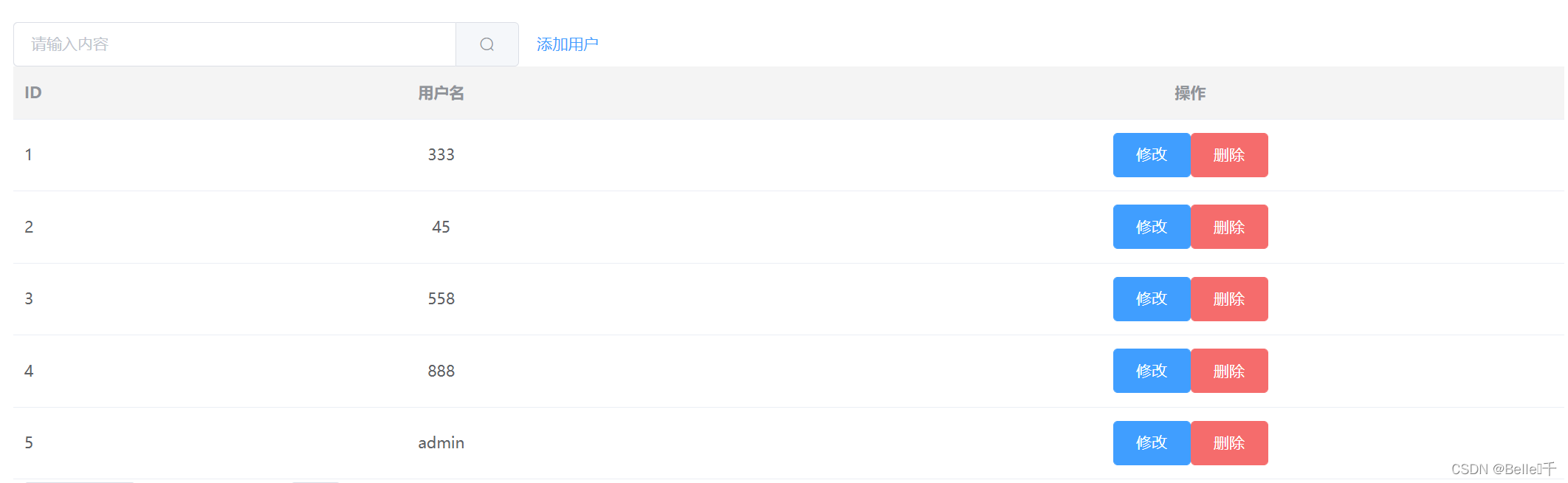
新手入手,请大佬指点





 扫一扫
扫一扫


 2277
2277

 被折叠的 条评论
为什么被折叠?
被折叠的 条评论
为什么被折叠?
 到【灌水乐园】发言





