



作者主页:编程千纸鹤
作者简介:Java领域优质创作者、优快云博客专家 、优快云内容合伙人、掘金特邀作者、阿里云博客专家、51CTO特邀作者、多年架构师设计经验、多年校企合作经验,被多个学校常年聘为校外企业导师,指导学生毕业设计并参与学生毕业答辩指导,有较为丰富的相关经验。期待与各位高校教师、企业讲师以及同行交流合作
主要内容:Java项目、Python项目、前端项目、PHP、ASP.NET、人工智能与大数据、单片机开发、物联网设计与开发设计、简历模板、学习资料、面试题库、技术互助、就业指导等
业务范围:免费功能设计、开题报告、任务书、中期检查PPT、系统功能实现、代码编写、论文编写和辅导、论文降重、长期答辩答疑辅导、腾讯会议一对一专业讲解辅导答辩、模拟答辩演练、和理解代码逻辑思路等。
收藏点赞不迷路 关注作者有好处
文末获取源码

项目编号:BS-XCX-123
一,环境介绍
语言环境:微信小程序
数据库:Mysql: mysql5.7
WEB框架:SpringBoot+Vue
开发工具:IDEA和微信开发者工具
二,项目简介
如今社会上各行各业,都喜欢用自己行业的专属软件工作,互联网发展到这个时候,人们已经发现离不开了互联网。新技术的产生,往往能解决一些老技术的弊端问题。因为传统校园快递平台系统信息管理难度大,容错率低,管理人员处理数据费工费时,所以专门为解决这个难题开发了一个校园快递平台系统管理系统,可以解决许多问题。
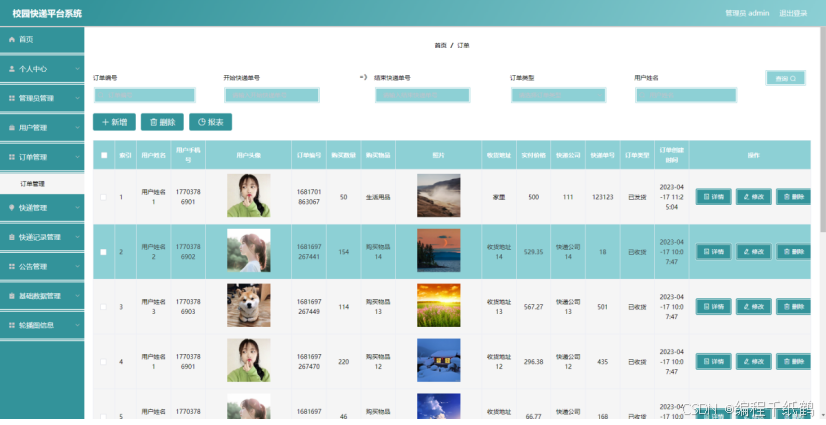
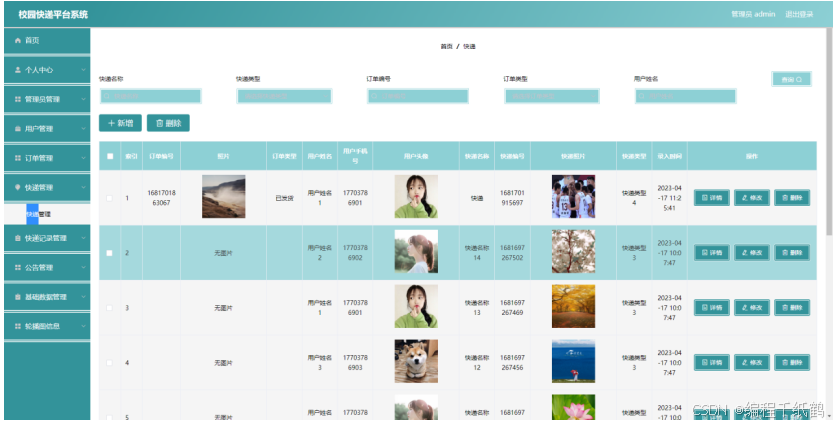
校园快递平台系统管理系统按照操作主体分为管理员和用户。管理员的功能包括字典管理、订单管理、公告管理、快递记录管理、快递管理、用户管理、管理员管理。用户的功能等。该系统采用了Mysql数据库,Java语言,Spring Boot框架等技术进行编程实现。
校园快递平台系统管理系统可以提高校园快递平台系统信息管理问题的解决效率,优化校园快递平台系统信息处理流程,保证校园快递平台系统信息数据的安全,它是一个非常可靠,非常安全的应用程序。
系统设计,肯定要把设计的思想进行统一,只有统一的思想才能指导程序的开发,并且可以让众多的程序开发人员更快速的进入状态,提高开发速度。根据当前系统的既定需求,下面将进行本系统设计思想的阐述。
(1)扩展性:开发任何一个系统的时候不可避免要考虑这个问题。软件版本的更迭是一种常识,任何一个软件都不会一次性开发就成永恒,软件是一个不断成长的东西。所以考虑问题的时候需要对当前问题进行数据上的扩大化,然后进行归纳整理,最终形成具有一定扩展性的程序。程序的可扩展性必然会影响开发进度,所以最终需要综合评估程序的可扩展程度,进而有的放矢,循序开发。
(2)实用性:程序设计是一个先高屋建瓴式的设想,然后再具体化,实用性就是具体化的第一个步骤,要充分考虑使用者是不懂程序设计的这一点,使用者只是懂得常规性的上网操作步骤,并不需要对程序进行理解,所以一定要让使用者感觉到便利,感觉到实用性的存在,如果使用者使用程序过程中没发现使用程序的好处,那么程序设计的实用性将大大降低。
(3)安全性:当使用者使用的过程中,会产生大量的相关数据,这些数据必须有安全性的保证,否则当使用者发现数据出现问题的原因是程序设计问题的时候,将会对程序开发者失去信任,甚至可能会产生大量的费用赔偿问题,这是一个不可避免的问题。所以安全性关系开发与使用者双方的经济利益,程序的安全性是一定要保证的。
(4)先进性:程序设计的先进性是开发者进行考虑的,必须要在满足系统功能的前提下,必须要选择好当下最合适的技术。最合适的技术要从开发成本,使用成本以及维护成本里面综合分析,经过综合分析后要让技术实现最优解,保持先进的技术生产力。
(5)维护性:程序开发之初就要考虑以后的维护问题。维护是在程序开发完毕,已经上线可以运作,进入生产试用过程和使用过程中才会发现需要维护的必要。要通过各方面降低维护成本,不是说维护的越少就代表程序开发的越完美,程序既然是人类进行设计制造的,肯定有很多不可避免的问题产生,那么如何维护好程序的正常运作也是一门很重要的学问。
三,系统展示
四,核心代码展示
package com.controller;

import java.io.File;
import java.math.BigDecimal;
import java.net.URL;
import java.text.SimpleDateFormat;
import com.alibaba.fastjson.JSONObject;
import java.util.*;
import org.springframework.beans.BeanUtils;
import javax.servlet.http.HttpServletRequest;
import org.springframework.web.context.ContextLoader;
import javax.servlet.ServletContext;
import com.service.TokenService;
import com.utils.*;
import java.lang.reflect.InvocationTargetException;

import com.service.DictionaryService;
import org.apache.commons.lang3.StringUtils;
import com.annotation.IgnoreAuth;
import org.slf4j.Logger;
import org.slf4j.LoggerFactory;
import org.springframework.beans.factory.annotation.Autowired;
import org.springframework.stereotype.Controller;
import org.springframework.web.bind.annotation.*;
import com.baomidou.mybatisplus.mapper.EntityWrapper;
import com.baomidou.mybatisplus.mapper.Wrapper;
import com.entity.*;
import com.entity.view.*;
import com.service.*;
import com.utils.PageUtils;
import com.utils.R;
import com.alibaba.fastjson.*;

/**
 * 快递记录
 * 后端接口
 * @author
 * @email
*/
@RestController
@Controller
@RequestMapping("/jilu")
public class JiluController {
    private static final Logger logger = LoggerFactory.getLogger(JiluController.class);

    private static final String TABLE_NAME = "jilu";

    @Autowired
    private JiluService jiluService;


    @Autowired
    private TokenService tokenService;

    @Autowired
    private DictionaryService dictionaryService;//字典
    @Autowired
    private DingdanService dingdanService;//订单
    @Autowired
    private GonggaoService gonggaoService;//公告
    @Autowired
    private KuaidiService kuaidiService;//快递
    @Autowired
    private YonghuService yonghuService;//用户
    @Autowired
    private UsersService usersService;//管理员


    /**
    * 后端列表
    */
    @RequestMapping("/page")
    public R page(@RequestParam Map<String, Object> params, HttpServletRequest request){
        logger.debug("page方法:,,Controller:{},,params:{}",this.getClass().getName(),JSONObject.toJSONString(params));
        String role = String.valueOf(request.getSession().getAttribute("role"));
        if(false)
            return R.error(511,"永不会进入");
        else if("用户".equals(role))
            params.put("yonghuId",request.getSession().getAttribute("userId"));
        params.put("jiluDeleteStart",1);params.put("jiluDeleteEnd",1);
        CommonUtil.checkMap(params);
        PageUtils page = jiluService.queryPage(params);

        //字典表数据转换
        List<JiluView> list =(List<JiluView>)page.getList();
        for(JiluView c:list){
            //修改对应字典表字段
            dictionaryService.dictionaryConvert(c, request);
        }
        return R.ok().put("data", page);
    }

    /**
    * 后端详情
    */
    @RequestMapping("/info/{id}")
    public R info(@PathVariable("id") Long id, HttpServletRequest request){
        logger.debug("info方法:,,Controller:{},,id:{}",this.getClass().getName(),id);
        JiluEntity jilu = jiluService.selectById(id);
        if(jilu !=null){
            //entity转view
            JiluView view = new JiluView();
            BeanUtils.copyProperties( jilu , view );//把实体数据重构到view中
            //级联表 快递
            //级联表
            KuaidiEntity kuaidi = kuaidiService.selectById(jilu.getKuaidiId());
            if(kuaidi != null){
            BeanUtils.copyProperties( kuaidi , view ,new String[]{ "id", "createTime", "insertTime", "updateTime", "yonghuId"});//把级联的数据添加到view中,并排除id和创建时间字段,当前表的级联注册表
            view.setKuaidiId(kuaidi.getId());
            }
            //级联表 用户
            //级联表
            YonghuEntity yonghu = yonghuService.selectById(jilu.getYonghuId());
            if(yonghu != null){
            BeanUtils.copyProperties( yonghu , view ,new String[]{ "id", "createTime", "insertTime", "updateTime", "yonghuId"});//把级联的数据添加到view中,并排除id和创建时间字段,当前表的级联注册表
            view.setYonghuId(yonghu.getId());
            }
            //修改对应字典表字段
            dictionaryService.dictionaryConvert(view, request);
            return R.ok().put("data", view);
        }else {
            return R.error(511,"查不到数据");
        }

    }

    /**
    * 后端保存
    */
    @RequestMapping("/save")
    public R save(@RequestBody JiluEntity jilu, HttpServletRequest request){
        logger.debug("save方法:,,Controller:{},,jilu:{}",this.getClass().getName(),jilu.toString());

        String role = String.valueOf(request.getSession().getAttribute("role"));
        if(false)
            return R.error(511,"永远不会进入");
        else if("用户".equals(role))
            jilu.setYonghuId(Integer.valueOf(String.valueOf(request.getSession().getAttribute("userId"))));

        Wrapper<JiluEntity> queryWrapper = new EntityWrapper<JiluEntity>()
            .eq("kuaidi_id", jilu.getKuaidiId())
            .eq("yonghu_id", jilu.getYonghuId())
            .eq("jilu_name", jilu.getJiluName())
            .eq("jilu_fachu_address", jilu.getJiluFachuAddress())
            .eq("jilu_jieshou_address", jilu.getJiluJieshouAddress())
            .eq("jilu_types", jilu.getJiluTypes())
            .eq("jilu_delete", 1)
            ;

        logger.info("sql语句:"+queryWrapper.getSqlSegment());
        JiluEntity jiluEntity = jiluService.selectOne(queryWrapper);
        if(jiluEntity==null){
            jilu.setJiluDelete(1);
            jilu.setInsertTime(new Date());
            jilu.setCreateTime(new Date());
            jiluService.insert(jilu);
            return R.ok();
        }else {
            return R.error(511,"表中有相同数据");
        }
    }

    /**
    * 后端修改
    */
    @RequestMapping("/update")
    public R update(@RequestBody JiluEntity jilu, HttpServletRequest request) throws NoSuchFieldException, ClassNotFoundException, IllegalAccessException, InstantiationException {
        logger.debug("update方法:,,Controller:{},,jilu:{}",this.getClass().getName(),jilu.toString());
        JiluEntity oldJiluEntity = jiluService.selectById(jilu.getId());//查询原先数据

        String role = String.valueOf(request.getSession().getAttribute("role"));
//        if(false)
//            return R.error(511,"永远不会进入");
//        else if("用户".equals(role))
//            jilu.setYonghuId(Integer.valueOf(String.valueOf(request.getSession().getAttribute("userId"))));
        if("".equals(jilu.getJiluContent()) || "null".equals(jilu.getJiluContent())){
                jilu.setJiluContent(null);
        }

            jiluService.updateById(jilu);//根据id更新
            return R.ok();
    }


    /**
    * 删除
    */
    @RequestMapping("/delete")
    public R delete(@RequestBody Integer[] ids, HttpServletRequest request){
        logger.debug("delete:,,Controller:{},,ids:{}",this.getClass().getName(),ids.toString());
        List<JiluEntity> oldJiluList =jiluService.selectBatchIds(Arrays.asList(ids));//要删除的数据
        ArrayList<JiluEntity> list = new ArrayList<>();
        for(Integer id:ids){
            JiluEntity jiluEntity = new JiluEntity();
            jiluEntity.setId(id);
            jiluEntity.setJiluDelete(2);
            list.add(jiluEntity);
        }
        if(list != null && list.size() >0){
            jiluService.updateBatchById(list);
        }

        return R.ok();
    }


    /**
     * 批量上传
     */
    @RequestMapping("/batchInsert")
    public R save( String fileName, HttpServletRequest request){
        logger.debug("batchInsert方法:,,Controller:{},,fileName:{}",this.getClass().getName(),fileName);
        Integer yonghuId = Integer.valueOf(String.valueOf(request.getSession().getAttribute("userId")));
        SimpleDateFormat sdf = new SimpleDateFormat("yyyy-MM-dd HH:mm:ss");
        //.eq("time", new SimpleDateFormat("yyyy-MM-dd").format(new Date()))
        try {
            List<JiluEntity> jiluList = new ArrayList<>();//上传的东西
            Map<String, List<String>> seachFields= new HashMap<>();//要查询的字段
            Date date = new Date();
            int lastIndexOf = fileName.lastIndexOf(".");
            if(lastIndexOf == -1){
                return R.error(511,"该文件没有后缀");
            }else{
                String suffix = fileName.substring(lastIndexOf);
                if(!".xls".equals(suffix)){
                    return R.error(511,"只支持后缀为xls的excel文件");
                }else{
                    URL resource = this.getClass().getClassLoader().getResource("static/upload/" + fileName);//获取文件路径
                    File file = new File(resource.getFile());
                    if(!file.exists()){
                        return R.error(511,"找不到上传文件,请联系管理员");
                    }else{
                        List<List<String>> dataList = PoiUtil.poiImport(file.getPath());//读取xls文件
                        dataList.remove(0);//删除第一行,因为第一行是提示
                        for(List<String> data:dataList){
                            //循环
                            JiluEntity jiluEntity = new JiluEntity();
//                            jiluEntity.setKuaidiId(Integer.valueOf(data.get(0)));   //快递 要改的
//                            jiluEntity.setYonghuId(Integer.valueOf(data.get(0)));   //用户 要改的
//                            jiluEntity.setJiluName(data.get(0));                    //快递记录名称 要改的
//                            jiluEntity.setJiluUuidNumber(data.get(0));                    //快递记录编号 要改的
//                            jiluEntity.setJiluFachuAddress(data.get(0));                    //发出地 要改的
//                            jiluEntity.setJiluJieshouAddress(data.get(0));                    //接受地 要改的
//                            jiluEntity.setJiluTypes(Integer.valueOf(data.get(0)));   //快递记录类型 要改的
//                            jiluEntity.setJiluContent("");//详情和图片
//                            jiluEntity.setJiluDelete(1);//逻辑删除字段
//                            jiluEntity.setInsertTime(date);//时间
//                            jiluEntity.setCreateTime(date);//时间
                            jiluList.add(jiluEntity);


                            //把要查询是否重复的字段放入map中
                                //快递记录编号
                                if(seachFields.containsKey("jiluUuidNumber")){
                                    List<String> jiluUuidNumber = seachFields.get("jiluUuidNumber");
                                    jiluUuidNumber.add(data.get(0));//要改的
                                }else{
                                    List<String> jiluUuidNumber = new ArrayList<>();
                                    jiluUuidNumber.add(data.get(0));//要改的
                                    seachFields.put("jiluUuidNumber",jiluUuidNumber);
                                }
                        }

                        //查询是否重复
                         //快递记录编号
                        List<JiluEntity> jiluEntities_jiluUuidNumber = jiluService.selectList(new EntityWrapper<JiluEntity>().in("jilu_uuid_number", seachFields.get("jiluUuidNumber")).eq("jilu_delete", 1));
                        if(jiluEntities_jiluUuidNumber.size() >0 ){
                            ArrayList<String> repeatFields = new ArrayList<>();
                            for(JiluEntity s:jiluEntities_jiluUuidNumber){
                                repeatFields.add(s.getJiluUuidNumber());
                            }
                            return R.error(511,"数据库的该表中的 [快递记录编号] 字段已经存在 存在数据为:"+repeatFields.toString());
                        }
                        jiluService.insertBatch(jiluList);
                        return R.ok();
                    }
                }
            }
        }catch (Exception e){
            e.printStackTrace();
            return R.error(511,"批量插入数据异常,请联系管理员");
        }
    }


    /**
    * 前端列表
    */
    @IgnoreAuth
    @RequestMapping("/list")
    public R list(@RequestParam Map<String, Object> params, HttpServletRequest request){
        logger.debug("list方法:,,Controller:{},,params:{}",this.getClass().getName(),JSONObject.toJSONString(params));

        CommonUtil.checkMap(params);
        PageUtils page = jiluService.queryPage(params);

        //字典表数据转换
        List<JiluView> list =(List<JiluView>)page.getList();
        for(JiluView c:list)
            dictionaryService.dictionaryConvert(c, request); //修改对应字典表字段

        return R.ok().put("data", page);
    }

    /**
    * 前端详情
    */
    @RequestMapping("/detail/{id}")
    public R detail(@PathVariable("id") Integer id, HttpServletRequest request){
        logger.debug("detail方法:,,Controller:{},,id:{}",this.getClass().getName(),id);
        JiluEntity jilu = jiluService.selectById(id);
            if(jilu !=null){


                //entity转view
                JiluView view = new JiluView();
                BeanUtils.copyProperties( jilu , view );//把实体数据重构到view中

                //级联表
                    KuaidiEntity kuaidi = kuaidiService.selectById(jilu.getKuaidiId());
                if(kuaidi != null){
                    BeanUtils.copyProperties( kuaidi , view ,new String[]{ "id", "createDate"});//把级联的数据添加到view中,并排除id和创建时间字段
                    view.setKuaidiId(kuaidi.getId());
                }
                //级联表
                    YonghuEntity yonghu = yonghuService.selectById(jilu.getYonghuId());
                if(yonghu != null){
                    BeanUtils.copyProperties( yonghu , view ,new String[]{ "id", "createDate"});//把级联的数据添加到view中,并排除id和创建时间字段
                    view.setYonghuId(yonghu.getId());
                }
                //修改对应字典表字段
                dictionaryService.dictionaryConvert(view, request);
                return R.ok().put("data", view);
            }else {
                return R.error(511,"查不到数据");
            }
    }


    /**
    * 前端保存
    */
    @RequestMapping("/add")
    public R add(@RequestBody JiluEntity jilu, HttpServletRequest request){
        logger.debug("add方法:,,Controller:{},,jilu:{}",this.getClass().getName(),jilu.toString());
        Wrapper<JiluEntity> queryWrapper = new EntityWrapper<JiluEntity>()
            .eq("kuaidi_id", jilu.getKuaidiId())
            .eq("yonghu_id", jilu.getYonghuId())
            .eq("jilu_name", jilu.getJiluName())
            .eq("jilu_uuid_number", jilu.getJiluUuidNumber())
            .eq("jilu_fachu_address", jilu.getJiluFachuAddress())
            .eq("jilu_jieshou_address", jilu.getJiluJieshouAddress())
            .eq("jilu_types", jilu.getJiluTypes())
            .eq("jilu_delete", jilu.getJiluDelete())
//            .notIn("jilu_types", new Integer[]{102})
            ;
        logger.info("sql语句:"+queryWrapper.getSqlSegment());
        JiluEntity jiluEntity = jiluService.selectOne(queryWrapper);
        if(jiluEntity==null){
            jilu.setJiluDelete(1);
            jilu.setInsertTime(new Date());
            jilu.setCreateTime(new Date());
        jiluService.insert(jilu);

            return R.ok();
        }else {
            return R.error(511,"表中有相同数据");
        }
    }

}
五,相关作品展示
基于Java开发、Python开发、PHP开发、C#开发等相关语言开发的实战项目
基于Nodejs、Vue等前端技术开发的前端实战项目
基于微信小程序和安卓APP应用开发的相关作品
基于51单片机等嵌入式物联网开发应用
基于各类算法实现的AI智能应用
基于大数据实现的各类数据管理和推荐系统










 扫一扫
扫一扫


 1691
1691

 被折叠的 条评论
为什么被折叠?
被折叠的 条评论
为什么被折叠?
 到【灌水乐园】发言





