



作者主页:编程千纸鹤
作者简介:Java领域优质创作者、优快云博客专家 、优快云内容合伙人、掘金特邀作者、阿里云博客专家、51CTO特邀作者、多年架构师设计经验、多年校企合作经验,被多个学校常年聘为校外企业导师,指导学生毕业设计并参与学生毕业答辩指导,有较为丰富的相关经验。期待与各位高校教师、企业讲师以及同行交流合作
主要内容:Java项目、Python项目、前端项目、PHP、ASP.NET、人工智能与大数据、单片机开发、物联网设计与开发设计、简历模板、学习资料、面试题库、技术互助、就业指导等
业务范围:免费功能设计、开题报告、任务书、中期检查PPT、系统功能实现、代码编写、论文编写和辅导、论文降重、长期答辩答疑辅导、腾讯会议一对一专业讲解辅导答辩、模拟答辩演练、和理解代码逻辑思路等。
收藏点赞不迷路 关注作者有好处
文末获取源码

项目编号:2024-2025-BS-AI-009
一,环境介绍
语言环境:Python3.8
数据库:Mysql: mysql5.7
WEB框架:Django
开发工具:IDEA或PyCharm
开发技术:Yolo8+PyQT5
二,项目简介
本系统是一款创新的桌面端智能情绪管理应用,旨在通过计算机视觉技术为用户提供实时的情绪反馈与历史分析。系统核心在于利用摄像头实时捕捉用户面部表情,并自动识别其背后的情绪状态,如高兴、平静、悲伤、惊讶、愤怒等。它不仅是一个情绪“镜子”,让用户直观了解自身情绪变化,更是一个贴心的“数字日记”,通过可视化的数据记录与分析,帮助用户洞察情绪模式,从而更好地进行自我调节与压力管理,提升心理健康水平。
技术架构与实现说明
本系统深度融合了前沿的深度学习模型与成熟的桌面应用开发框架,其技术实现主要分为两个层面:后端智能识别引擎与前端用户交互界面。
-
后端智能识别引擎:基于YOLOv8
-
核心技术: 我们选用了YOLOv8这一最新、最先进的实时目标检测算法。与传统的分类模型不同,YOLOv8能够在一张图像中快速、准确地定位出多个目标。在本系统中,我们将其定制化训练为一个高效的人脸表情检测器。
-
工作流程: 系统通过摄像头获取视频流,并逐帧送入YOLOv8模型。模型首先执行人脸检测,精准框定画面中的人脸区域。随后,不同于标准的YOLO,我们对其进行了改进,在检测到人脸的基础上,集成了一个情绪分类头。该分类头会对裁剪出的人脸区域进行深度特征提取,并最终输出其所属的情绪类别及置信度。
-
技术优势: YOLOv8以其极高的推理速度和优异的精度著称,确保了系统能够达到实时反馈的要求,用户体验流畅无延迟。同时,其模型结构紧凑,在普通CPU和GPU上均能良好运行,降低了部署门槛。
-
-
前端用户交互界面:基于PyQt5
-
核心技术: 系统界面采用PyQt5这一强大的Python GUI开发库构建。PyQt5提供了丰富的UI控件和灵活的布局管理能力,使我们能够设计出直观、美观且交互性强的桌面应用程序。
-
功能实现:
-
实时视频显示: 主界面中央实时展示摄像头画面,并用醒目的边界框和标签标注出识别到的人脸及其情绪状态。
-
数据可视化: 利用PyQt5的图表库或集成Matplotlib,系统动态生成情绪趋势折线图、情绪分布饼图等,让用户一目了然地看到自己一天或一周的情绪变化。
-
历史记录与回顾: 系统将每次识别的情绪结果、时间戳及快照(可选)保存至本地数据库(如SQLite)。用户可以通过日期筛选查看历史情绪记录,进行复盘与反思。
-
交互控制: 界面提供了清晰的按钮(如开始/停止识别、拍照记录、查看报告)和菜单,所有操作均通过PyQt5的事件驱动机制实现,响应迅速。
-
-
三,系统展示
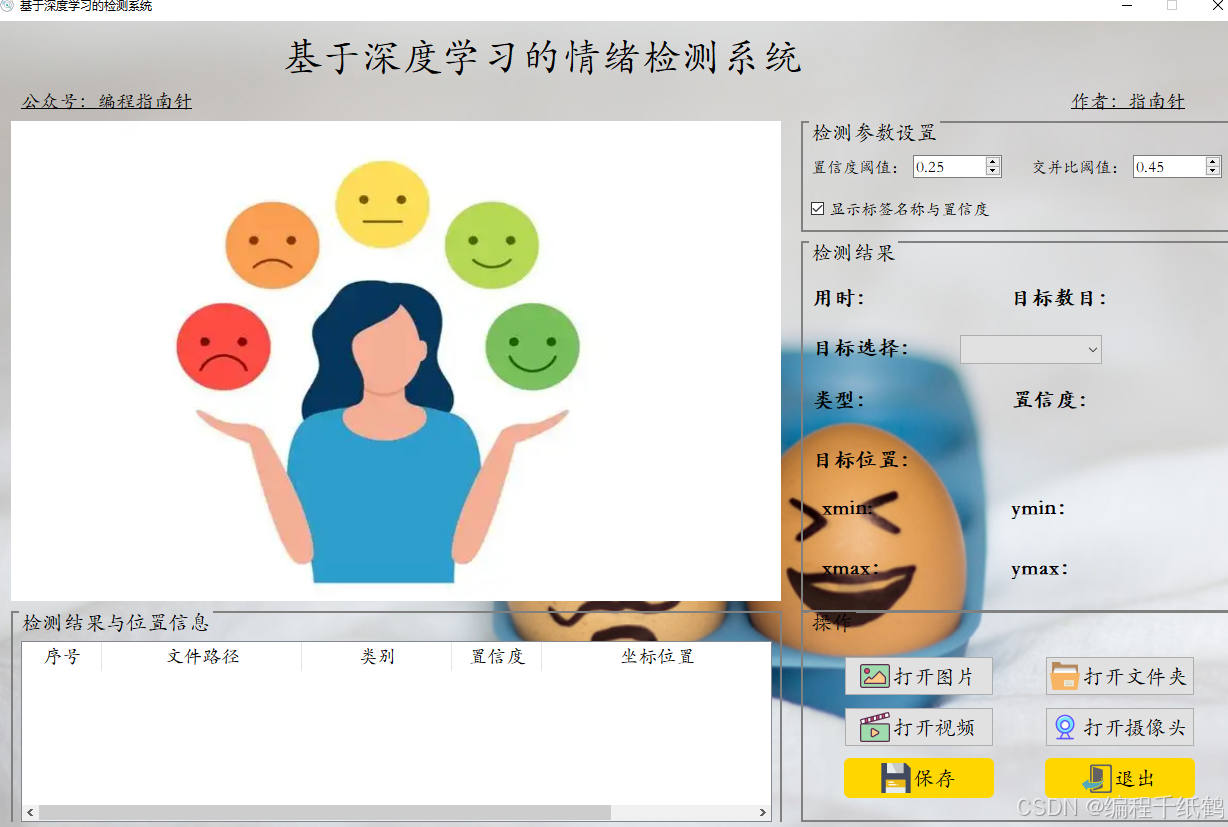
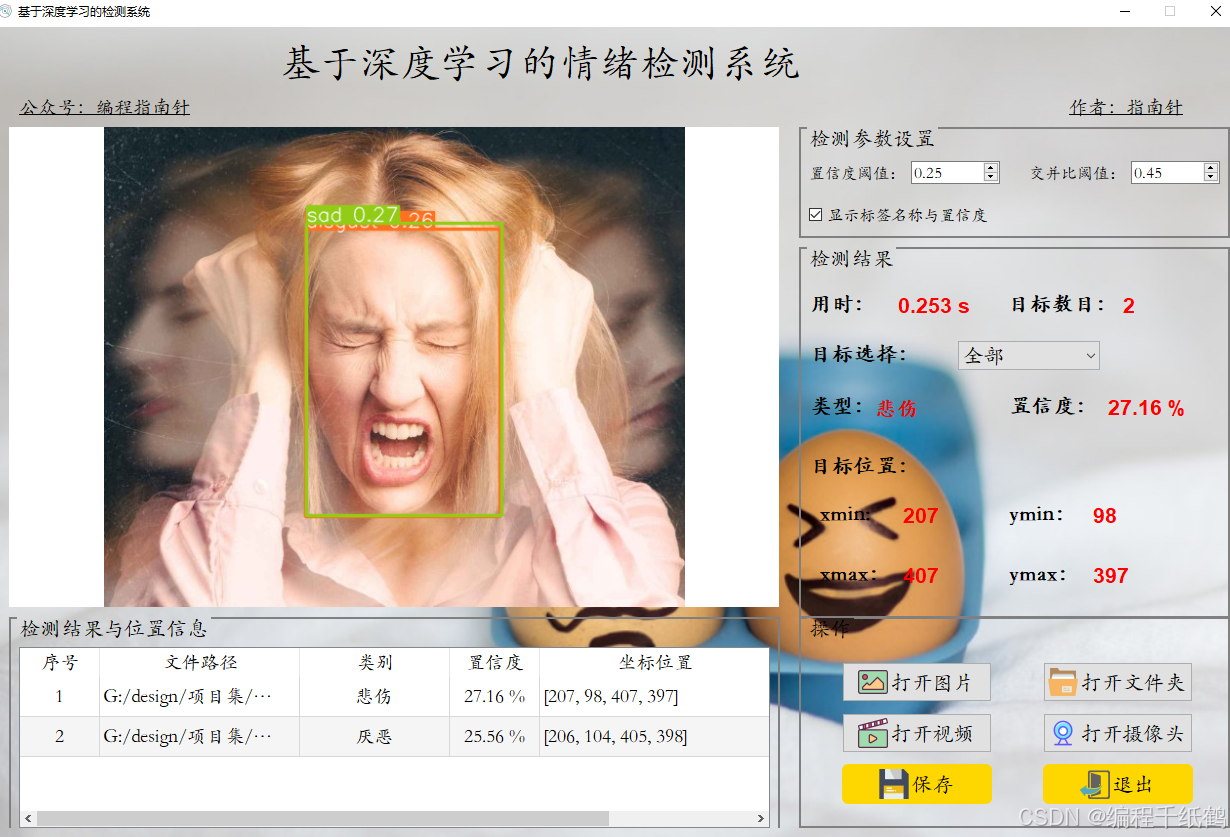
图片检测
悲伤
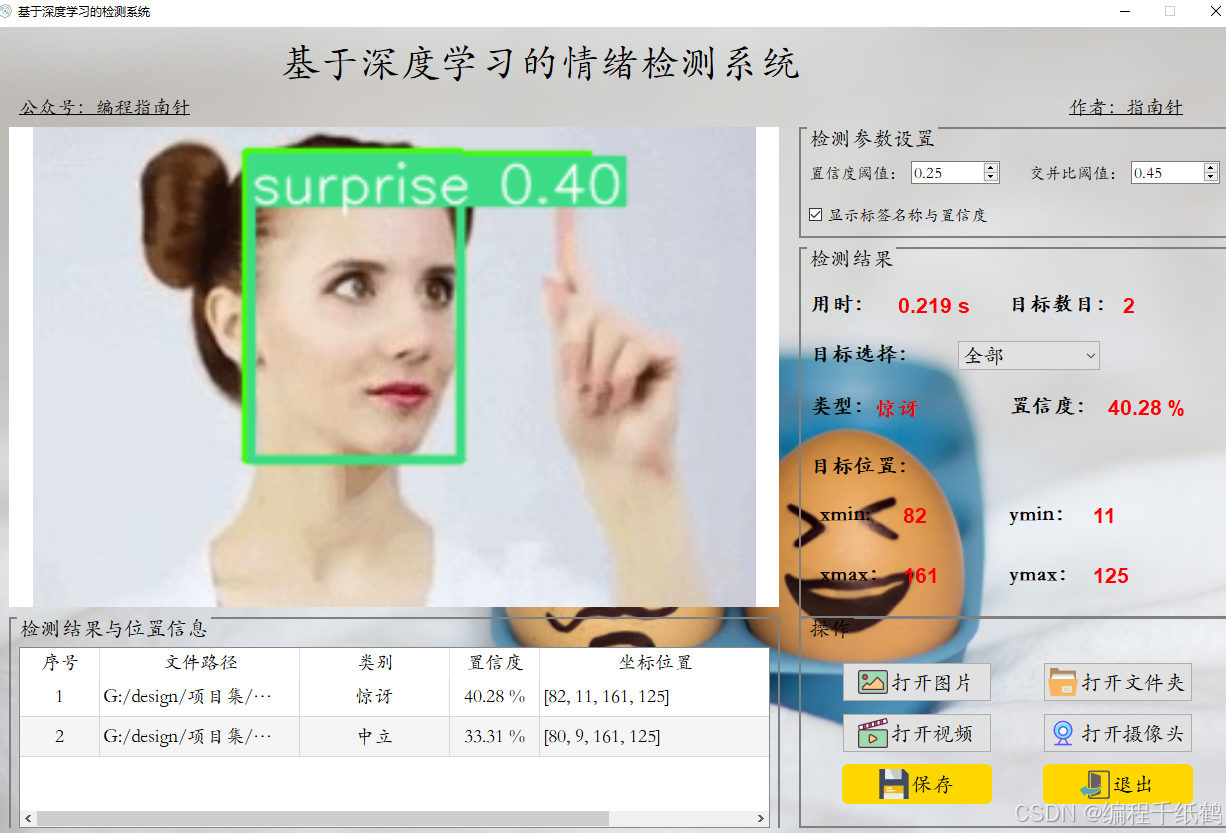
惊讶
四,核心代码展示
# -*- coding: utf-8 -*-
import time
from PyQt5.QtWidgets import QApplication, QMainWindow, QFileDialog, \
QMessageBox, QWidget, QHeaderView, QTableWidgetItem, QAbstractItemView, QStackedWidget
import sys
import os
from PIL import ImageFont
from ultralytics import YOLO
sys.path.append('UIProgram')
from UIProgram.UiMain import Ui_MainWindow
import sys
from PyQt5.QtCore import QTimer, Qt, QThread, pyqtSignal,QCoreApplication
import detect_tools as tools
import cv2
import Config
from UIProgram.QssLoader import QSSLoader
from UIProgram.precess_bar import ProgressBar
import numpy as np
import torch
from login_widget import LoginWidget
import hashlib # 用于密码哈希
from PyQt5.QtWidgets import QStackedWidget, QMessageBox # 用于界面管理和消息框
import UIProgram.ui_sources_rc
from UIProgram import ui_sources_rc
class MainWindow(QMainWindow, Ui_MainWindow):
def __init__(self, parent=None):
super().__init__(parent)
self.setupUi(self)
self.initMain()
self.signalconnect()
# 加载css渲染效果
style_file = 'UIProgram/style.css'
qssStyleSheet = QSSLoader.read_qss_file(style_file)
self.setStyleSheet(qssStyleSheet)
# 设置SpinBox的范围和步长
self.doubleSpinBox.setRange(0.0, 1.0) # 置信度阈值范围
self.doubleSpinBox.setSingleStep(0.05) # 步长
self.doubleSpinBox_2.setRange(0.0, 1.0) # IOU阈值范围
self.doubleSpinBox_2.setSingleStep(0.05) # 步长
# 添加新控件的信号连接
self.doubleSpinBox.valueChanged.connect(self.update_conf_thres)
self.doubleSpinBox_2.valueChanged.connect(self.update_iou_thres)
self.checkBox.stateChanged.connect(self.update_show_labels)
# 初始化参数
self.conf_thres = 0.25 # 默认置信度阈值
self.iou_thres = 0.45 # 默认IOU阈值
self.show_labels = True # 默认显示标签
# 设置SpinBox的初始值
self.doubleSpinBox.setValue(self.conf_thres)
self.doubleSpinBox_2.setValue(self.iou_thres)
self.checkBox.setChecked(self.show_labels)
def signalconnect(self):
self.PicBtn.clicked.connect(self.open_img)
self.comboBox.activated.connect(self.combox_change)
self.VideoBtn.clicked.connect(self.vedio_show)
self.CapBtn.clicked.connect(self.camera_show)
self.SaveBtn.clicked.connect(self.save_detect_video)
self.ExitBtn.clicked.connect(QCoreApplication.quit)
self.FilesBtn.clicked.connect(self.detact_batch_imgs)
def initMain(self):
self.show_width = 770
self.show_height = 480
self.org_path = None
self.is_camera_open = False
self.cap = None
self.device = 0 if torch.cuda.is_available() else 'cpu'
# 加载检测模型
self.model = YOLO(Config.model_path, task='detect')
self.model(np.zeros((48, 48, 3)), device=self.device) #预先加载推理模型
self.fontC = ImageFont.truetype("Font/platech.ttf", 25, 0)
# 用于绘制不同颜色矩形框
self.colors = tools.Colors()
# 更新视频图像
self.timer_camera = QTimer()
# 更新检测信息表格
# self.timer_info = QTimer()
# 保存视频
self.timer_save_video = QTimer()
# 表格
self.tableWidget.verticalHeader().setSectionResizeMode(QHeaderView.Fixed)
self.tableWidget.verticalHeader().setDefaultSectionSize(40)
self.tableWidget.setColumnWidth(0, 80) # 设置列宽
self.tableWidget.setColumnWidth(1, 200)
self.tableWidget.setColumnWidth(2, 150)
self.tableWidget.setColumnWidth(3, 90)
self.tableWidget.setColumnWidth(4, 230)
# self.tableWidget.horizontalHeader().setSectionResizeMode(QHeaderView.Stretch) # 表格铺满
# self.tableWidget.horizontalHeader().setSectionResizeMode(0, QHeaderView.Interactive)
# self.tableWidget.setEditTriggers(QAbstractItemView.NoEditTriggers) # 设置表格不可编辑
self.tableWidget.setSelectionBehavior(QAbstractItemView.SelectRows) # 设置表格整行选中
self.tableWidget.verticalHeader().setVisible(False) # 隐藏列标题
self.tableWidget.setAlternatingRowColors(True) # 表格背景交替
# 设置主页背景图片border-image: url(:/icons/ui_imgs/icons/camera.png)
# self.setStyleSheet("#MainWindow{background-image:url(:/bgs/ui_imgs/bg3.jpg)}")
def open_img(self):
if self.cap:
# 打开图片前关闭摄像头
self.video_stop()
self.is_camera_open = False
self.CaplineEdit.setText('摄像头未开启')
self.cap = None
# 弹出的窗口名称:'打开图片'
# 默认打开的目录:'./'
# 只能打开.jpg与.gif结尾的图片文件
# file_path, _ = QFileDialog.getOpenFileName(self.centralwidget, '打开图片', './', "Image files (*.jpg *.gif)")
file_path, _ = QFileDialog.getOpenFileName(None, '打开图片', './', "Image files (*.jpg *.jpeg *.png *.bmp)")
if not file_path:
return
self.comboBox.setDisabled(False)
self.org_path = file_path
self.org_img = tools.img_cvread(self.org_path)
# 目标检测
t1 = time.time()
self.results = self.model(self.org_path, conf=self.conf_thres, iou=self.iou_thres)[0]
t2 = time.time()
take_time_str = '{:.3f} s'.format(t2 - t1)
self.time_lb.setText(take_time_str)
location_list = self.results.boxes.xyxy.tolist()
self.location_list = [list(map(int, e)) for e in location_list]
cls_list = self.results.boxes.cls.tolist()
self.cls_list = [int(i) for i in cls_list]
self.conf_list = self.results.boxes.conf.tolist()
self.conf_list = ['%.2f %%' % (each*100) for each in self.conf_list]
# now_img = self.cv_img.copy()
# for loacation, type_id, conf in zip(self.location_list, self.cls_list, self.conf_list):
# type_id = int(type_id)
# color = self.colors(int(type_id), True)
# # cv2.rectangle(now_img, (int(x1), int(y1)), (int(x2), int(y2)), colors(int(type_id), True), 3)
# now_img = tools.drawRectBox(now_img, loacation, Config.CH_names[type_id], self.fontC, color)
now_img = self.results.plot()
self.draw_img = now_img
# 获取缩放后的图片尺寸
self.img_width, self.img_height = self.get_resize_size(now_img)
resize_cvimg = cv2.resize(now_img,(self.img_width, self.img_height))
pix_img = tools.cvimg_to_qpiximg(resize_cvimg)
self.label_show.setPixmap(pix_img)
self.label_show.setAlignment(Qt.AlignCenter)
# 设置路径显示
self.PiclineEdit.setText(self.org_path)
# 目标数目
target_nums = len(self.cls_list)
self.label_nums.setText(str(target_nums))
# 设置目标选择下拉框
choose_list = ['全部']
target_names = [Config.names[id]+ '_'+ str(index) for index,id in enumerate(self.cls_list)]
# object_list = sorted(set(self.cls_list))
# for each in object_list:
# choose_list.append(Config.CH_names[each])
choose_list = choose_list + target_names
self.comboBox.clear()
self.comboBox.addItems(choose_list)
if target_nums >= 1:
self.type_lb.setText(Config.CH_names[self.cls_list[0]])
self.label_conf.setText(str(self.conf_list[0]))
# 默认显示第一个目标框坐标
# 设置坐标位置值
self.label_xmin.setText(str(self.location_list[0][0]))
self.label_ymin.setText(str(self.location_list[0][1]))
self.label_xmax.setText(str(self.location_list[0][2]))
self.label_ymax.setText(str(self.location_list[0][3]))
else:
self.type_lb.setText('')
self.label_conf.setText('')
self.label_xmin.setText('')
self.label_ymin.setText('')
self.label_xmax.setText('')
self.label_ymax.setText('')
# # 删除表格所有行
self.tableWidget.setRowCount(0)
self.tableWidget.clearContents()
self.tabel_info_show(self.location_list, self.cls_list, self.conf_list,path=self.org_path)
def detact_batch_imgs(self):
if self.cap:
# 打开图片前关闭摄像头
self.video_stop()
self.is_camera_open = False
self.CaplineEdit.setText('摄像头未开启')
self.cap = None
directory = QFileDialog.getExistingDirectory(self,
"选取文件夹",
"./") # 起始路径
if not directory:
return
self.org_path = directory
img_suffix = ['jpg','png','jpeg','bmp']
for file_name in os.listdir(directory):
full_path = os.path.join(directory,file_name)
if os.path.isfile(full_path) and file_name.split('.')[-1].lower() in img_suffix:
# self.comboBox.setDisabled(False)
img_path = full_path
self.org_img = tools.img_cvread(img_path)
# 目标检测
t1 = time.time()
self.results = self.model(img_path,conf=self.conf_thres, iou=self.iou_thres)[0]
t2 = time.time()
take_time_str = '{:.3f} s'.format(t2 - t1)
self.time_lb.setText(take_time_str)
location_list = self.results.boxes.xyxy.tolist()
self.location_list = [list(map(int, e)) for e in location_list]
cls_list = self.results.boxes.cls.tolist()
self.cls_list = [int(i) for i in cls_list]
self.conf_list = self.results.boxes.conf.tolist()
self.conf_list = ['%.2f %%' % (each * 100) for each in self.conf_list]
now_img = self.results.plot()
self.draw_img = now_img
# 获取缩放后的图片尺寸
self.img_width, self.img_height = self.get_resize_size(now_img)
resize_cvimg = cv2.resize(now_img, (self.img_width, self.img_height))
pix_img = tools.cvimg_to_qpiximg(resize_cvimg)
self.label_show.setPixmap(pix_img)
self.label_show.setAlignment(Qt.AlignCenter)
# 设置路径显示
self.PiclineEdit.setText(img_path)
# 目标数目
target_nums = len(self.cls_list)
self.label_nums.setText(str(target_nums))
# 设置目标选择下拉框
choose_list = ['全部']
target_names = [Config.names[id] + '_' + str(index) for index, id in enumerate(self.cls_list)]
choose_list = choose_list + target_names
self.comboBox.clear()
self.comboBox.addItems(choose_list)
if target_nums >= 1:
self.type_lb.setText(Config.CH_names[self.cls_list[0]])
self.label_conf.setText(str(self.conf_list[0]))
# 默认显示第一个目标框坐标
# 设置坐标位置值
self.label_xmin.setText(str(self.location_list[0][0]))
self.label_ymin.setText(str(self.location_list[0][1]))
self.label_xmax.setText(str(self.location_list[0][2]))
self.label_ymax.setText(str(self.location_list[0][3]))
else:
self.type_lb.setText('')
self.label_conf.setText('')
self.label_xmin.setText('')
self.label_ymin.setText('')
self.label_xmax.setText('')
self.label_ymax.setText('')
# # 删除表格所有行
# self.tableWidget.setRowCount(0)
# self.tableWidget.clearContents()
self.tabel_info_show(self.location_list, self.cls_list, self.conf_list, path=img_path)
self.tableWidget.scrollToBottom()
QApplication.processEvents() #刷新页面
def draw_rect_and_tabel(self, results, img):
now_img = img.copy()
location_list = results.boxes.xyxy.tolist()
self.location_list = [list(map(int, e)) for e in location_list]
cls_list = results.boxes.cls.tolist()
self.cls_list = [int(i) for i in cls_list]
self.conf_list = results.boxes.conf.tolist()
self.conf_list = ['%.2f %%' % (each * 100) for each in self.conf_list]
for loacation, type_id, conf in zip(self.location_list, self.cls_list, self.conf_list):
type_id = int(type_id)
color = self.colors(int(type_id), True)
# cv2.rectangle(now_img, (int(x1), int(y1)), (int(x2), int(y2)), colors(int(type_id), True), 3)
now_img = tools.drawRectBox(now_img, loacation, Config.CH_names[type_id], self.fontC, color)
# 获取缩放后的图片尺寸
self.img_width, self.img_height = self.get_resize_size(now_img)
resize_cvimg = cv2.resize(now_img, (self.img_width, self.img_height))
pix_img = tools.cvimg_to_qpiximg(resize_cvimg)
self.label_show.setPixmap(pix_img)
self.label_show.setAlignment(Qt.AlignCenter)
# 设置路径显示
self.PiclineEdit.setText(self.org_path)
# 目标数目
target_nums = len(self.cls_list)
self.label_nums.setText(str(target_nums))
if target_nums >= 1:
self.type_lb.setText(Config.CH_names[self.cls_list[0]])
self.label_conf.setText(str(self.conf_list[0]))
self.label_xmin.setText(str(self.location_list[0][0]))
self.label_ymin.setText(str(self.location_list[0][1]))
self.label_xmax.setText(str(self.location_list[0][2]))
self.label_ymax.setText(str(self.location_list[0][3]))
else:
self.type_lb.setText('')
self.label_conf.setText('')
self.label_xmin.setText('')
self.label_ymin.setText('')
self.label_xmax.setText('')
self.label_ymax.setText('')
# 删除表格所有行
self.tableWidget.setRowCount(0)
self.tableWidget.clearContents()
self.tabel_info_show(self.location_list, self.cls_list, self.conf_list, path=self.org_path)
return now_img
def combox_change(self):
com_text = self.comboBox.currentText()
if com_text == '全部':
cur_box = self.location_list
cur_img = self.results.plot()
self.type_lb.setText(Config.CH_names[self.cls_list[0]])
self.label_conf.setText(str(self.conf_list[0]))
else:
index = int(com_text.split('_')[-1])
cur_box = [self.location_list[index]]
cur_img = self.results[index].plot()
self.type_lb.setText(Config.CH_names[self.cls_list[index]])
self.label_conf.setText(str(self.conf_list[index]))
# 设置坐标位置值
self.label_xmin.setText(str(cur_box[0][0]))
self.label_ymin.setText(str(cur_box[0][1]))
self.label_xmax.setText(str(cur_box[0][2]))
self.label_ymax.setText(str(cur_box[0][3]))
resize_cvimg = cv2.resize(cur_img, (self.img_width, self.img_height))
pix_img = tools.cvimg_to_qpiximg(resize_cvimg)
self.label_show.clear()
self.label_show.setPixmap(pix_img)
self.label_show.setAlignment(Qt.AlignCenter)
def get_video_path(self):
file_path, _ = QFileDialog.getOpenFileName(None, '打开视频', './', "Image files (*.avi *.mp4 *.wmv *.mkv)")
if not file_path:
return None
self.org_path = file_path
self.VideolineEdit.setText(file_path)
return file_path
def video_start(self):
# 删除表格所有行
self.tableWidget.setRowCount(0)
self.tableWidget.clearContents()
# 清空下拉框
self.comboBox.clear()
# 定时器开启,每隔一段时间,读取一帧
self.timer_camera.start(1)
self.timer_camera.timeout.connect(self.open_frame)
def tabel_info_show(self, locations, clses, confs, path=None):
path = path
for location, cls, conf in zip(locations, clses, confs):
row_count = self.tableWidget.rowCount() # 返回当前行数(尾部)
self.tableWidget.insertRow(row_count) # 尾部插入一行
item_id = QTableWidgetItem(str(row_count+1)) # 序号
item_id.setTextAlignment(Qt.AlignHCenter | Qt.AlignVCenter) # 设置文本居中
item_path = QTableWidgetItem(str(path)) # 路径
# item_path.setTextAlignment(Qt.AlignHCenter | Qt.AlignVCenter)
item_cls = QTableWidgetItem(str(Config.CH_names[cls]))
item_cls.setTextAlignment(Qt.AlignHCenter | Qt.AlignVCenter) # 设置文本居中
item_conf = QTableWidgetItem(str(conf))
item_conf.setTextAlignment(Qt.AlignHCenter | Qt.AlignVCenter) # 设置文本居中
item_location = QTableWidgetItem(str(location)) # 目标框位置
# item_location.setTextAlignment(Qt.AlignHCenter | Qt.AlignVCenter) # 设置文本居中
self.tableWidget.setItem(row_count, 0, item_id)
self.tableWidget.setItem(row_count, 1, item_path)
self.tableWidget.setItem(row_count, 2, item_cls)
self.tableWidget.setItem(row_count, 3, item_conf)
self.tableWidget.setItem(row_count, 4, item_location)
self.tableWidget.scrollToBottom()
def video_stop(self):
self.cap.release()
self.timer_camera.stop()
# self.timer_info.stop()
def open_frame(self):
ret, now_img = self.cap.read()
if ret:
# 目标检测
t1 = time.time()
results = self.model(now_img,conf=self.conf_thres, iou=self.iou_thres)[0]
t2 = time.time()
take_time_str = '{:.3f} s'.format(t2 - t1)
self.time_lb.setText(take_time_str)
location_list = results.boxes.xyxy.tolist()
self.location_list = [list(map(int, e)) for e in location_list]
cls_list = results.boxes.cls.tolist()
self.cls_list = [int(i) for i in cls_list]
self.conf_list = results.boxes.conf.tolist()
self.conf_list = ['%.2f %%' % (each * 100) for each in self.conf_list]
now_img = results.plot()
# 获取缩放后的图片尺寸
self.img_width, self.img_height = self.get_resize_size(now_img)
resize_cvimg = cv2.resize(now_img, (self.img_width, self.img_height))
pix_img = tools.cvimg_to_qpiximg(resize_cvimg)
self.label_show.setPixmap(pix_img)
self.label_show.setAlignment(Qt.AlignCenter)
# 目标数目
target_nums = len(self.cls_list)
self.label_nums.setText(str(target_nums))
# 设置目标选择下拉框
choose_list = ['全部']
target_names = [Config.names[id] + '_' + str(index) for index, id in enumerate(self.cls_list)]
# object_list = sorted(set(self.cls_list))
# for each in object_list:
# choose_list.append(Config.CH_names[each])
choose_list = choose_list + target_names
self.comboBox.clear()
self.comboBox.addItems(choose_list)
if target_nums >= 1:
self.type_lb.setText(Config.CH_names[self.cls_list[0]])
self.label_conf.setText(str(self.conf_list[0]))
# 默认显示第一个目标框坐标
# 设置坐标位置值
self.label_xmin.setText(str(self.location_list[0][0]))
self.label_ymin.setText(str(self.location_list[0][1]))
self.label_xmax.setText(str(self.location_list[0][2]))
self.label_ymax.setText(str(self.location_list[0][3]))
else:
self.type_lb.setText('')
self.label_conf.setText('')
self.label_xmin.setText('')
self.label_ymin.setText('')
self.label_xmax.setText('')
self.label_ymax.setText('')
# 删除表格所有行
# self.tableWidget.setRowCount(0)
# self.tableWidget.clearContents()
self.tabel_info_show(self.location_list, self.cls_list, self.conf_list, path=self.org_path)
else:
self.cap.release()
self.timer_camera.stop()
def vedio_show(self):
if self.is_camera_open:
self.is_camera_open = False
self.CaplineEdit.setText('摄像头未开启')
video_path = self.get_video_path()
if not video_path:
return None
self.cap = cv2.VideoCapture(video_path)
self.video_start()
self.comboBox.setDisabled(True)
def camera_show(self):
self.is_camera_open = not self.is_camera_open
if self.is_camera_open:
self.CaplineEdit.setText('摄像头开启')
self.cap = cv2.VideoCapture(0)
self.video_start()
self.comboBox.setDisabled(True)
else:
self.CaplineEdit.setText('摄像头未开启')
self.label_show.setText('')
if self.cap:
self.cap.release()
cv2.destroyAllWindows()
self.label_show.clear()
def get_resize_size(self, img):
_img = img.copy()
img_height, img_width , depth= _img.shape
ratio = img_width / img_height
if ratio >= self.show_width / self.show_height:
self.img_width = self.show_width
self.img_height = int(self.img_width / ratio)
else:
self.img_height = self.show_height
self.img_width = int(self.img_height * ratio)
return self.img_width, self.img_height
def save_detect_video(self):
if self.cap is None and not self.org_path:
QMessageBox.about(self, '提示', '当前没有可保存信息,请先打开图片或视频!')
return
if self.is_camera_open:
QMessageBox.about(self, '提示', '摄像头视频无法保存!')
return
if self.cap:
res = QMessageBox.information(self, '提示', '保存视频检测结果可能需要较长时间,请确认是否继续保存?',QMessageBox.Yes | QMessageBox.No , QMessageBox.Yes)
if res == QMessageBox.Yes:
self.video_stop()
com_text = self.comboBox.currentText()
self.btn2Thread_object = btn2Thread(self.org_path, self.model, com_text,self.conf_thres,self.iou_thres)
self.btn2Thread_object.start()
self.btn2Thread_object.update_ui_signal.connect(self.update_process_bar)
else:
return
else:
if os.path.isfile(self.org_path):
fileName = os.path.basename(self.org_path)
name , end_name= fileName.rsplit(".",1)
save_name = name + '_detect_result.' + end_name
save_img_path = os.path.join(Config.save_path, save_name)
# 保存图片
cv2.imwrite(save_img_path, self.draw_img)
QMessageBox.about(self, '提示', '图片保存成功!\n文件路径:{}'.format(save_img_path))
else:
img_suffix = ['jpg', 'png', 'jpeg', 'bmp']
for file_name in os.listdir(self.org_path):
full_path = os.path.join(self.org_path, file_name)
if os.path.isfile(full_path) and file_name.split('.')[-1].lower() in img_suffix:
name, end_name = file_name.rsplit(".",1)
save_name = name + '_detect_result.' + end_name
save_img_path = os.path.join(Config.save_path, save_name)
results = self.model(full_path,conf=self.conf_thres, iou=self.iou_thres)[0]
now_img = results.plot()
# 保存图片
cv2.imwrite(save_img_path, now_img)
QMessageBox.about(self, '提示', '图片保存成功!\n文件路径:{}'.format(Config.save_path))
def update_process_bar(self,cur_num, total):
if cur_num == 1:
self.progress_bar = ProgressBar(self)
self.progress_bar.show()
if cur_num >= total:
self.progress_bar.close()
QMessageBox.about(self, '提示', '视频保存成功!\n文件在{}目录下'.format(Config.save_path))
return
if self.progress_bar.isVisible() is False:
# 点击取消保存时,终止进程
self.btn2Thread_object.stop()
return
value = int(cur_num / total *100)
self.progress_bar.setValue(cur_num, total, value)
QApplication.processEvents()
# 添加新的槽函数
def update_conf_thres(self, value):
self.conf_thres = value
# 更新检测参数
if hasattr(self, 'model'):
self.model.conf = value
# 如果当前有图片,重新检测
if hasattr(self, 'org_img'):
self.detect_current_image()
def update_iou_thres(self, value):
self.iou_thres = value
# 更新检测参数
if hasattr(self, 'model'):
self.model.iou = value
# 如果当前有图片,重新检测
if hasattr(self, 'org_img'):
self.detect_current_image()
def update_show_labels(self, state):
self.show_labels = state == Qt.Checked
# 如果当前有检测结果,重新绘制
if hasattr(self, 'results'):
self.draw_detection_results()
# 添加新方法用于重新检测当前图片
def detect_current_image(self):
if hasattr(self, 'org_img'):
t1 = time.time()
self.results = self.model(self.org_img, conf=self.conf_thres, iou=self.iou_thres)[0]
t2 = time.time()
take_time_str = '{:.3f} s'.format(t2 - t1)
self.time_lb.setText(take_time_str)
# 更新检测结果相关信息
location_list = self.results.boxes.xyxy.tolist()
self.location_list = [list(map(int, e)) for e in location_list]
cls_list = self.results.boxes.cls.tolist()
self.cls_list = [int(i) for i in cls_list]
self.conf_list = self.results.boxes.conf.tolist()
self.conf_list = ['%.2f %%' % (each*100) for each in self.conf_list]
# 更新目标数目
target_nums = len(self.cls_list)
self.label_nums.setText(str(target_nums))
# 重新设置目标选择下拉框
choose_list = ['全部']
target_names = [Config.names[id]+ '_'+ str(index) for index,id in enumerate(self.cls_list)]
choose_list = choose_list + target_names
self.comboBox.clear()
self.comboBox.addItems(choose_list)
self.comboBox.setCurrentIndex(0) # 设置为"全部"
# 更新目标信息显示
if target_nums >= 1:
self.type_lb.setText(Config.CH_names[self.cls_list[0]])
self.label_conf.setText(str(self.conf_list[0]))
self.label_xmin.setText(str(self.location_list[0][0]))
self.label_ymin.setText(str(self.location_list[0][1]))
self.label_xmax.setText(str(self.location_list[0][2]))
self.label_ymax.setText(str(self.location_list[0][3]))
else:
self.type_lb.setText('')
self.label_conf.setText('')
self.label_xmin.setText('')
self.label_ymin.setText('')
self.label_xmax.setText('')
self.label_ymax.setText('')
# 更新表格信息
self.tableWidget.setRowCount(0)
self.tableWidget.clearContents()
self.tabel_info_show(self.location_list, self.cls_list, self.conf_list, path=self.org_path)
# 绘制检测结果
self.draw_detection_results()
# 添加新方法用于绘制检测结果
def draw_detection_results(self):
if not hasattr(self, 'results'):
return
# 使用results.plot()作为基础图像
now_img = self.results.plot()
# 如果不显示标签,重新绘制只有框的图像
if not self.show_labels:
now_img = self.org_img.copy()
for box in self.results.boxes:
x1, y1, x2, y2 = map(int, box.xyxy[0])
cls = int(box.cls[0])
color = self.colors(cls, True)
cv2.rectangle(now_img, (x1, y1), (x2, y2), color, 2)
self.draw_img = now_img
# 更新显示
self.img_width, self.img_height = self.get_resize_size(now_img)
resize_cvimg = cv2.resize(now_img, (self.img_width, self.img_height))
pix_img = tools.cvimg_to_qpiximg(resize_cvimg)
self.label_show.setPixmap(pix_img)
self.label_show.setAlignment(Qt.AlignCenter)
class btn2Thread(QThread):
"""
进行检测后的视频保存
"""
# 声明一个信号
update_ui_signal = pyqtSignal(int,int)
def __init__(self, path, model, com_text,conf,iou):
super(btn2Thread, self).__init__()
self.org_path = path
self.model = model
self.com_text = com_text
self.conf = conf
self.iou = iou
# 用于绘制不同颜色矩形框
self.colors = tools.Colors()
self.is_running = True # 标志位,表示线程是否正在运行
def run(self):
# VideoCapture方法是cv2库提供的读取视频方法
cap = cv2.VideoCapture(self.org_path)
# 设置需要保存视频的格式"xvid"
# 该参数是MPEG-4编码类型,文件名后缀为.avi
fourcc = cv2.VideoWriter_fourcc(*'XVID')
# 设置视频帧频
fps = cap.get(cv2.CAP_PROP_FPS)
# 设置视频大小
size = (int(cap.get(cv2.CAP_PROP_FRAME_WIDTH)), int(cap.get(cv2.CAP_PROP_FRAME_HEIGHT)))
# VideoWriter方法是cv2库提供的保存视频方法
# 按照设置的格式来out输出
fileName = os.path.basename(self.org_path)
name, end_name = fileName.split('.')
save_name = name + '_detect_result.avi'
save_video_path = os.path.join(Config.save_path, save_name)
out = cv2.VideoWriter(save_video_path, fourcc, fps, size)
prop = cv2.CAP_PROP_FRAME_COUNT
total = int(cap.get(prop))
print("[INFO] 视频总帧数:{}".format(total))
cur_num = 0
# 确定视频打开并循环读取
while (cap.isOpened() and self.is_running):
cur_num += 1
print('当前第{}帧,总帧数{}'.format(cur_num, total))
# 逐帧读取,ret返回布尔值
# 参数ret为True 或者False,代表有没有读取到图片
# frame表示截取到一帧的图片
ret, frame = cap.read()
if ret == True:
# 检测
results = self.model(frame,conf=self.conf,iou=self.iou)[0]
frame = results.plot()
out.write(frame)
self.update_ui_signal.emit(cur_num, total)
else:
break
# 释放资源
cap.release()
out.release()
def stop(self):
self.is_running = False
if __name__ == "__main__":
app = QApplication(sys.argv)
win = MainWindow()
win.show()
sys.exit(app.exec_())
五,相关作品展示
基于Java开发、Python开发、PHP开发、C#开发等相关语言开发的实战项目
基于Nodejs、Vue等前端技术开发的前端实战项目
基于微信小程序和安卓APP应用开发的相关作品
基于51单片机等嵌入式物联网开发应用
基于各类算法实现的AI智能应用
基于大数据实现的各类数据管理和推荐系统










 扫一扫
扫一扫


 18
18

 被折叠的 条评论
为什么被折叠?
被折叠的 条评论
为什么被折叠?
 到【灌水乐园】发言





