



作者主页:编程千纸鹤
作者简介:Java领域优质创作者、优快云博客专家 、优快云内容合伙人、掘金特邀作者、阿里云博客专家、51CTO特邀作者、多年架构师设计经验、多年校企合作经验,被多个学校常年聘为校外企业导师,指导学生毕业设计并参与学生毕业答辩指导,有较为丰富的相关经验。期待与各位高校教师、企业讲师以及同行交流合作
主要内容:Java项目、Python项目、前端项目、PHP、ASP.NET、人工智能与大数据、单片机开发、物联网设计与开发设计、简历模板、学习资料、面试题库、技术互助、就业指导等
业务范围:免费功能设计、开题报告、任务书、中期检查PPT、系统功能实现、代码编写、论文编写和辅导、论文降重、长期答辩答疑辅导、腾讯会议一对一专业讲解辅导答辩、模拟答辩演练、和理解代码逻辑思路等。
收藏点赞不迷路 关注作者有好处
文末获取源码

项目编号:BS-XX-378
一,环境介绍
语言环境:Java: jdk1.8
数据库:Mysql: mysql5.7
应用服务器:Tomcat: tomcat8.5.31
开发工具:IDEA或eclipse
开发技术:SpringBoot+Vue
二,项目简介
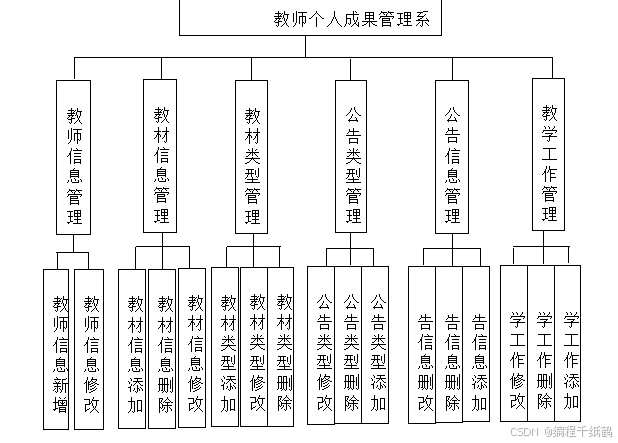
传统办法管理信息首先需要花费的时间比较多,其次数据出错率比较高,而且对错误的数据进行更改也比较困难,最后,检索数据费事费力。因此,在计算机上安装教师个人成果管理系统软件来发挥其高效地信息处理的作用,可以规范信息管理流程,让管理工作可以系统化和程序化,同时,教师个人成果管理系统的有效运用可以帮助管理人员准确快速地处理信息。
教师个人成果管理系统在对开发工具的选择上也很慎重,为了便于开发实现,选择的开发工具为Eclipse,选择的数据库工具为Mysql。以此搭建开发环境实现教师个人成果管理系统的功能。其中管理员管理用户,新闻公告。
教师个人成果管理系统是一款运用软件开发技术设计实现的应用系统,在信息处理上可以达到快速的目的,不管是针对数据添加,数据维护和统计,以及数据查询等处理要求,教师个人成果管理系统都可以轻松应对。
三,系统展示
5.1教师信息管理
如图5.1显示的就是教师信息管理页面,此页面提供给管理员的功能有:教师信息的查询管理,可以删除教师信息、修改教师信息、新增教师信息,
还进行了对用户名称的模糊查询的条件
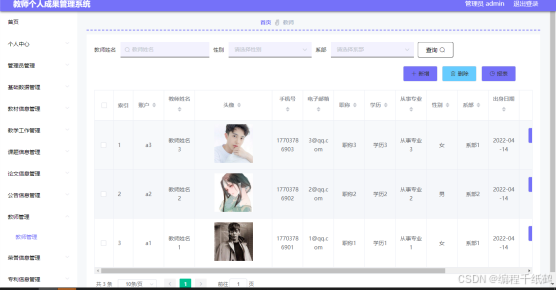
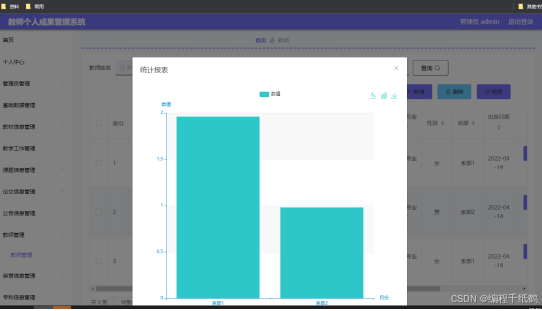
图5.1 教师信息管理页面
5.2 教材信息管理
如图5.2显示的就是教材信息管理页面,此页面提供给管理员的功能有:查看已发布的教材信息数据,修改教材信息,教材信息作废,即可删除,还进行了对教材信息名称的模糊查询 教材信息信息的类型查询等等一些条件。
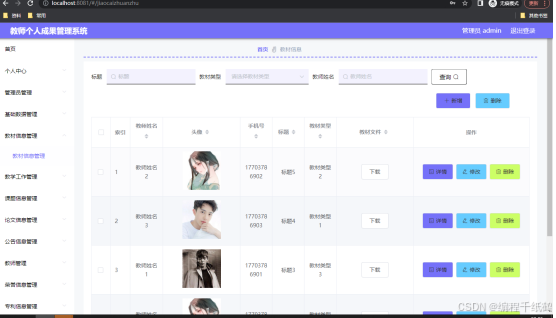
图5.2 教材信息管理页面
5.3公告类型管理
如图5.3显示的就是公告类型管理页面,此页面提供给管理员的功能有:根据公告类型进行条件查询,还可以对公告类型进行新增、修改、查询操作等等。
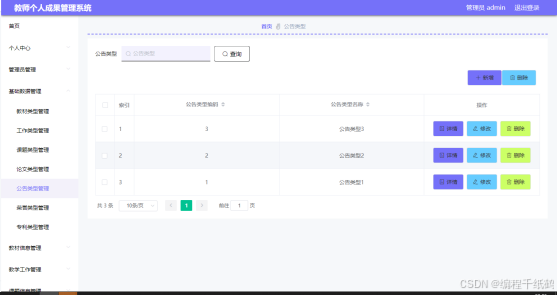
图5.3 公告类型管理页面
5.4公告信息管理
如图5.4显示的就是公告信息管理页面,此页面提供给管理员的功能有:根据公告信息进行新增、修改、查询操作等等。
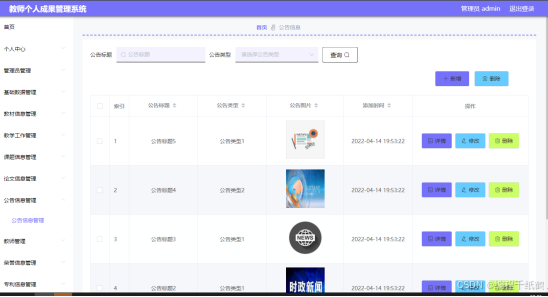
图5.4 公告信息管理页面
四,核心代码展示
package com.controller;

import java.io.File;
import java.io.FileNotFoundException;
import java.io.IOException;
import java.text.SimpleDateFormat;
import java.util.*;

import javax.servlet.http.HttpServletRequest;

import com.alibaba.fastjson.JSON;
import com.utils.StringUtil;
import org.apache.commons.lang3.StringUtils;
import org.json.JSONObject;
import org.slf4j.Logger;
import org.slf4j.LoggerFactory;
import org.springframework.beans.factory.annotation.Autowired;
import org.springframework.util.ResourceUtils;
import org.springframework.web.bind.annotation.PathVariable;
import org.springframework.web.bind.annotation.RequestBody;
import org.springframework.web.bind.annotation.RequestMapping;
import org.springframework.web.bind.annotation.RequestParam;
import org.springframework.web.bind.annotation.RestController;

import com.annotation.IgnoreAuth;
import com.baidu.aip.face.AipFace;
import com.baidu.aip.face.MatchRequest;
import com.baidu.aip.util.Base64Util;
import com.baomidou.mybatisplus.mapper.EntityWrapper;
import com.baomidou.mybatisplus.mapper.Wrapper;
import com.entity.ConfigEntity;
import com.service.CommonService;
import com.service.ConfigService;
import com.utils.BaiduUtil;
import com.utils.FileUtil;
import com.utils.R;

/**
 * 通用接口
 */
@RestController
public class CommonController{
	private static final Logger logger = LoggerFactory.getLogger(CommonController.class);
	@Autowired
	private CommonService commonService;

	@Autowired
	private ConfigService configService;

	private static AipFace client = null;

	private static String BAIDU_DITU_AK = null;

	@RequestMapping("/location")
	public R location(String lng,String lat) {
		if(BAIDU_DITU_AK==null) {
			BAIDU_DITU_AK = configService.selectOne(new EntityWrapper<ConfigEntity>().eq("name", "baidu_ditu_ak")).getValue();
			if(BAIDU_DITU_AK==null) {
				return R.error("请在配置管理中正确配置baidu_ditu_ak");
			}
		}
		Map<String, String> map = BaiduUtil.getCityByLonLat(BAIDU_DITU_AK, lng, lat);
		return R.ok().put("data", map);
	}

	/**
	 * 人脸比对
	 *
	 * @param face1 人脸1
	 * @param face2 人脸2
	 * @return
	 */
	@RequestMapping("/matchFace")
	public R matchFace(String face1, String face2, HttpServletRequest request) {
		if(client==null) {
			/*String AppID = configService.selectOne(new EntityWrapper<ConfigEntity>().eq("name", "AppID")).getValue();*/
			String APIKey = configService.selectOne(new EntityWrapper<ConfigEntity>().eq("name", "APIKey")).getValue();
			String SecretKey = configService.selectOne(new EntityWrapper<ConfigEntity>().eq("name", "SecretKey")).getValue();
			String token = BaiduUtil.getAuth(APIKey, SecretKey);
			if(token==null) {
				return R.error("请在配置管理中正确配置APIKey和SecretKey");
			}
			client = new AipFace(null, APIKey, SecretKey);
			client.setConnectionTimeoutInMillis(2000);
			client.setSocketTimeoutInMillis(60000);
		}
		JSONObject res = null;
		try {
			File file1 = new File(request.getSession().getServletContext().getRealPath("/upload")+"/"+face1);
			File file2 = new File(request.getSession().getServletContext().getRealPath("/upload")+"/"+face2);
			String img1 = Base64Util.encode(FileUtil.FileToByte(file1));
			String img2 = Base64Util.encode(FileUtil.FileToByte(file2));
			MatchRequest req1 = new MatchRequest(img1, "BASE64");
			MatchRequest req2 = new MatchRequest(img2, "BASE64");
			ArrayList<MatchRequest> requests = new ArrayList<MatchRequest>();
			requests.add(req1);
			requests.add(req2);
			res = client.match(requests);
			System.out.println(res.get("result"));
		} catch (FileNotFoundException e) {
			e.printStackTrace();
			return R.error("文件不存在");
		} catch (IOException e) {
			e.printStackTrace();
		}
		return R.ok().put("data", com.alibaba.fastjson.JSONObject.parse(res.get("result").toString()));
	}

	/**
	 * 获取table表中的column列表(联动接口)
	 * @return
	 */
	@RequestMapping("/option/{tableName}/{columnName}")
	@IgnoreAuth
	public R getOption(@PathVariable("tableName") String tableName, @PathVariable("columnName") String columnName,String level,String parent) {
		Map<String, Object> params = new HashMap<String, Object>();
		params.put("table", tableName);
		params.put("column", columnName);
		if(StringUtils.isNotBlank(level)) {
			params.put("level", level);
		}
		if(StringUtils.isNotBlank(parent)) {
			params.put("parent", parent);
		}
		List<String> data = commonService.getOption(params);
		return R.ok().put("data", data);
	}

	/**
	 * 根据table中的column获取单条记录
	 * @return
	 */
	@RequestMapping("/follow/{tableName}/{columnName}")
	@IgnoreAuth
	public R getFollowByOption(@PathVariable("tableName") String tableName, @PathVariable("columnName") String columnName, @RequestParam String columnValue) {
		Map<String, Object> params = new HashMap<String, Object>();
		params.put("table", tableName);
		params.put("column", columnName);
		params.put("columnValue", columnValue);
		Map<String, Object> result = commonService.getFollowByOption(params);
		return R.ok().put("data", result);
	}

	/**
	 * 修改table表的sfsh状态
	 * @param map
	 * @return
	 */
	@RequestMapping("/sh/{tableName}")
	public R sh(@PathVariable("tableName") String tableName, @RequestBody Map<String, Object> map) {
		map.put("table", tableName);
		commonService.sh(map);
		return R.ok();
	}

	/**
	 * 获取需要提醒的记录数
	 * @param tableName
	 * @param columnName
	 * @param type 1:数字 2:日期
	 * @param map
	 * @return
	 */
	@RequestMapping("/remind/{tableName}/{columnName}/{type}")
	@IgnoreAuth
	public R remindCount(@PathVariable("tableName") String tableName, @PathVariable("columnName") String columnName,
						 @PathVariable("type") String type,@RequestParam Map<String, Object> map) {
		map.put("table", tableName);
		map.put("column", columnName);
		map.put("type", type);

		if(type.equals("2")) {
			SimpleDateFormat sdf = new SimpleDateFormat("yyyy-MM-dd");
			Calendar c = Calendar.getInstance();
			Date remindStartDate = null;
			Date remindEndDate = null;
			if(map.get("remindstart")!=null) {
				Integer remindStart = Integer.parseInt(map.get("remindstart").toString());
				c.setTime(new Date());
				c.add(Calendar.DAY_OF_MONTH,remindStart);
				remindStartDate = c.getTime();
				map.put("remindstart", sdf.format(remindStartDate));
			}
			if(map.get("remindend")!=null) {
				Integer remindEnd = Integer.parseInt(map.get("remindend").toString());
				c.setTime(new Date());
				c.add(Calendar.DAY_OF_MONTH,remindEnd);
				remindEndDate = c.getTime();
				map.put("remindend", sdf.format(remindEndDate));
			}
		}

		int count = commonService.remindCount(map);
		return R.ok().put("count", count);
	}

	/**
	 * 圖表统计
	 */
	@IgnoreAuth
	@RequestMapping("/group/{tableName}")
	public R group1(@PathVariable("tableName") String tableName, @RequestParam Map<String,Object> params) {
		params.put("table1", tableName);
		List<Map<String, Object>> result = commonService.chartBoth(params);
		return R.ok().put("data", result);
	}


	/**
	 * 单列求和
	 */
	@RequestMapping("/cal/{tableName}/{columnName}")
	@IgnoreAuth
	public R cal(@PathVariable("tableName") String tableName, @PathVariable("columnName") String columnName) {
		Map<String, Object> params = new HashMap<String, Object>();
		params.put("table", tableName);
		params.put("column", columnName);
		Map<String, Object> result = commonService.selectCal(params);
		return R.ok().put("data", result);
	}

	/**
	 * 分组统计
	 */
	@RequestMapping("/group/{tableName}/{columnName}")
	@IgnoreAuth
	public R group(@PathVariable("tableName") String tableName, @PathVariable("columnName") String columnName) {
		Map<String, Object> params = new HashMap<String, Object>();
		params.put("table", tableName);
		params.put("column", columnName);
		List<Map<String, Object>> result = commonService.selectGroup(params);
		return R.ok().put("data", result);
	}

	/**
	 * (按值统计)
	 */
	@RequestMapping("/value/{tableName}/{xColumnName}/{yColumnName}")
	@IgnoreAuth
	public R value(@PathVariable("tableName") String tableName, @PathVariable("yColumnName") String yColumnName, @PathVariable("xColumnName") String xColumnName) {
		Map<String, Object> params = new HashMap<String, Object>();
		params.put("table", tableName);
		params.put("xColumn", xColumnName);
		params.put("yColumn", yColumnName);
		List<Map<String, Object>> result = commonService.selectValue(params);
		return R.ok().put("data", result);
	}


	/**
	 * 下面为新加的
	 *
	 *
	 *
	 */

	/**
	 * 查询字典表的分组求和
	 * tableName  		表名
	 * groupColumn  		分组字段
	 * sumCloum			统计字段
	 * @return
	 */
	@RequestMapping("/newSelectGroupSum")
	public R newSelectGroupSum(@RequestParam Map<String,Object> params) {
		logger.debug("newSelectGroupSum:,,Controller:{},,params:{}",this.getClass().getName(),params);
		List<Map<String, Object>> result = commonService.newSelectGroupSum(params);
		return R.ok().put("data", result);
	}


    /**
     tableName 查询表
     condition1 条件1
     condition1Value 条件1值
     average 计算平均评分

     取值
        有值 Number(res.data.value.toFixed(1))
        无值 if(res.data){}
     * */
    @IgnoreAuth
    @RequestMapping("/queryScore")
    public R queryScore(@RequestParam Map<String, Object> params) {
        logger.debug("queryScore:,,Controller:{},,params:{}",this.getClass().getName(),params);
        Map<String, Object> queryScore = commonService.queryScore(params);
        return R.ok().put("data", queryScore);
    }

	/**
	 * 查询字典表的分组统计总条数
	 *  tableName  		表名
	 *	groupColumn  	分组字段
	 * @return
	 */
	@RequestMapping("/newSelectGroupCount")
	public R newSelectGroupCount(@RequestParam Map<String,Object> params) {
		logger.debug("newSelectGroupCount:,,Controller:{},,params:{}",this.getClass().getName(),params);
		List<Map<String, Object>> result = commonService.newSelectGroupCount(params);
		return R.ok().put("data", result);
	}


	/**
	 * 当前表的日期分组求和
	 * tableName  		表名
	 * groupColumn  		分组字段
	 * sumCloum			统计字段
	 * dateFormatType	日期格式化类型   1:年 2:月 3:日
	 * @return
	 */
	@RequestMapping("/newSelectDateGroupSum")
	public R newSelectDateGroupSum(@RequestParam Map<String,Object> params) {
		logger.debug("newSelectDateGroupSum:,,Controller:{},,params:{}",this.getClass().getName(),params);
		String dateFormatType = String.valueOf(params.get("dateFormatType"));
		if("1".equals(dateFormatType)){
			params.put("dateFormat", "%Y");
		}else if("2".equals(dateFormatType)){
			params.put("dateFormat", "%Y-%m");
		}else if("3".equals(dateFormatType)){
			params.put("dateFormat", "%Y-%m-%d");
		}else{
			R.error("日期格式化不正确");
		}
		List<Map<String, Object>> result = commonService.newSelectDateGroupSum(params);
		return R.ok().put("data", result);
	}

	/**
	 *
	 * 查询字典表的分组统计总条数
	 * tableName  		表名
	 * groupColumn  		分组字段
	 * dateFormatType	日期格式化类型   1:年 2:月 3:日
	 * @return
	 */
	@RequestMapping("/newSelectDateGroupCount")
	public R newSelectDateGroupCount(@RequestParam Map<String,Object> params) {
		logger.debug("newSelectDateGroupCount:,,Controller:{},,params:{}",this.getClass().getName(),params);
		String dateFormatType = String.valueOf(params.get("dateFormatType"));
		if("1".equals(dateFormatType)){
			params.put("dateFormat", "%Y");
		}else if("2".equals(dateFormatType)){
			params.put("dateFormat", "%Y-%m");
		}else if("3".equals(dateFormatType)){
			params.put("dateFormat", "%Y-%m-%d");
		}else{
			R.error("日期格式化类型不正确");
		}
		List<Map<String, Object>> result = commonService.newSelectDateGroupCount(params);
		return R.ok().put("data", result);
	}
/**
 * 饼状图
 * -- 饼状图  查询当前表
 -- 				查询字典表【月】
 -- 				 统计   -- 查询某个月的每个类型的订单销售数量
 -- 				 求和   -- 查询某个月的每个类型的订单销售额
 -- 				查询某个字符串【月】
 -- 				 统计   -- 查询某个月的每个员工的订单销售数量
 -- 				 求和   -- 查询某个月的每个员工的订单销售额
 -- 				查询时间【年】
 -- 				 统计 	-- 查询每个月的订单销售数量
 -- 				 求和 	-- 查询每个月的订单销售额
 -- 饼状图  查询级联表
 -- 				查询字典表
 -- 				 统计  	-- 查询某个月的每个类型的订单销售数量
 -- 				 求和   -- 查询某个月的每个类型的订单销售额
 -- 				查询某个字符串
 -- 				 统计   -- 查询某个月的每个员工的订单销售数量
 -- 				 求和   -- 查询某个月的每个员工的订单销售额
 -- 				查询时间
 -- 				 统计 	-- 统计每个月的订单销售数量
 -- 				 求和 	-- 查询每个月的订单销售额
 */


/**
 * 柱状图
 -- 柱状图  查询当前表
 --             某个【年,月】
 -- 			 当前表 2 级联表 1
 -- 						统计
 --   						【日期,字符串,下拉框】
 -- 						求和
 --   						【日期,字符串,下拉框】
 -- 柱状图  查询级联表
 -- 					某个【年,月】
 -- 						统计
 --   						【日期,字符串,下拉框】
 -- 						求和
 --   						【日期,字符串,下拉框】
 */

    /**
     * 柱状图求和
     */
    @RequestMapping("/barSum")
    public R barSum(@RequestParam Map<String,Object> params) {
        logger.debug("barSum方法:,,Controller:{},,params:{}",this.getClass().getName(), com.alibaba.fastjson.JSONObject.toJSONString(params));
        Boolean isJoinTableFlag =  false;//是否有级联表相关
        String one =  "";//第一优先
        String two =  "";//第二优先

		//处理thisTable和joinTable 处理内容是把json字符串转为Map并把带有,的切割为数组
			//当前表
			Map<String,Object> thisTable = JSON.parseObject(String.valueOf(params.get("thisTable")),Map.class);
			params.put("thisTable",thisTable);

			//级联表
			String joinTableString = String.valueOf(params.get("joinTable"));
			if(StringUtil.isNotEmpty(joinTableString)) {
				Map<String, Object> joinTable = JSON.parseObject(joinTableString, Map.class);
				params.put("joinTable", joinTable);
				isJoinTableFlag = true;
			}

		if(StringUtil.isNotEmpty(String.valueOf(thisTable.get("date")))){//当前表日期
			thisTable.put("date",String.valueOf(thisTable.get("date")).split(","));
			one = "thisDate0";
		}
		if(isJoinTableFlag){//级联表日期
			Map<String, Object> joinTable = (Map<String, Object>) params.get("joinTable");
			if(StringUtil.isNotEmpty(String.valueOf(joinTable.get("date")))){
				joinTable.put("date",String.valueOf(joinTable.get("date")).split(","));
				if(StringUtil.isEmpty(one)){
					one ="joinDate0";
				}else{
					if(StringUtil.isEmpty(two)){
						two ="joinDate0";
					}
				}
			}
		}
		if(StringUtil.isNotEmpty(String.valueOf(thisTable.get("string")))){//当前表字符串
			thisTable.put("string",String.valueOf(thisTable.get("string")).split(","));
			if(StringUtil.isEmpty(one)){
				one ="thisString0";
			}else{
				if(StringUtil.isEmpty(two)){
					two ="thisString0";
				}
			}
		}
		if(isJoinTableFlag){//级联表字符串
			Map<String, Object> joinTable = (Map<String, Object>) params.get("joinTable");
			if(StringUtil.isNotEmpty(String.valueOf(joinTable.get("string")))){
				joinTable.put("string",String.valueOf(joinTable.get("string")).split(","));
				if(StringUtil.isEmpty(one)){
					one ="joinString0";
				}else{
					if(StringUtil.isEmpty(two)){
						two ="joinString0";
					}
				}
			}
		}
		if(StringUtil.isNotEmpty(String.valueOf(thisTable.get("types")))){//当前表类型
			thisTable.put("types",String.valueOf(thisTable.get("types")).split(","));
			if(StringUtil.isEmpty(one)){
				one ="thisTypes0";
			}else{
				if(StringUtil.isEmpty(two)){
					two ="thisTypes0";
				}
			}
		}
		if(isJoinTableFlag){//级联表类型
			Map<String, Object> joinTable = (Map<String, Object>) params.get("joinTable");
			if(StringUtil.isNotEmpty(String.valueOf(joinTable.get("types")))){
				joinTable.put("types",String.valueOf(joinTable.get("types")).split(","));
				if(StringUtil.isEmpty(one)){
					one ="joinTypes0";
				}else{
					if(StringUtil.isEmpty(two)){
						two ="joinTypes0";
					}
				}

			}
		}

		List<Map<String, Object>> result = commonService.barSum(params);

		List<String> xAxis = new ArrayList<>();//报表x轴
		List<List<String>> yAxis = new ArrayList<>();//y轴
		List<String> legend = new ArrayList<>();//标题

		if(StringUtil.isEmpty(two)){//不包含第二列
			List<String> yAxis0 = new ArrayList<>();
			yAxis.add(yAxis0);
			legend.add("数值");
			for(Map<String, Object> map :result){
				String oneValue = String.valueOf(map.get(one));
				String value = String.valueOf(map.get("value"));
				xAxis.add(oneValue);
				yAxis0.add(value);
			}
		}else{//包含第二列
			Map<String, HashMap<String, String>> dataMap = new LinkedHashMap<>();
			if(StringUtil.isNotEmpty(two)){
				for(Map<String, Object> map :result){
					String oneValue = String.valueOf(map.get(one));
					String twoValue = String.valueOf(map.get(two));
					String value = String.valueOf(map.get("value"));
					if(!legend.contains(twoValue)){
						legend.add(twoValue);//添加完成后 就是最全的第二列的类型
					}
					if(dataMap.containsKey(oneValue)){
						dataMap.get(oneValue).put(twoValue,value);
					}else{
						HashMap<String, String> oneData = new HashMap<>();
						oneData.put(twoValue,value);
						dataMap.put(oneValue,oneData);
					}

				}
			}

			for(int i =0; i<legend.size(); i++){
				yAxis.add(new ArrayList<String>());
			}

			Set<String> keys = dataMap.keySet();
			for(String key:keys){
				xAxis.add(key);
				HashMap<String, String> map = dataMap.get(key);
				for(int i =0; i<legend.size(); i++){
					List<String> data = yAxis.get(i);
					if(StringUtil.isNotEmpty(map.get(legend.get(i)))){
						data.add(map.get(legend.get(i)));
					}else{
						data.add("0");
					}
				}
			}
			System.out.println();
		}

		Map<String, Object> resultMap = new HashMap<>();
		resultMap.put("xAxis",xAxis);
		resultMap.put("yAxis",yAxis);
		resultMap.put("legend",legend);
		return R.ok().put("data", resultMap);
    }

	/**
     * 柱状图统计
     */
    @RequestMapping("/barCount")
    public R barCount(@RequestParam Map<String,Object> params) {
        logger.debug("barCount方法:,,Controller:{},,params:{}",this.getClass().getName(), com.alibaba.fastjson.JSONObject.toJSONString(params));
        Boolean isJoinTableFlag =  false;//是否有级联表相关
        String one =  "";//第一优先
        String two =  "";//第二优先

		//处理thisTable和joinTable 处理内容是把json字符串转为Map并把带有,的切割为数组
			//当前表
			Map<String,Object> thisTable = JSON.parseObject(String.valueOf(params.get("thisTable")),Map.class);
			params.put("thisTable",thisTable);

			//级联表
			String joinTableString = String.valueOf(params.get("joinTable"));
			if(StringUtil.isNotEmpty(joinTableString)) {
				Map<String, Object> joinTable = JSON.parseObject(joinTableString, Map.class);
				params.put("joinTable", joinTable);
				isJoinTableFlag = true;
			}

		if(StringUtil.isNotEmpty(String.valueOf(thisTable.get("date")))){//当前表日期
			thisTable.put("date",String.valueOf(thisTable.get("date")).split(","));
			one = "thisDate0";
		}
		if(isJoinTableFlag){//级联表日期
			Map<String, Object> joinTable = (Map<String, Object>) params.get("joinTable");
			if(StringUtil.isNotEmpty(String.valueOf(joinTable.get("date")))){
				joinTable.put("date",String.valueOf(joinTable.get("date")).split(","));
				if(StringUtil.isEmpty(one)){
					one ="joinDate0";
				}else{
					if(StringUtil.isEmpty(two)){
						two ="joinDate0";
					}
				}
			}
		}
		if(StringUtil.isNotEmpty(String.valueOf(thisTable.get("string")))){//当前表字符串
			thisTable.put("string",String.valueOf(thisTable.get("string")).split(","));
			if(StringUtil.isEmpty(one)){
				one ="thisString0";
			}else{
				if(StringUtil.isEmpty(two)){
					two ="thisString0";
				}
			}
		}
		if(isJoinTableFlag){//级联表字符串
			Map<String, Object> joinTable = (Map<String, Object>) params.get("joinTable");
			if(StringUtil.isNotEmpty(String.valueOf(joinTable.get("string")))){
				joinTable.put("string",String.valueOf(joinTable.get("string")).split(","));
				if(StringUtil.isEmpty(one)){
					one ="joinString0";
				}else{
					if(StringUtil.isEmpty(two)){
						two ="joinString0";
					}
				}
			}
		}
		if(StringUtil.isNotEmpty(String.valueOf(thisTable.get("types")))){//当前表类型
			thisTable.put("types",String.valueOf(thisTable.get("types")).split(","));
			if(StringUtil.isEmpty(one)){
				one ="thisTypes0";
			}else{
				if(StringUtil.isEmpty(two)){
					two ="thisTypes0";
				}
			}
		}
		if(isJoinTableFlag){//级联表类型
			Map<String, Object> joinTable = (Map<String, Object>) params.get("joinTable");
			if(StringUtil.isNotEmpty(String.valueOf(joinTable.get("types")))){
				joinTable.put("types",String.valueOf(joinTable.get("types")).split(","));
				if(StringUtil.isEmpty(one)){
					one ="joinTypes0";
				}else{
					if(StringUtil.isEmpty(two)){
						two ="joinTypes0";
					}
				}

			}
		}

		List<Map<String, Object>> result = commonService.barCount(params);

		List<String> xAxis = new ArrayList<>();//报表x轴
		List<List<String>> yAxis = new ArrayList<>();//y轴
		List<String> legend = new ArrayList<>();//标题

		if(StringUtil.isEmpty(two)){//不包含第二列
			List<String> yAxis0 = new ArrayList<>();
			yAxis.add(yAxis0);
			legend.add("数值");
			for(Map<String, Object> map :result){
				String oneValue = String.valueOf(map.get(one));
				String value = String.valueOf(map.get("value"));
				xAxis.add(oneValue);
				yAxis0.add(value);
			}
		}else{//包含第二列
			Map<String, HashMap<String, String>> dataMap = new LinkedHashMap<>();
			if(StringUtil.isNotEmpty(two)){
				for(Map<String, Object> map :result){
					String oneValue = String.valueOf(map.get(one));
					String twoValue = String.valueOf(map.get(two));
					String value = String.valueOf(map.get("value"));
					if(!legend.contains(twoValue)){
						legend.add(twoValue);//添加完成后 就是最全的第二列的类型
					}
					if(dataMap.containsKey(oneValue)){
						dataMap.get(oneValue).put(twoValue,value);
					}else{
						HashMap<String, String> oneData = new HashMap<>();
						oneData.put(twoValue,value);
						dataMap.put(oneValue,oneData);
					}

				}
			}

			for(int i =0; i<legend.size(); i++){
				yAxis.add(new ArrayList<String>());
			}

			Set<String> keys = dataMap.keySet();
			for(String key:keys){
				xAxis.add(key);
				HashMap<String, String> map = dataMap.get(key);
				for(int i =0; i<legend.size(); i++){
					List<String> data = yAxis.get(i);
					if(StringUtil.isNotEmpty(map.get(legend.get(i)))){
						data.add(map.get(legend.get(i)));
					}else{
						data.add("0");
					}
				}
			}
			System.out.println();
		}

		Map<String, Object> resultMap = new HashMap<>();
		resultMap.put("xAxis",xAxis);
		resultMap.put("yAxis",yAxis);
		resultMap.put("legend",legend);
		return R.ok().put("data", resultMap);
    }
}
五,相关作品展示
基于Java开发、Python开发、PHP开发、C#开发等相关语言开发的实战项目
基于Nodejs、Vue等前端技术开发的前端实战项目
基于微信小程序和安卓APP应用开发的相关作品
基于51单片机等嵌入式物联网开发应用
基于各类算法实现的AI智能应用
基于大数据实现的各类数据管理和推荐系统









 扫一扫
扫一扫


 被折叠的 条评论
为什么被折叠?
被折叠的 条评论
为什么被折叠?
 到【灌水乐园】发言





