


 文章介绍了如何在Vue.js中使用el-tree组件,通过设置`highlight-current=true`属性实现节点被点击时的高亮效果。并提供了自定义样式的代码,包括节点激活时的背景颜色以及鼠标悬停时的颜色变化。同时,文章提到了`node-key`、`check-on-click-node`和`expand-on-click-node`等属性的用法。
el-tree选中节点高亮显示
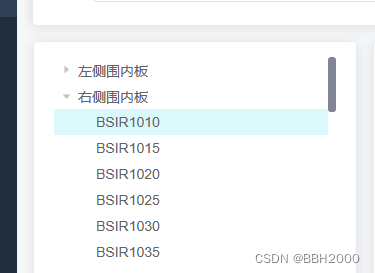
<el-tree :data="treeData" :props="defaultProps" @node-click="handleNodeClick"
                            :highlight-current="true" node-key="lineCode" :check-on-click-node="true"
                            :expand-on-click-node="false" ref="treeBox"></el-tree>
主要是highlight-current=“true”
添加样式
::v-deep .el-tree--highlight-current .el-tree-node.is-current>.el-tree-node__content {
    background-color: rgba(210, 248, 250, 0.793) !important;
}
::v-deep .el-tree-node__content:hover {
    background-color: rgba(241, 251, 252, 0.793) !important;
}

::v-deep .el-tree-node:focus>.el-tree-node__content {
    background-color: transparent;
}





 扫一扫
扫一扫


 8041
8041

 被折叠的 条评论
为什么被折叠?
被折叠的 条评论
为什么被折叠?
 到【灌水乐园】发言





