<template>
<view class="map_container">
<!-- 地图组件保持不变 -->
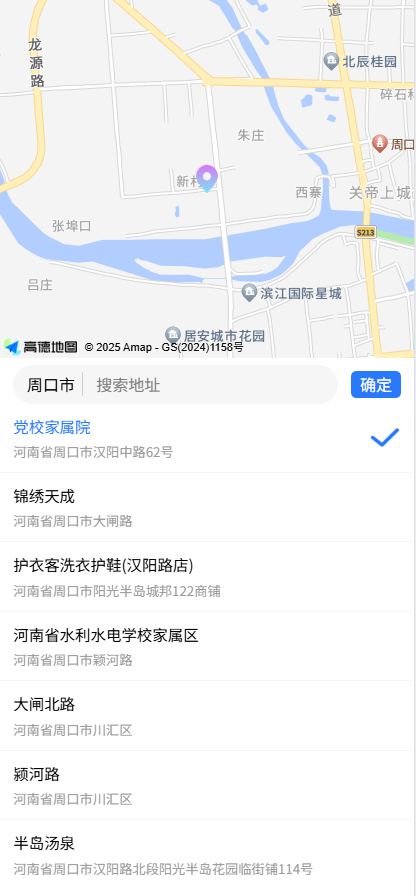
<view class="map">
<map class="map" id="map" :longitude="longitude" :latitude="latitude" show-location="false" scale="14"
:markers="markers" :include-points="markers" @regionchange="regionchange" @updated="onMapFinish"></map>
<!--
<cover-image src="/static/img/location.png" class="icon"></cover-image>
<!--
<!-- <view class="pickBtnClose" @click="back">取消</view> -->
<!-- <view class="pickBtn" @click="backPick">选择</view> -->
</view>
<!-- 新增地址信息展示 -->
<view class="address-box">
<view style="padding-top: 12rpx;display: flex;align-items: center;justify-content: space-between;">
<view class="siteBox">
<picker @change="bindPickerChange" :value="index" :range="array" class="picker">
<view class="uni-input">{{array[index]}}</view>
</picker>
<view class="ipt">
<input type="text" placeholder="搜索地址" v-model="keywords" @input="iptSearch" />
</view>
</view>
<view class="pickBtn" @click="backPick">确定</view>
</view>
<scroll-view scroll-y style="height: 90%;">
<view class="siteList" v-for="(item,i) in addressList" @click="pickAddress(item)">
<view>
<view :style="pickSiteId==item.id?'color:#2979ff':''">{{item.adnam}}{{item.name}}</view>
<view style="font-size: 24rpx;color:#999999;margin-top: 10rpx;">
{{item.pname}}{{item.cityname }}{{item.address}}
</view>
</view>
<image class="pick" src="/static/img/pick.png" v-if="pickSiteId==item.id"></image>
</view>
</scroll-view>
<!-- <text>当前位置:{{ address }}</text> -->
</view>
</view>
</template>
<script setup>
import {
ref,
onMounted
} from 'vue'
import {//专门整合的地图类接口js
getRegeoCode,
getLocationList
} from '@/utils/amap';
import {//获取当前可选择的城市
homeData
} from '@/utils/api';
// 响应式数据
const latitude = ref(0)
const longitude = ref(0)
const markers = ref([])
const address = ref('') // 新增地址存储
const array = ref([])
const regionList = ref([])
const index = ref(0)
const keywords = ref('')
const addressList = ref([])
const pickSiteId = ref('')
const pickLocation = ref('')
onMounted(() => {
array.value = []
regionList.value = []
// 第一步:获取原生定位
uni.getLocation({
type: 'gcj02',
success: function(res) {
// 更新经纬度
latitude.value = res.latitude
longitude.value = res.longitude
regionList.value = [{
name: uni.getStorageSync('city'),
lat: latitude.value,
lng: longitude.value
}]
array.value.push(uni.getStorageSync('city'))
console.log('0000', array.value)
addressAxios()
},
fail: (err) => {
handleLocationError(err)
}
})
})
const addressAxios = () => {
homeData({}).then((res) => {
console.log(res)
if (res.code == 0) {
// regionList.value = res.data.region_list
res.data.region_list.map(V => {
if (V.name != uni.getStorageSync('city')) {
regionList.value.push(V)
array.value.push(V.name)
}
})
console.log(array.value)
// 第二步:获取周围位置列表
getSiteList(regionList.value[0].lng, regionList.value[0].lat)
}
})
}
// 取消
const back = () => {
uni.navigateBack();
}
// 选择 返回上一页
const backPick = () => {
uni.$emit('updateData', array.value[index.value], latitude.value, longitude.value); // 触发事件并传递数据
uni.navigateBack();
}
// 选中地址
const pickAddress = (item) => {
pickSiteId.value = item.id
pickLocation.value = item.location
latitude.value = item.location.split(',')[1]
longitude.value = item.location.split(',')[0]
}
// 切换城市
const bindPickerChange = (e) => {
index.value = e.detail.value
latitude.value = regionList.value[index.value].lat
longitude.value = regionList.value[index.value].lng
getSiteList(regionList.value[index.value].lng, regionList.value[index.value].lat)
}
const onMapFinish = () => {
console.log('现在可以开始监听@regionchange了');
}
// 拖动地图问题
const regionchange = (e) => {
console.log(e)
keywords.value = ''
//H5 app都可以
let mapCtx = uni.createMapContext("map"); // 创建map的上下文对象, 从而操控map组件
mapCtx.getCenterLocation({
success: (res) => {
getSiteList(res.longitude, res.latitude)
}
})
}
//搜索框
const iptSearch = () => {
getSiteList(longitude.value, latitude.value)
}
// 获取周围位置列表
const getSiteList = (lon, lat) => {
getLocationList('xxxxxxxx', lon + ',' + lat, keywords.value).then((res) => {//xxxx 高德key
if (res.status == 1 && res.count > 0) {
addressList.value = res.pois
pickSiteId.value = addressList.value[0].id
pickLocation.value = addressList.value[0].location
latitude.value = pickLocation.value.split(',')[1]
longitude.value = pickLocation.value.split(',')[0]
markers.value = [{
id: 1,
latitude: res.latitude,
longitude: res.longitude,
iconPath: '../../static/img/location.jpg',
width: 50,
height: 50,
}, ]
}
})
}
// 高德逆地理编码方法
const loadRegeoData = async (lat, lng) => {
const regeoCode = await getRegeoCode(lat, lng, 'xxxxxxx');//xxxx 高德key
if (regeoCode.status == 1) {
const addressInfo = regeoCode.regeocode.addressComponent;
address.value = [
addressInfo.province,
addressInfo.city,
addressInfo.district,
addressInfo.township
].join('')
console.log(address.value);
} else {
//默认地址跟经纬度
addres.value = 'xxxx';
latitude.value = 'xxx';
longitude.value = 'xxx';
}
}
// 错误处理函数
const handleLocationError = (err) => {
console.error('定位错误:', err)
const errMsg = {
1: '位置服务不可用',
2: '位置获取失败',
3: '定位超时'
} [err.errCode] || '未知错误'
uni.showModal({
title: '定位失败',
content: errMsg,
success(res) {
if (res.confirm) {
// 用户确认后跳转设置页
uni.openSetting()
}
}
})
}
</script>
<style scoped>
.pickBtn {
background:
color:
width: 90rpx;
height: 50rpx;
line-height: 50rpx;
text-align: center;
border-radius: 10rpx;
margin-right: 24rpx;
/* position: absolute;
top: 32rpx;
right: 32rpx;
z-index: 99999; */
}
.pickBtnClose {
background:
color:
width: 90rpx;
height: 50rpx;
line-height: 50rpx;
text-align: center;
border-radius: 10rpx;
position: absolute;
top: 32rpx;
left: 32rpx;
z-index: 99999;
}
.pick {
width: 55rpx;
height: 35rpx;
}
.siteList {
height: 100rpx;
padding: 12rpx 24rpx;
border-bottom: 2rpx solid
display: flex;
justify-content: space-between;
align-items: center;
font-size: 28rpx;
}
.ipt {
flex: 1;
padding-left: 24rpx;
}
.picker {
min-width: 20%;
width: auto;
text-align: center;
border-right: 2rpx solid
}
.siteBox {
display: flex;
background:
height: 70rpx;
border-radius: 50rpx;
margin: 0 24rpx;
display: flex;
align-items: center;
padding: 0 12rpx;
flex: 1;
}
/deep/.amap-icon {
display: none;
}
.icon {
width: 40rpx;
height: 50rpx;
position: absolute;
top: 0;
left: 0;
bottom: 0;
right: 0;
margin: auto;
}
.map_container {
width: 100%;
height: 100vh;
/* 更灵活的响应式高度 */
}
.map {
width: 100%;
height: 40vh;
position: relative;
}
/* 新增地址样式 */
.address-box {
background: rgba(255, 255, 255, 1);
/* padding: 10px; */
box-shadow: 0 2px 6px rgba(0, 0, 0, 0.1);
height: 60vh;
}
</style>








 扫一扫
扫一扫


 1万+
1万+

 被折叠的 条评论
为什么被折叠?
被折叠的 条评论
为什么被折叠?
 到【灌水乐园】发言





