



更换JDK版本后,tomcat启动出现:
The JRE could not be found.Edit the server and change the JRE location.
解决方案:eclipse中:Windows->Preferences->Server->Runtime Environments
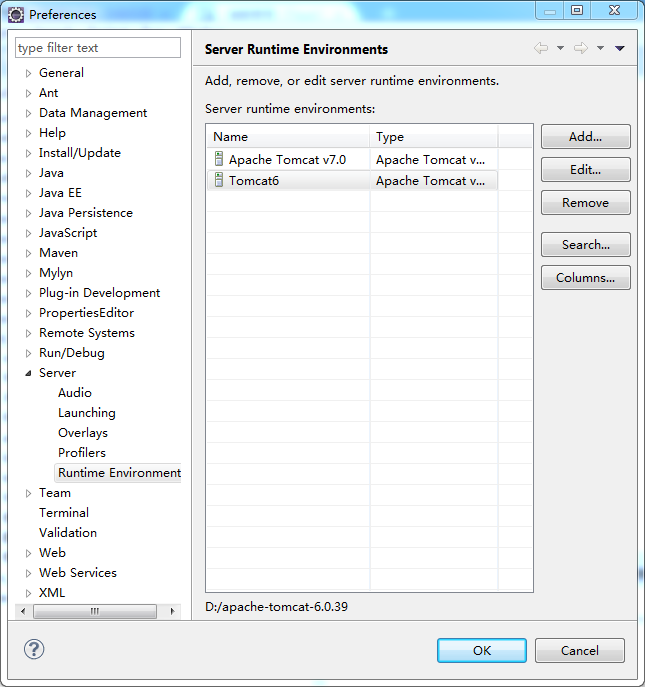
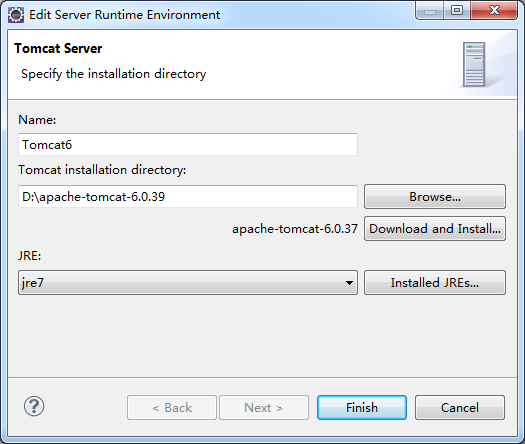
单击edit选择对应的JRE即可
 本文介绍了解决更换JDK版本后,Tomcat启动提示找不到JRE的问题。通过编辑Eclipse中的服务器配置,更改JRE的位置设置,可以轻松解决此问题。
更换JDK版本后,tomcat启动出现:
The JRE could not be found.Edit the server and change the JRE location.
解决方案:eclipse中:Windows->Preferences->Server->Runtime Environments
单击edit选择对应的JRE即可

 被折叠的 条评论
为什么被折叠?
被折叠的 条评论
为什么被折叠?
 到【灌水乐园】发言








 扫一扫
扫一扫


