


 本文介绍了C++中变量的不同存储区域,包括全局数据存储区、栈和堆,并详细探讨了static关键字的多种用途,例如修饰变量和函数,以及如何在不同作用域下使用static变量。
首先,看看变量的存储:
int global ;
int main()
{
    int stackStore ;
    int heapStore* = (int *)malloc(sizeof(int));
}
变量global存储在全局数据存储区,stackStore存储在栈中,heapStore存储在堆中;
static作为静态修释符用法:
1.static可以用来修饰变量,也可以用来修饰函数,其用法相似;
2. static可以静态的呈现一个变量,在作用范围内不会改变变量的值;
3. 但是如果函数的局部变量复写了变量的值,那么这个值在当前局部函数内有效; 若出了当前局部范围,static的值生效;
例一, static在全局范围内,用include扩展static的作用范围, 用extern扩展函数的作用域:
107.h
#ifndef _107H_
#def _107H_

extern void func();
#endif
107.cpp

#include "stdafx.h"
#include <stdio.h>
#include <string.h>
#include "107.h"

voic func()
{
    x = 12;
    printf("%d\n", x);
}
108.h
#ifndef _108H_
#def _108H_

extern void func1();
#endif
108.cpp
#include "stdafx.h"
#include <stdio.h>
#include <string.h>
#include "108.h"

voic func1()
{
    x = 56;
    printf("%d\n", x);
}
109.cpp
#include "stdafx.h"
#include <stdio.h>
#include <string.h>
#include "107.h"
#include "108.h"

int main()
{
    func();
    func1();
    printf("%d", x);
}
输出结果为:
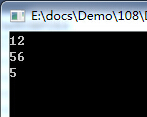
例二,static在当前文本作用域,用extern扩展函数的作用域:
file1.h
#ifndef _FILE1_
#define _FILE1_

extern void func1();
extern void func2();

#endif
file1.cpp
#include "stdafx.h"
#include <stdio.h>
#include <string.h>
#include "file1.h"

static char* hello = "hello world!";
void func1()
{
    printf("%s\n", hello);
}

void func2()
{
    hello = "changed world!";
    printf("%s\n", hello);
}
file2.cpp
#include "stdafx.h"
#include <stdio.h>
#include <string.h>
#include "file1.h"

int main()
{
    func1();
    func2();

    return 0;
}
输出结果:
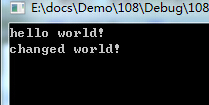
!!! 若将static char* hello = "hello world!"放入func1, 如下;
file1.cpp
#include "stdafx.h"
#include <stdio.h>
#include <string.h>
#include "file1.h"


void func1()
{
    static char* hello = "hello world!";
    printf("%s\n", hello);
}

void func2()
{
    hello = "changed world!";
    printf("%s\n", hello);
}
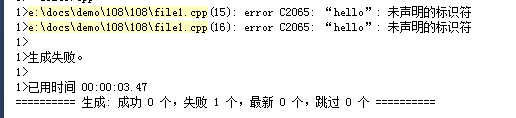
那就会出错,错误为:





 扫一扫
扫一扫


 被折叠的 条评论
为什么被折叠?
被折叠的 条评论
为什么被折叠?
 到【灌水乐园】发言





