


一、主进程
1.在主进程的main文件夹下面创建updater.js文件
 autoUpdater.autoDownload = false // 禁止自动下载更新,如果为true的话用户体验感不好,这里让用户手动下载
 // 检查更新是否已启动时发出。
    autoUpdater.on('checking-for-update', () => {
        sendStatusToWindow('Checking for update...');
    })
    // 有可用更新时发出。如果 autoDownload 为 true,则会自动下载更新。
    autoUpdater.on('update-available', (info) => {
        sendStatusToWindow('update-status', {
            type: 'available',
            version: info.version
        })
    })
    // 在没有可用更新时发出。
    autoUpdater.on('update-not-available', (ev, info) => {
        sendStatusToWindow('update-status', {
            type: 'noAvailable'
        })
    })
    // 更新时出现错误时发出。
    autoUpdater.on('error', (ev, err) => {
        // sendStatusToWindow('Error in auto-updater.');
        ElNotification({
            message: '更新出错',
            type: 'error',
         })
    })

    // 在进度时发出。
    autoUpdater.on('download-progress', (prog) => {
        let speed = prog.bytesPerSecond / 1000000 > 1 ? Math.ceil(prog.bytesPerSecond / 1000000) + 'M/s' : Math.ceil(prog.bytesPerSecond / 1000) + 'K/s'

        mainWindow.webContents.send('pc-update-progress', {
            speed, // 网速
            percent: Math.ceil(prog.percent), // 百分比
        });
    })

    // 下载完成
    autoUpdater.on('update-downloaded', (ev, info) => {
        sendStatusToWindow('update-status', {
            type: 'downloaded',
            readyToInstall: true
        })
    });
autoUpdater.checkForUpdates()
检查是否有新版本。
updater.js完整代码
import { autoUpdater } from 'electron-updater'
// import { allWindows } from '../createWindow';
import { ipcMain,ElNotification } from 'electron'
export function initUpdater(mainWindow) {
    autoUpdater.autoDownload = false // 禁止自动下载更新
    // 创建专用通信通道
    const sendStatusToWindow = (channel, payload) => {
        if (mainWindow && !mainWindow.isDestroyed()) {
            mainWindow.webContents.send(channel, payload)
        }
    }
    // 检查更新是否已启动时发出。
    autoUpdater.on('checking-for-update', () => {
        sendStatusToWindow('Checking for update...');
    })
    // 有可用更新时发出。如果 autoDownload 为 true,则会自动下载更新。
    autoUpdater.on('update-available', (info) => {
        sendStatusToWindow('update-status', {
            type: 'available',
            version: info.version
        })
    })
    // 在没有可用更新时发出。
    autoUpdater.on('update-not-available', (ev, info) => {
        sendStatusToWindow('update-status', {
            type: 'noAvailable'
        })
    })
    // 更新时出现错误时发出。
    autoUpdater.on('error', (ev, err) => {
        // sendStatusToWindow('Error in auto-updater.');
        ElNotification({
            message: '更新出错',
            type: 'error',
         })
    })

    // 在进度时发出。
    autoUpdater.on('download-progress', (prog) => {
        let speed = prog.bytesPerSecond / 1000000 > 1 ? Math.ceil(prog.bytesPerSecond / 1000000) + 'M/s' : Math.ceil(prog.bytesPerSecond / 1000) + 'K/s'

        mainWindow.webContents.send('pc-update-progress', {
            speed, // 网速
            percent: Math.ceil(prog.percent), // 百分比
        });
    })

    // 下载完成
    autoUpdater.on('update-downloaded', (ev, info) => {
        sendStatusToWindow('update-status', {
            type: 'downloaded',
            readyToInstall: true
        })
    });
    ipcMain.on('install-update', () => {
        // 重新启动应用程序并在下载更新后安装更新。 它应该只在发出后调用。update-downloaded
        autoUpdater.quitAndInstall();
    })
    /*监听渲染进程指令,执行更新*/
    ipcMain.on('send-update', () => {
        autoUpdater.checkForUpdates();
        autoUpdater.autoDownload = true;
    })
    ipcMain.on('check-update-now', () => {
        autoUpdater.checkForUpdates();
    })
}
2.在创建窗口的代码下面 initUpdater(mainWindow) 调用方法
// 创建主窗口
function createMainWindow() {

    // Create the browser window.
    const mainWindow = new BrowserWindow({
        ...winState.winOptions,
        show: false, //窗口初始时不显示(show: false)
        autoHideMenuBar: true, //自动隐藏菜单栏(autoHideMenuBar: true)
        webSecurity: true, //是否开启同源策略 false:禁用同源策略 true: 开启同源策略
        frame: false,
        transparent: true,
        minWidth: 1096,
        minHeight: 740,
        resizable: true,
        webPreferences: {
            // eslint-disable-next-line no-undef
            preload: join(__dirname, '../preload/index.js'),
            sandbox: false,
            nodeIntegration: true,
            nodeIntegrationInWorker: true,
            contextIsolation: false
        }
    })

    allWindows.mainWindow = mainWindow
    initUpdater(mainWindow)
    winState.manage(mainWindow)

    const page = getPageUrl('')
    mainWindow.loadURL(page)
}
二、渲染进程,在通知页面向主进程发送检查更新的请求,主进程回复后,监听是否有更新的版本
1.index.vue
onMounted(() => {
  setTimeout(() => {
    window.electron.ipcRenderer.send('check-update-now');
  }, 3000);
  window.electron.ipcRenderer.on('update-status', (_, data) => {
    console.log('data', data);
    if (data.type === 'available') {
      isUpdate.value = true;
    }
  });
});
DOM部分
  <!-- 更新提示 -->
    <Update
      :centerDialogVisible="isUpdate"
      @update:centerDialogVisible="(val) => (isUpdate = val)"
    ></Update>
2.弹窗的样式及完整功能
<script setup>
import { ref, defineProps, computed } from 'vue';
// import { ipcRenderer } from 'electron';
const props = defineProps({
  centerDialogVisible: {
    type: Boolean,
    default: false,
  },
});
const emit = defineEmits(['update:centerDialogVisible']);

const dialogVisible = computed({
  get: () => props.centerDialogVisible,
  set: (value) => emit('update:centerDialogVisible', value),
});
const cancel = () => {
  dialogVisible.value = false;
};
const Confirm = () => {
  dialogVisible.value = false;
  isShowProgress.value = true;
  window.electron.ipcRenderer.send('send-update');
};
const isShowProgress = ref(false);
const percentage = ref(0);
const duration = computed(() => Math.floor(percentage.value / 10));
window.electron.ipcRenderer.on('update-status', (_,info) => {

  if (info.type == 'downloaded') {
    dialogVisible.value = false;
    dialogVisible2.value = true;
  }
});
const speed = ref('');
window.electron.ipcRenderer.on('pc-update-progress', (event, arg) => {
  isShowProgress.value = true;
  percentage.value = arg.percent;
  speed.value = arg.speed;
  console.log('网速,百分比', arg);
});

const dialogVisible2 = ref(false);
const cancel2 = () => {
  dialogVisible2.value = false;
};
const Confirm2 = () => {
  dialogVisible2.value = false;
  window.electron.ipcRenderer.send('install-update');
};
</script>
<template>
  <!-- <div>/ -->
  <el-dialog
    v-model="dialogVisible"
    title="更新提示"
    width="450"
    center
    top="20%"
  >
    <div class="title" v-if="!isShowProgress">检测到新版本,是否更新?</div>
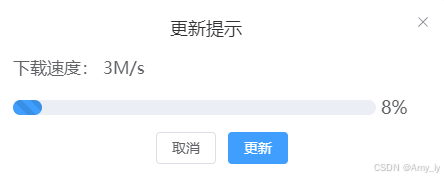
    <div class="title" v-else>下载速度:  {{ speed }}</div>
    <el-progress
      :percentage="percentage"
      :stroke-width="15"
      striped
      striped-flow
      :duration="duration"
      v-if="isShowProgress"
    />
    <template #footer v-if="!isShowProgress">
      <div class="dialog-footer">
        <el-button @click="cancel">取消</el-button>
        <el-button type="primary" @click="Confirm"> 更新 </el-button>
      </div>
    </template>
  </el-dialog>
  <el-dialog
    v-model="dialogVisible2"
    title="下载完成"
    width="500"
    center
    top="20%"
  >
    <div class="title">新版本已经下载完毕是否现在安装?</div>
    <template #footer>
      <div class="dialog-footer">
        <el-button @click="cancel2">稍后</el-button>
        <el-button type="primary" @click="Confirm2"> 安装 </el-button>
      </div>
    </template>
  </el-dialog>
  <!-- </div> -->
</template>
<style lang="scss" scoped>
:deep(.demo-progress .el-progress--line) {
  margin-bottom: 55px;
  max-width: 600px;
}
:deep(.el-dialog__footer) {
  padding-top: 30px;
}
.title {
  margin-bottom: 20px;
  font-size: 17px;
}
</style>





 扫一扫
扫一扫


 508
508

 被折叠的 条评论
为什么被折叠?
被折叠的 条评论
为什么被折叠?
 到【灌水乐园】发言





