



 本文详细介绍MyBatis中if、choose、where和trim元素在条件查询中的应用,包括如何根据不同场景选择合适的元素,以及如何避免硬编码1=1的问题,提高SQL查询效率。
数据库如下:
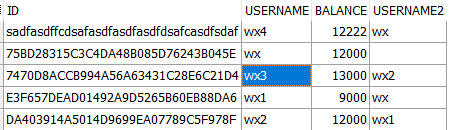
1 . if 元素
按照条件进行查询,如果查询条件中有username数据,则是一种查询方式,没有是另外一种查询方式:
在映射文件中
          <select id="findAccountByUsername" parameterType="account" resultType="account">
	 	select * from Account where 1 = 1
	 	<if test="username != null and username != ''">
	 	   and username = #{username}
	 	</if>
	 </select>
            Account account = new Account();
            account.setUsername("wx");
	    List<Map<String,Object>> list =            session.selectList("com.wx.mapper.AccountMapper.findAccountByUsername",account);
	    System.out.println("条件查询:"+list);
2 choose元素
如果需求中要求:如果username不为空,则按照username条件查询。username为空,username2不为空则按照username2条件进行查询,如果username2和username都为空,则按照另外一要求查询。
        <select id="findAccountByChoose" parameterType="account" resultType="account">
	 	select * from Account where 1 = 1
	 	<choose>
	 		<when test="username != null and username != ''">
	 			and username = #{username}
	 		</when>
	 		<when test="username2 != null and username2 != ''">
	 			and username2 = #{username2}
	 		</when>
	 		<otherwise>
	 			and balance > 12000
	 		</otherwise>
	 	</choose>
	 </select>
3. where 和 trim元素
在之前Map映射文件中,在查询条件中无论是使用Choose还是使用if元素进行查询,都需要添加where 1 =1 条件。为了去掉这个,使用where 和 trim元素。
        <select id="findAccountByUsername" parameterType="account" resultType="account">
	 	select * from Account
	 	<where>
		 	<if test="username != null and username != ''">
		 	   and username = #{username}
		 	</if>
	 	</where>
	 </select>
在上述代码中,如果where中的条件不成立,则不往查询条件后追加,反之则正常追加。
在下面代码中:如果username 不为空,则只按照username条件进行查询。如果username为空,username2条件不为空,则按照username2条件进行查询。如果username和username2都为空,则按照另外条件进行查询
        <select id="findAccountByChoose" parameterType="account" resultType="account">
	 	select * from Account
	 	<trim prefix="where" prefixOverrides="and">
		 	<choose>
		 		<when test="username != null and username != ''">
		 			and username = #{username}
		 		</when>
		 		<when test="username2 != null and username2 != ''">
		 			and username2 = #{username2}
		 		</when>
		 		<otherwise>
		 			and balance > 12000
		 		</otherwise>
		 	</choose>
	 	</trim>
	 </select>
使用trim元素来代替where 1=1 条件。 其中prefix 表示在拼接下列sql语句时,需要追加的前缀。prefixOverrides=“and”的功能是:因为在choose语句中有 and XXXX,prefixOverrides表示去掉Sql中的and。如果在sql语句中没有and,例如下边这样:
        <select id="findAccountByChoose" parameterType="account" resultType="account">
	 	select * from Account
	 	<trim prefix="where" >
		 	<choose>
		 		<when test="username != null and username != ''">
		 			username = #{username}
		 		</when>
		 		<when test="username2 != null and username2 != ''">
		 			username2 = #{username2}
		 		</when>
		 		<otherwise>
		 			balance > 12000
		 		</otherwise>
		 	</choose>
	 	</trim>
	 </select>





 扫一扫
扫一扫


 1万+
1万+

 被折叠的 条评论
为什么被折叠?
被折叠的 条评论
为什么被折叠?
 到【灌水乐园】发言





