



MyBatis
MyBatis入门
MyBatis 框架介绍
//框架是一款半成品,我们可以给予这个半成品软件继续开发,来完成我们个新华的需求
ORM(Object Relational Mapping):对象关系映射
指的是持久化数据和实体对象的映射模式,为了解决面向对象与关系型数据库存在的互不匹配的现象的技术。
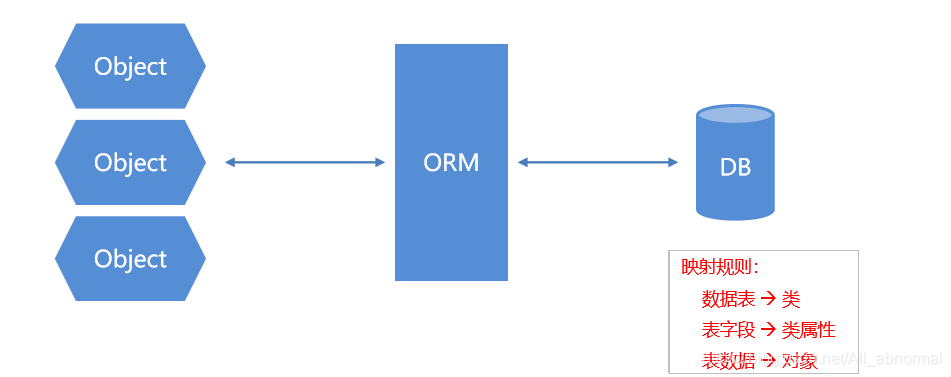
MyBatis 介绍
MyBatis 入门程序:查询数据库中的所有学生表中的数据
public class JDBCDemo01 {
    public static void main(String[] args) throws ClassNotFoundException, SQLException {


        //① 导入jar包
        // ② 注册驱动
        Class.forName("com.mysql.jdbc.Driver");

        // ③ 获取数据库连接
        Connection con = DriverManager.getConnection("jdbc:mysql://192.168.23.129:3306/db14", "root", "root");

        // ④ 获取执行者对象
        Statement stat = con.createStatement();

        // ⑤ 执行sql语句并返回结果
        String sql = "SELECT * FROM student";
        ResultSet re = stat.executeQuery(sql);

        // ⑥ 处理结果1
        while (re.next()) {
            System.out.println(re.getInt("sid")
                    + "\t" + re.getString("NAME")
                    + "\t" + re.getString("age")
                    + "\t" + re.getString("birthday"));
        }
        // ⑦ 释放资源
        re.close();
        stat.close();
        con.close();
    }
}
小结:
MyBatis 是一个优秀的基于 Java 的持久层框架,它内部封装了 JDBC,使开发者只需要关注 SQL 语句本身, 而不需要花费精力去处理加载驱动、创建连接、创建执行者等复杂的操作。
MyBatis 通过 xml 或注解的方式将要执行的各种Statement 配置起来,并通过Java 对象和 Statement 中 SQL 的动态参数进行映射生成最终要执行的SQL 语句。
最后 MyBatis 框架执行完SQL 并将结果映射为 Java 对象并返回。采用ORM 思想解决了实体和数据库映射 的问题,对 JDBC 进行了封装,屏蔽了JDBC API 底层访问细节,使我们不用与JDBC API 打交道,就可以 完成对数据库的持久化操作。
MyBatis 相关API
public void selectAll() throws IOException {
        //1 加载核心配置文件
        //Resources加载配置文件为inputStream的工具类:加载资源的工具类
        InputStream is = Resources.getResourceAsStream("MyBatisConfig.xml");
        //2 获取SqlSession工厂对象------获取SqlSessionFactory 工厂对象的功能类
        SqlSessionFactory sqlsessionfactory = new SqlSessionFactoryBuilder().build(is);
        //3 通过SqlSession工厂对象过去SqlSession对象-----获取SqlSession 构建者对象的工厂接口
        SqlSession sqlSession = sqlsessionfactory.openSession();
        //4 执行映射配置文件中的sql语句,并接受接过
        List<Student> list = sqlSession.selectList("StudentMapper.selectAll");
        //5 处理结果
        for (Student student : list) {
            System.out.println(student);
        }
        //6 释放资源
        sqlSession.close();
        is.close();
    }
Resources: 加载资源的工具列,通过类加载器返回指定资源的字节输入流
SqlSessionFactoryBuilder: 获取SqlSessionFactory 工厂对象的功能类, 通过指定资源字节输入流获取SqlSession工厂对象
SqlSessionFactory: 获取SqlSession 构建者对象的工厂接口, 获取SqlSession构建者对象,并开启手动提交事务,如果参数为true,则开启 自动提交事务
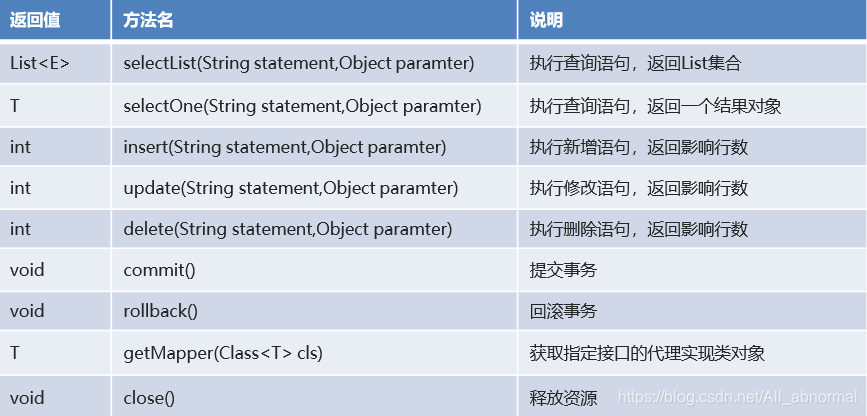
SqlSession:构建者对象接口。用于执行SQL、管理事务、接口代理,方法**如图所示:
 ## 映射配置文件介绍
<mapper namespace="itheima001_1.mapper.StudentMapper">
    <!--
        select:查询功能的标签
        id属性:唯一标识
        resultType属性:指定结果映射对象类型
        parameterType属性:指定参数映射对象类型
    -->
    <!--查询所有-->
    <select id="selectAll" resultType="student">
        SELECT * FROM student
    </select>


    <!--查询一个 resultType:返回值    parameterType:参数-->
    <select id="selectById" resultType="student" parameterType="java.lang.Integer">
    SELECT  * FROM student WHERE sid = #{sid}
    </select>


    <!--添加一个-->
    <insert id="insert" parameterType="student">

    </insert>

	<!--修改一个-->
    <update id="update" parameterType="student">
        UPDATE student SET name  = #{name},age = #{age} WHERE sid =#{sid}
    </update>

	 <!--删除一个-->
    <delete id="delete" parameterType="student">
        DELETE FROM student WHERE sid = #{sid}
    </delete>

</mapper>
核心配置文件介
<?xml version="1.0" encoding="UTF-8" ?>
<!--MyBatis的DTD约束-->
<!DOCTYPE configuration PUBLIC "-//mybatis.org//DTD Config 3.0//EN" "http://mybatis.org/dtd/mybatis-3-config.dtd">
<!--configuration 核心根标签     -->
<configuration>
    <!--引入数据库连接的配置文件-->
    <properties resource="JDK.properties"></properties>
    <!--配置LOG4-->
    <settings>
        <setting name="logImpl" value="log4j"/>
    </settings>

    <!--environments配置数据库环境,环境可以有多个。default属性指定使用的是哪个-->
    <environments default="mysql">
        <!--environment配置数据库环境  id属性唯一标识-->
        <environment id="mysql">
            <!-- transactionManager事务管理。  type属性,采用JDBC默认的事务-->
            <transactionManager type="JDBC"></transactionManager>
            <!-- dataSource数据源信息   type属性 连接池-->
            <dataSource type="POOLED">
                <!-- property获取数据库连接的配置信息 -->
                <property name="driver" value="${driver}"/>
                <property name="url" value="${url}"/>
                <property name="username" value="${username}"/>
                <property name="password" value="${password}"/>
            </dataSource>
        </environment>
    </environments>
    <!-- mappers引入映射配置文件 -->
    <mappers>
        <!-- mapper 引入指定的映射配置文件   resource属性指定映射配置文件的名称 -->
        <mapper resource="StudentMapper.xml"/>
    </mappers>
</configuration>
起别名
<!--起别名-->
    <typeAliases><!--为全类名起别名的父标签。-->
        <typeAlias type="itheima001_1.bean.Student" alias="student">
                <!--type:指定全类名 alias:指定别名-->
        </typeAlias><!--为全类名起别名的子标签。-->
    </typeAliases>
Dao 层传统实现方式
分层思想:控制层(controller)→业务层(service)→持久层(dao)
调试流程如图所示:
 ### LOG4J
在日常开发过程中,排查问题时难免需要输出MyBatis 真正执行的 SQL 语句、参数、结果等信息,我们就 可以借助 LOG4J 的功能来实现执行信息的输出。
使用步骤
- 导入 jar 包。
- 修改核心配置文件 添加如下代码。
<!--配置LOG4-->
    <settings>
        <setting name="logImpl" value="log4j"/>
    </settings>
- 在 src 下编写 LOG4J 配置文件
# Global logging configuration
log4j.rootLogger=DEBUG, stdout
# Console output...
log4j.appender.stdout=org.apache.log4j.ConsoleAppender
log4j.appender.stdout.layout=org.apache.log4j.PatternLayout
log4j.appender.stdout.layout.ConversionPattern=%5p [%t] - %m%n
接口代理方式-实现规则
-
删除 dao 层接口的实现类 只在写SQL语句。
-
修改映射配置文件填写成你dao文件的接口绝对路径。
<!-- mappers引入映射配置文件 -->
<mappers>
    <package name="com.itheima.dao"/>
</mappers>
-
修改 service 层接口的实现类,采用接口代理方式实现功能。
public class StudentServiceImpl implements StudentService {
    StudentDao mapper;
    public StudentServiceImpl() {
        InputStream re = null;
        SqlSession sqlSession = null;
        try {
            re = Resources.getResourceAsStream("MyBatisConfig.xml");
            SqlSessionFactory sqls = new SqlSessionFactoryBuilder().build(re);
            sqlSession = sqls.openSession(true);
            mapper = sqlSession.getMapper(StudentDao.class);

        } catch (IOException e) {
            e.printStackTrace();
        }

    }
    @Override
    public List<Student> findAll() {
        return mapper.findAll();
    }
    @Override
    public Student findById(Integer sid) {
        return mapper.findById(sid);
    }
    @Override
    public Integer insert(Student student) {
        return null;
    }
    @Override
    public Integer update(Student student) {
        return mapper.update(student);
    }
    @Override
    public Integer delete(Integer sid) {
        return mapper.delete(sid);
    }
}
实现规则
- 映射配置文件中的名称空间必须和Dao 层接口的全类名相同。
- 映射配置文件中的增删改查标签的id 属性必须和 Dao 层接口的方法名相同。
- 映射配置文件中的增删改查标签的parameterType 属性必须和 Dao 层接口方法的参数相同。
- 映射配置文件中的增删改查标签的resultType 属性必须和 Dao 层接口方法的返回值相同。
MyBatis 映射配置文件 - 动态 SQ
动态 SQL 介绍
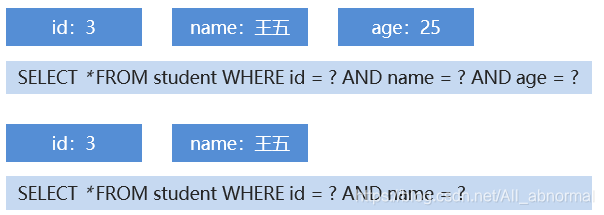
1.MyBatis 映射配置文件中,前面我们的SQL 都是比较简单的,有些时候业务逻辑复杂时,我们的SQL 就是 动态变化的,此时在前面学习的SQL 就不能满足要求了
2.多条件查询
 ### < if>标签
<select id="selectCondition" resultType="student" parameterType="student">
    <include refid="select"/>
    <where>
        <if test="id != null">
            id = #{id}
        </if>
        <if test="name != null">
            AND name = #{name}
        </if>
        <if test="age != null">
            AND age = #{age}
        </if>
    </where>
</select>
- < where>:条件标签。如果有动态条件,则使用该标签代替where 关键字。
- < if>:条件判断标签
< foreach>标签
< foreach>:循环遍历标签。适用于多个参数或者的关系
<!--id="selectByIds"bi表示为id为selectByIds
	resultType="student"表示为引用数据类型
	parameterType="list"表示为输出类型
-->
<select id="selectByIds" resultType="student" parameterType="list">
    <include refid="select"/>
    <where>
        <foreach collection="list" open="id IN (" close=")" item="id" separator=",">
            #{id}
        </foreach>
    </where>
</select>
属性
- collection:参数容器类型,(list-集合,array-数组)。
- open:开始的 SQL 语句。
- close:结束的SQL 语句。
- item:参数变量名。 separator:分隔符
MyBatis 核心配置文件 – 分页插件
分页插件介绍
- 分页可以将很多条结果进行分页显示。
- 如果当前在第一页,则没有上一页。如果当前在最后一页,则没有下一页。
- 需要明确当前是第几页,这一页中显示多少条结果。
- 在企业级开发中,分页也是一种常见的技术。而目前使用的MyBatis 是不带分页功能的,如果想实现分页的 功能,需要我们手动编写LIMIT 语句。但是不同的数据库实现分页的SQL 语句也是不同的,所以手写分页 成本较高。这个时候就可以借助分页插件来帮助我们实现分页功能。
- PageHelper:第三方分页助手。将复杂的分页操作进行封装,从而让分页功能变得非常简单。
分页插件实现步骤
<!--1.导入 jar 包-->
<!--2.在核心配置文件中实现  集成分页助手插件-->
<plugins>
    <plugin interceptor="com.github.pagehelper.PageInterceptor"></plugin>
</plugins>
//3.通过分页助手来实现分页功能
// 第一页:显示3条数据
//PageHelper.startPage(1,3);
// 第二页:显示3条数据
//PageHelper.startPage(2,3);
// 第三页:显示3条数据
PageHelper.startPage(3,3);
分页插件相关参数
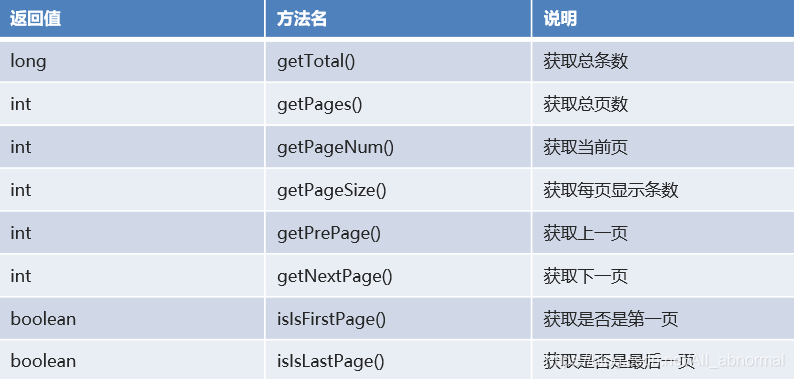
- PageInfo:封装分页相关参数的功能类。
- 核心方法如图所示:
 ## MyBatis 注解开发
常用注解介绍
- 我们除了可以使用映射配置文件来操作以外,还可以使用注解形式来操作。
- 常用注解
- @Select(“查询的 SQL 语句”):执行查询操作注解
- @Insert(“新增的 SQL 语句”):执行新增操作注解
- @Update(“修改的 SQL 语句”):执行修改操作注解
- @Delete(“删除的SQL 语句”):执行删除操作注解
public interface StudentMapper {
    //查询所有
    @Select("SELECT * FROM student")
    public abstract List<Student> selectAll();
	//添加一个学生
    @Insert("INSERT INTO student VALUES (#{id},#{name},#{age}")
    public abstract Integer insert(Student student);
    //修改操作
    @Update("UPDATE student SET name=#{name},age=#{age} WHERE id=#{id}")
    public abstract Integer update(Student stu);
    //删除操作
    @Delete("DELETE FROM student WHERE id=#{id}")
    public abstract Integer delete(Integer id);
//---------------------------测试类------------------------------------------
public class Testmedo {
	//查询所有
    @Test
    public void selectAll() throws IOException {
        InputStream re = Resources.getResourceAsStream("MyBatisConfig.xml");

        SqlSessionFactory build = new SqlSessionFactoryBuilder().build(re);

        SqlSession sqlSession = build.openSession(true);
        StudentMapper mapper = sqlSession.getMapper(StudentMapper.class);

        List<Student> students = mapper.selectAll();

        for (Student student : students) {
            System.out.println(student);
        }

        sqlSession.close();

        re.close();
    }
    //添加一个学生
    @Test
    public void insert() throws IOException {
        InputStream re = Resources.getResourceAsStream("MyBatisConfig.xml");

        SqlSessionFactory build = new SqlSessionFactoryBuilder().build(re);

        SqlSession sqlSession = build.openSession(true);
        StudentMapper mapper = sqlSession.getMapper(StudentMapper.class);
        Student student = new Student(5, "迷魂汤", 80);

        Integer insert = mapper.insert(student);

        System.out.println(insert);

        sqlSession.close();
        re.close();
    }
	 //修改操作
    @Test
    public void update() throws Exception {
        //1.加载核心配置文件
        InputStream is = Resources.getResourceAsStream("MyBatisConfig.xml");

        //2.获取SqlSession工厂对象
        SqlSessionFactory sqlSessionFactory = new SqlSessionFactoryBuilder().build(is);

        //3.通过工厂对象获取SqlSession对象
        SqlSession sqlSession = sqlSessionFactory.openSession(true);

        //4.获取StudentMapper接口的实现类对象
        StudentMapper mapper = sqlSession.getMapper(StudentMapper.class);

        //5.调用实现类对象中的方法,接收结果
        Student stu = new Student(4, "赵六", 36);
        Integer result = mapper.update(stu);

        //6.处理结果
        System.out.println(result);

        //7.释放资源
        sqlSession.close();
        is.close();
    }
	 //删除操作
    @Test
    public void delete() throws Exception {
        //1.加载核心配置文件
        InputStream is = Resources.getResourceAsStream("MyBatisConfig.xml");

        //2.获取SqlSession工厂对象
        SqlSessionFactory sqlSessionFactory = new SqlSessionFactoryBuilder().build(is);

        //3.通过工厂对象获取SqlSession对象
        SqlSession sqlSession = sqlSessionFactory.openSession(true);

        //4.获取StudentMapper接口的实现类对象
        StudentMapper mapper = sqlSession.getMapper(StudentMapper.class);

        //5.调用实现类对象中的方法,接收结果
        Integer result = mapper.delete(4);

        //6.处理结果
        System.out.println(result);

        //7.释放资源
        sqlSession.close();
        is.close();
    }
}
-
注解可以简化开发操作,省略映射配置文件的编写。
-
常用注解如下:
- @Select(“查询的 SQL 语句”):执行查询操作注解
- @Insert(“查询的 SQL 语句”):执行新增操作注解
- @Update(“查询的 SQL 语句”):执行修改操作注解
- @Delete(“查询的SQL 语句”):执行删除操作注解
-
配置映射关系
< mappers> < package name=“接口所在包”/>
</mappers





 扫一扫
扫一扫


 15万+
15万+

 被折叠的 条评论
为什么被折叠?
被折叠的 条评论
为什么被折叠?
 到【灌水乐园】发言





