



 本文介绍如何在 Vue 中使用 el-table 实现动态行合并,包括单个表格和循环表格两种情况。示例代码展示如何根据数据动态合并行,并提供了计算合并数的不同逻辑。文中还提到了一种新的合并逻辑更新,对于处理复杂表格数据合并具有参考价值。
页面实现行合并的情况还是比较常见的,但实现起来却有一点点难。官网的例子有,不过人家的合并逻辑是从第一行开始两行两行合并,不能根据数据动态合并,感觉参考意义不太大。实际需求一般都是根据表数据动态来进行合并的,也会有更复杂的情况,比如循环表格的。
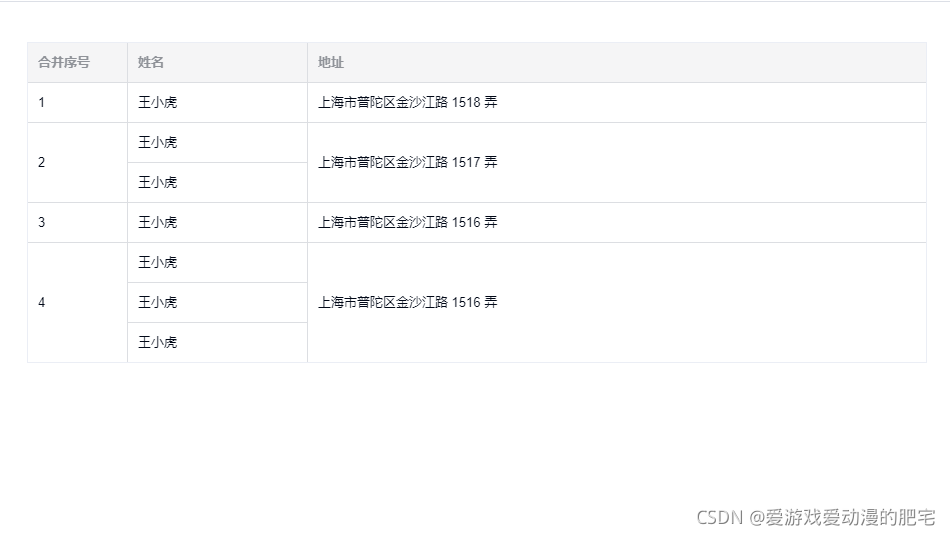
以下的例子中,表格数据是放在页面的假数据,hbxh 值相同时,表示需要合并
示例一:单个表格
单个表格的比较简单,知道合并方法的使用基本就好弄了
<template>
  <div>
    <el-form
      ref="testForm"
      :model="testForm"
      style="height: 600px;"
    >
      <el-row
        style="padding: 10px"
      >
        <el-table
          :data="testForm.tableData"
          :span-method="colSpanMethod"
          border
          style="width: 100%;"
        >
          <el-table-column prop="hbxh" label="合并序号" width="100" />
          <el-table-column prop="name" label="姓名" width="180" />
          <el-table-column prop="address" label="地址" />
        </el-table>
      </el-row>
    </el-form>
  </div>
</template>

<script>

export default {
  data() {
    return {
      spanArr: [], // 用于存放每一行记录的合并数
      testForm: {
        tableData: [
          {
            hbxh: '1',
            name: '王小虎',
            address: '上海市普陀区金沙江路 1518 弄'
          }, {
            hbxh: '2',
            name: '王小虎',
            address: '上海市普陀区金沙江路 1517 弄'
          }, {
            hbxh: '2',
            name: '王小虎',
            address: '上海市普陀区金沙江路 1519 弄'
          }, {
            hbxh: '3',
            name: '王小虎',
            address: '上海市普陀区金沙江路 1516 弄'
          }, {
            hbxh: '4',
            name: '王小虎',
            address: '上海市普陀区金沙江路 1516 弄'
          }, {
            hbxh: '4',
            name: '王小虎',
            address: '上海市普陀区金沙江路 1516 弄'
          }, {
            hbxh: '4',
            name: '王小虎',
            address: '上海市普陀区金沙江路 1516 弄'
          }
        ] // 测试数据
      },
    }
  },
  created() {
    this.getSpanArr(this.testForm.tableData)
  },
  methods: {
    getSpanArr(data) {
      // data就是我们从后台拿到的数据
      for (var i = 0; i < data.length; i++) {
        if (i === 0) {
          this.spanArr.push(1);
          this.pos = 0;
        } else {
          // 判断当前对象的指定属性值与上一个对象的指定属性值是否相等
          if (data[i].hbxh === data[i - 1].hbxh) {
            this.spanArr[this.pos] += 1;
            this.spanArr.push(0);
          } else {
            this.spanArr.push(1);
            this.pos = i;
          }
        }
      }
    },
    colSpanMethod({ row, column, rowIndex, columnIndex }) {
      if (columnIndex === 0 || columnIndex === 2) {
        const _row = this.spanArr[rowIndex];
        const _col = _row > 0 ? 1 : 0;
        console.log(`rowspan:${_row} colspan:${_col}`);
        return {
          // [0,0] 表示这一行不显示, [2,1]表示行的合并数
          rowspan: _row,
          colspan: _col
        };
      }
    }
  }

}
</script>
效果:
示例二:循环表格
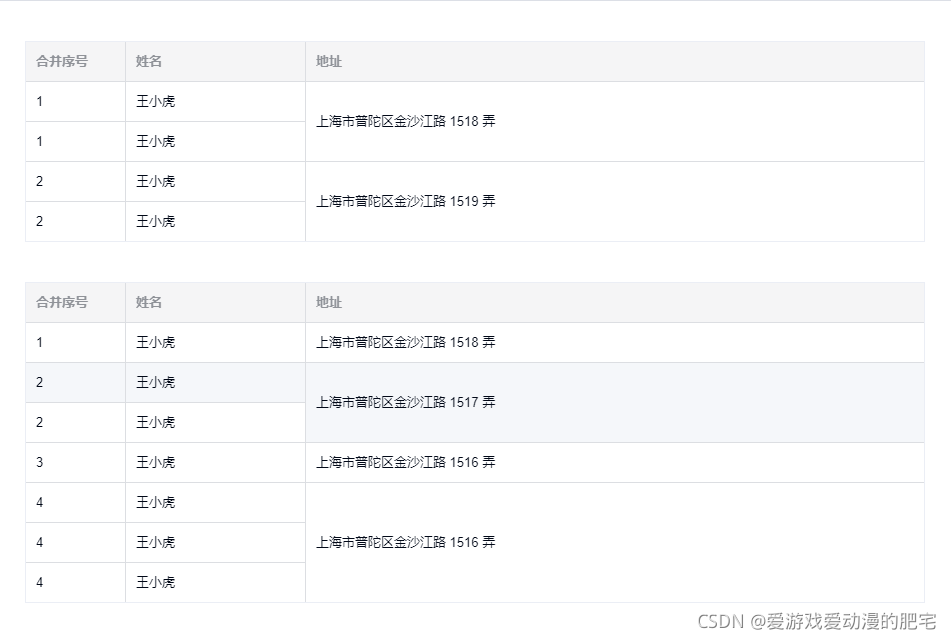
循环表格时,需要在表的每行数据传入一个值,代表是第几个表格,方便合并方法使用
<template>
  <div>
    <el-form
      ref="testForm"
      :model="testForm"
      style="height: 600px;"
    >
      <el-row
        v-for="(item, index) in testForm.tableList"
        :key="index"
        style="padding: 10px"
      >
        <el-table
          :data="item"
          :span-method="colSpanMethod"
          border
          style="width: 100%; margin-bottom: 20px;"
        >
          <el-table-column prop="hbxh" label="合并序号" width="100" />
          <el-table-column prop="name" label="姓名" width="180" />
          <el-table-column prop="address" label="地址" />
        </el-table>
      </el-row>
    </el-form>
  </div>
</template>

<script>

export default {
  data() {
    return {
      spanArr: [], // 用于存放每一行记录的合并数
      testForm: {
        tableList: [
          [
            {
              hbxh: '1',
              name: '王小虎',
              address: '上海市普陀区金沙江路 1518 弄',
              tbIndex: 0
            }, {
              hbxh: '1',
              name: '王小虎',
              address: '上海市普陀区金沙江路 1517 弄',
              tbIndex: 0
            }, {
              hbxh: '2',
              name: '王小虎',
              address: '上海市普陀区金沙江路 1519 弄',
              tbIndex: 0
            }, {
              hbxh: '2',
              name: '王小虎',
              address: '上海市普陀区金沙江路 1516 弄',
              tbIndex: 0
            }
          ],
          [
            {
              hbxh: '1',
              name: '王小虎',
              address: '上海市普陀区金沙江路 1518 弄',
              tbIndex: 1
            }, {
              hbxh: '2',
              name: '王小虎',
              address: '上海市普陀区金沙江路 1517 弄',
              tbIndex: 1
            }, {
              hbxh: '2',
              name: '王小虎',
              address: '上海市普陀区金沙江路 1519 弄',
              tbIndex: 1
            }, {
              hbxh: '3',
              name: '王小虎',
              address: '上海市普陀区金沙江路 1516 弄',
              tbIndex: 1
            }, {
              hbxh: '4',
              name: '王小虎',
              address: '上海市普陀区金沙江路 1516 弄',
              tbIndex: 1
            }, {
              hbxh: '4',
              name: '王小虎',
              address: '上海市普陀区金沙江路 1516 弄',
              tbIndex: 1
            }, {
              hbxh: '4',
              name: '王小虎',
              address: '上海市普陀区金沙江路 1516 弄',
              tbIndex: 1
            }
          ]
        ] // 测试数据
      },
    }
  },
  created() {
    this.getSpanArr(this.testForm.tableList)
  },
  methods: {
    getSpanArr(data) {
      // 用一个对象数组来存放每个表中每一行记录的合并数
      for (let m = 0, n = data.length; m < n; m++) {
        this.spanArr.push({
          tbArr: []
        });
      }
      for (let i = 0, l = data.length; i < l; i++) {
        let contactDot = 0; // 记录开始合并的行索引
        data[i].forEach((item, index) => {
          item.index = index
          if (index === 0) {
            this.spanArr[i].tbArr.push(1);
          } else {
            // 判断当前对象的指定属性值与上一个对象的指定属性值是否相等
            if (item.hbxh === data[i][index - 1].hbxh) {
              this.spanArr[i].tbArr[contactDot] += 1;
              this.spanArr[i].tbArr.push(0);
            } else {
              this.spanArr[i].tbArr.push(1);
              contactDot = index;
            }
          }
        })
      }
      console.log('==========this.spanArr==========')
      console.log(this.spanArr)
      /* [
        [2, 0, 2, 0],
        [1, 2, 0, 1, 3, 0, 0]
      ] */
    },
    colSpanMethod({ row, column, rowIndex, columnIndex }) {
      if (columnIndex === 2) {
        const _row = this.spanArr[row.tbIndex].tbArr[rowIndex];
        const _col = _row > 0 ? 1 : 0;
        return {
          // [0,0] 表示这一行不显示, [2,1]表示行的合并数
          rowspan: _row,
          colspan: _col
        };
      }
    }
  }

}
</script>
有循环的需求时,数据结构会比较复杂,需要耐心理清数据之间的关系
效果:
合并的关键主要就是要准确计算出每行记录的合并数,计算逻辑可能每个人会想得不太一样,以上的栗子仅代表一种实现方式,不同方式的朋友可以留言讨论
>>>>>>>>>今天又发现了一种新的逻辑>>>>>>>>>>>>>(2021-11-29)
<template>
  <div>
    <el-form
      ref="testForm"
      :model="testForm"
      style="height: 600px;"
    >
      <el-row
        v-for="(item, index) in testForm.tableList"
        :key="index"
        style="padding: 10px"
      >
        <el-table
          :data="item"
          :span-method="colSpanMethod2"
          border
          style="width: 100%; margin-bottom: 20px;"
        >
          <el-table-column prop="hbxh" label="合并序号" width="100" />
          <el-table-column prop="name" label="姓名" width="180" />
          <el-table-column prop="address" label="地址" />
        </el-table>
      </el-row>
    </el-form>
  </div>
</template>

<script>

export default {
  data() {
    return {
      spanArr: [], // 用于存放每一行记录的合并数
      testForm: {
        tableList: [
          [
            {
              hbxh: '1',
              name: '王小虎',
              address: '上海市普陀区金沙江路 1518 弄',
              tbIndex: 0
            }, {
              hbxh: '1',
              name: '王小虎',
              address: '上海市普陀区金沙江路 1517 弄',
              tbIndex: 0
            }, {
              hbxh: '2',
              name: '王小虎',
              address: '上海市普陀区金沙江路 1519 弄',
              tbIndex: 0
            }, {
              hbxh: '2',
              name: '王小虎',
              address: '上海市普陀区金沙江路 1516 弄',
              tbIndex: 0
            }
          ],
          [
            {
              hbxh: '1',
              name: '王小虎',
              address: '上海市普陀区金沙江路 1518 弄',
              tbIndex: 1
            }, {
              hbxh: '2',
              name: '王小虎',
              address: '上海市普陀区金沙江路 1517 弄',
              tbIndex: 1
            }, {
              hbxh: '2',
              name: '王小虎',
              address: '上海市普陀区金沙江路 1519 弄',
              tbIndex: 1
            }, {
              hbxh: '3',
              name: '王小虎',
              address: '上海市普陀区金沙江路 1516 弄',
              tbIndex: 1
            }, {
              hbxh: '4',
              name: '王小虎',
              address: '上海市普陀区金沙江路 1516 弄',
              tbIndex: 1
            }, {
              hbxh: '4',
              name: '王小虎',
              address: '上海市普陀区金沙江路 1516 弄',
              tbIndex: 1
            }, {
              hbxh: '4',
              name: '王小虎',
              address: '上海市普陀区金沙江路 1516 弄',
              tbIndex: 1
            }
          ]
        ] // 测试数据
      },
    }
  },
  created() {
    this.getSpanArr2(this.testForm.tableList)
  },
  methods: {
    getSpanArr2(data) {
      for (let i = 0, l = data.length; i < l; i++) {
        let orderObj = {}
        data[i].forEach((item, index) => {
          // item.index = index
          if (orderObj[item.hbxh]) {
            orderObj[item.hbxh].push(index)
          } else {
            orderObj[item.hbxh] = []
            orderObj[item.hbxh].push(index)
          }
          this.spanArr[i] = {
            orderIndexArr: []
          }
          // 将数组长度大于1的值 存储到this.orderIndexArr(也就是需要合并的项)
          Object.keys(orderObj).forEach((key) => {
            if (orderObj[key].length > 1) {
              this.spanArr[i].orderIndexArr.push(orderObj[key])
            }
          })
        })
      }
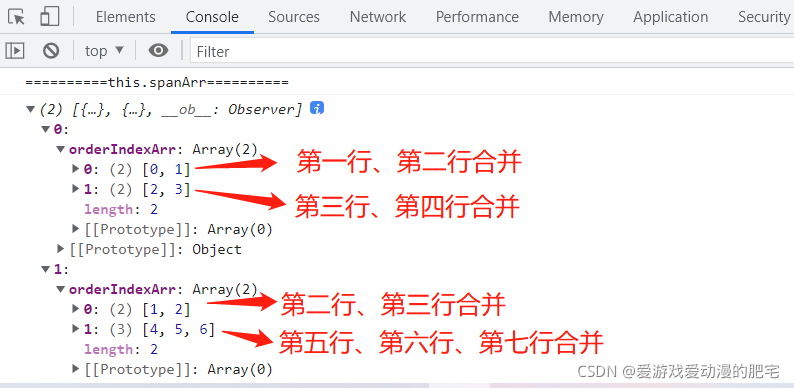
      console.log('==========this.spanArr==========')
      console.log(this.spanArr)
    },
    colSpanMethod2({ row, column, rowIndex, columnIndex }) {
      if (columnIndex === 2) {
        for (let i = 0, l = this.spanArr[row.tbIndex].orderIndexArr.length; i < l; i++) {
          let element = this.spanArr[row.tbIndex].orderIndexArr[i]
          for (let j = 0; j < element.length; j++) {
            let item = element[j]
            if (rowIndex === item) {
              if (j === 0) {
                return {
                  rowspan: element.length,
                  colspan: 1
                }
              } else {
                return {
                  rowspan: 0,
                  colspan: 0
                }
              }
            }
          }
        }
      }
    }
  }

}
</script>
效果:
同上
来看看前端打印的信息:





 扫一扫
扫一扫


 820
820


 到【灌水乐园】发言



