





 本文介绍了一种基于表单的树形单选功能,支持多级筛选与高效界面设计,包括加载机制、树节点默认展开、文本筛选框与自动查询、焦点自动设置及美观呈现等特性。
名称:表单支持 树 单选
路径要求:暂无
页面要求:
- 点击框的时候才判断是否需要加载;有加载过的话不能再加载;(代码要求)
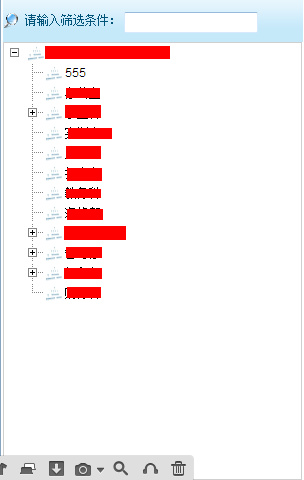
- 树默认打开到一级树节点;(页面效果)
- 支持文本筛选框。筛选框支持回车和自动查询;只是展示匹配到的结果。同样,只是展示到一级树节点;(可以的话,可以看怎么实现到展开到匹配到的节点,然后该节点的子节点不再打开。)(页面效果)
- 点击框之后,焦点自动设置到文本筛选框,不需要用户自己再点一次!(页面效果)
- 必须配上合适的节点素材等美观;不要有不必要的滚动条和线边框;
自我实现:
<bandbox id="${REPEAT}EntityID" mold="rounded" maxlength="50" forward="onOpen =main.onInitialparentEntityIDModel"
autodrop="true" width="90%" readonly="true" onOpen="parentDepartID_searchVal.focus()" onMouseOver="parentDepartID_searchVal.focus()"
value="@{main$composer.viewModel.parentEntityID.XXXXXName }">
<bandpopup style='overflow-x:hidden' width="300px" height="480px">
<div vflex="1">
<div style="padding-top:2px;background-image: url(${pageContext.request.contextPath}/zkau/web/a52de3f1/sapphire/zul/img/grid/column-bg.png);">
<hbox left="2px;" style="padding-top:10px;" height="30px;">
<image src="/img/common/funnel.png" />
<n:span style="color:#00547A;">
 请输入筛选条件:
</n:span>
<textbox id="parentDepartID_searchVal" instant="true" maxlength="20"/>
</hbox>
</div>
<tree width="99%" zclass="z-dottree" id="parentEntityID_tree" forward="onSelect=main.onChooseOneTreeNode" vflex="1">
<template name="model">
<treeitem>
<treerow>
<treecell label="${each.description}" image="/img/common/department-16.png"/>
</treerow>
</treeitem>
</template>
</tree>
</div>
</bandpopup>
</bandbox>
其中值得注意的还有:
${pageContext.request.contextPath}

${desktop.webApp.servletContext.contextPath }





 扫一扫
扫一扫


 1163
1163

 被折叠的 条评论
为什么被折叠?
被折叠的 条评论
为什么被折叠?
 到【灌水乐园】发言





