





 本文介绍了Hadoop集群中历史服务器的配置,包括在mapred-site.xml中添加相关配置,并启动历史服务器进行验证。接着讲解了日志聚集的设置,通过修改yarn-site.xml实现日志上传至HDFS,以及测试过程。此外,还详细阐述了集群时间同步的重要性,选择了时间服务器并配置其他主机同步时间,确保整个集群的时间一致性。
Hadoop(5)
历史服务其和日志聚集的配置、集群时间同步的配置
历史服务器
为了查看程序的历史运行情况,需要配置一下历史服务器
- 配置mapred-site.xml
打开mapred-site.xml,在configuration标签里面添加以下内容:
<!-- 历史服务器端地址 -->
<property>
	<name>mapreduce.jobhistory.address</name>
    <value><历史服务器地址>:10020</value>
</property>
<!-- 历史服务器web端地址 -->
<property>
    <name>mapreduce.jobhistory.webapp.address</name>
    <value><历史服务器地址>:19888</value>
</property>
- 启动历史服务器
<Hadoop安装目录>/sbin/mr-jobhistory-daemon.sh start historyserver
- 使用
scp或者xsync命令同步配置文件 - 然后使用
jps命令查看历史服务器是否启动成功
日志聚集
日志聚集即将Hadoop运行的日志信息上传到HDFS上,这样可以方便的查看到程序运行的详情,方便开发调试
- 配置yarn-site.xml,在
configuration标签中添加以下内容:
<!-- 日志聚集功能使能 -->
<property>
<name>yarn.log-aggregation-enable</name>
<value>true</value>
</property>

<!-- 日志保留时间设置7天,value以秒为单位 -->
<property>
<name>yarn.log-aggregation.retain-seconds</name>
<value>604800</value>
</property>
- 使用
scp或者xsync命令同步配置文件 - 重新启动NodeManager 、ResourceManager和HistoryManager
测试历史服务器和日志聚集
-
访问ResourceManager的8088端口,可以看到Hadoop资源调度的页面
-
在Hadoop上执行一个MapReduce程序,执行完之后在资源调度的页面会出现一个History

-
访问JobHistoryServer的19888端口
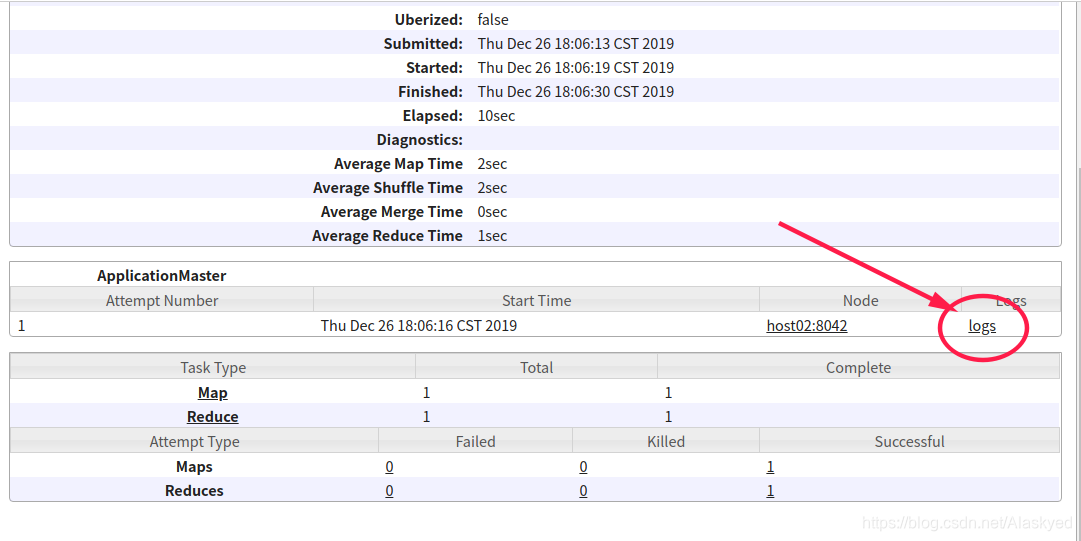
点击logs按钮可以查看日志
集群时间同步
有有时候我们需要保证集群中所有的服务器时间相同,不然可能会出现一些问题,具体的思路就是使用一台主机作为时间服务器,其他的主机同步时间服务器的时间,从而保证集群中所有的节点时间一致
注意
配置过程最好都使用root
配置集群中的时间服务器
选取一台主机当做时间服务器,这里我们使用192.168.8.101作为时间服务器
- 检查ntp是否安装
rpm -qa|grep ntp
看一下是否有以下内容
ntp-4.2.6p5-10.el6.centos.x86_64
ntpdate-4.2.6p5-10.el6.centos.x86_64
如果没有,需要我们手动安装ntp
yum -y install ntp
- 确保ntp安装完成之后,先关掉ntp服务
systemctl stop ntpd
- 修改ntp配置文件
vim /etc/ntp.conf
首先将#restrict 192.168.1.0 mask 255.255.255.0 nomodify notrap前面的注释去掉,然后将这个网段改为自己集群的额网段,我的网段是192.168.8.*
这个配置的意义是该网段上的所有机器可以从这台机器上查询和同步时间
restrict 192.168.8.0 mask 255.255.255.0 nomodify notrap
然后在下面几行前面加上注释,即不使用该配置
这几行的作用是从网络上获取时间
#server 0.centos.pool.ntp.org iburst
#server 1.centos.pool.ntp.org iburst
#server 2.centos.pool.ntp.org iburst
#server 3.centos.pool.ntp.org iburst
然后再添加以下内容到配置文件
server 127.127.1.0
fudge 127.127.1.0 stratum 10
- 修改 /etc/sysconfig/ntpd 文件,添加以下内容(同步硬件时钟)
SYNC_HWCLOCK=yes
- 然后重新启动ntp服务
systemctl start ntpd
- 设置ntp服务开机启动
systemctl enable ntpd
配置集群中的其他主机
- 首先跟上面一样检测ntp是否安装
- 确认安装ntp以后,启动ntp服务,并设置开机启动
- 创建一个定时任务
crontab -e
然后输入
*/10 * * * * /usr/sbin/ntpdate <集群中时间府服务器地址>
保存退出即可





 扫一扫
扫一扫


 1623
1623

 被折叠的 条评论
为什么被折叠?
被折叠的 条评论
为什么被折叠?
 到【灌水乐园】发言





