



 本文详细介绍了Spring MVC项目的结构,包括web.xml的配置,如ContextLoaderListener和DispatcherServlet的设置,以及pom.xml中相关依赖的引入。通过UserServlet展示了如何利用Spring管理Bean并调用服务。此外,还探讨了DispatcherServlet在处理URL请求中的作用,以及通过@Controller注解的UserController实现请求映射。内容涵盖了Spring MVC的基本流程和关键组件。
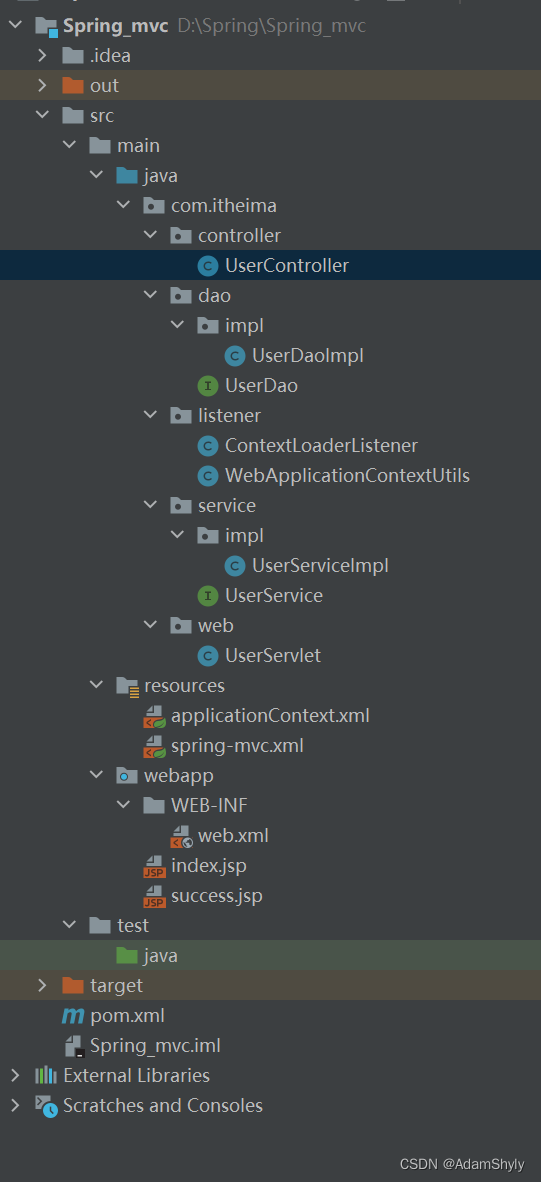
以下是本次入门学习SpringMVC的项目结构、web.xml以及pom.xml的配置内容
<?xml version="1.0" encoding="UTF-8"?>
<web-app xmlns="http://xmlns.jcp.org/xml/ns/javaee"
         xmlns:xsi="http://www.w3.org/2001/XMLSchema-instance"
         xsi:schemaLocation="http://xmlns.jcp.org/xml/ns/javaee http://xmlns.jcp.org/xml/ns/javaee/web-app_4_0.xsd"
         version="4.0">

    <context-param>
        <param-name>contextConfigLocation</param-name>
        <param-value>classpath:applicationContext.xml</param-value>
    </context-param>

    <listener>
        <listener-class>org.springframework.web.context.ContextLoaderListener</listener-class>
    </listener>

    <servlet>
        <servlet-name>UserServlet</servlet-name>
        <servlet-class>com.itheima.web.UserServlet</servlet-class>
    </servlet>
    <servlet-mapping>
        <servlet-name>UserServlet</servlet-name>
        <url-pattern>/userServlet</url-pattern>
    </servlet-mapping>

    <servlet>
        <servlet-name>DispatcherServlet</servlet-name>
        <servlet-class>org.springframework.web.servlet.DispatcherServlet</servlet-class>
        <init-param>
            <param-name>contextConfigLocation</param-name>
            <param-value>classpath:spring-mvc.xml</param-value>
        </init-param>
        <load-on-startup>1</load-on-startup>
    </servlet>
    <servlet-mapping>
        <servlet-name>DispatcherServlet</servlet-name>
        <url-pattern>/</url-pattern>
    </servlet-mapping>

</web-app>
<?xml version="1.0" encoding="UTF-8"?>
<project xmlns="http://maven.apache.org/POM/4.0.0"
         xmlns:xsi="http://www.w3.org/2001/XMLSchema-instance"
         xsi:schemaLocation="http://maven.apache.org/POM/4.0.0 http://maven.apache.org/xsd/maven-4.0.0.xsd">
    <modelVersion>4.0.0</modelVersion>

    <groupId>org.example</groupId>
    <artifactId>Spring_mvc</artifactId>
    <version>1.0-SNAPSHOT</version>

    <properties>
        <maven.compiler.source>8</maven.compiler.source>
        <maven.compiler.target>8</maven.compiler.target>
    </properties>

    <dependencies>
        <dependency>
            <groupId>org.springframework</groupId>
            <artifactId>spring-context</artifactId>
            <version>5.3.19</version>
        </dependency>
        <dependency>
            <groupId>org.springframework</groupId>
            <artifactId>spring-web</artifactId>
            <version>5.3.19</version>
        </dependency>
        <dependency>
            <groupId>org.springframework</groupId>
            <artifactId>spring-webmvc</artifactId>
            <version>5.3.19</version>
        </dependency>
        <dependency>
            <groupId>javax.servlet</groupId>
            <artifactId>javax.servlet-api</artifactId>
            <version>4.0.1</version>
        </dependency>
        <dependency>
            <groupId>javax.servlet.jsp</groupId>
            <artifactId>javax.servlet.jsp-api</artifactId>
            <version>2.3.3</version>
        </dependency>
    </dependencies>

</project>
首先在浏览器输入localhost:8080,页面会默认跳转到index.jsp中。此时在URL后加上/userServlet会调用com.itheima.web.UserServlet的doGet方法(浏览器向Tomcat发起的是GET请求)
package com.itheima.web;

import com.itheima.service.UserService;
import org.springframework.context.ApplicationContext;
import org.springframework.web.context.support.WebApplicationContextUtils;

import javax.servlet.ServletContext;
import javax.servlet.ServletException;
import javax.servlet.http.HttpServlet;
import javax.servlet.http.HttpServletRequest;
import javax.servlet.http.HttpServletResponse;
import java.io.IOException;

public class UserServlet extends HttpServlet {

    @Override
    protected void doGet(HttpServletRequest req, HttpServletResponse resp) throws ServletException, IOException {
        ServletContext servletContext = this.getServletContext();
WebApplicationContextUtils.getWebApplication(servletContext);
        ApplicationContext app = WebApplicationContextUtils.getWebApplicationContext(servletContext);
        UserService userService = app.getBean(UserService.class);
        userService.save();
    }

}
由于我在项目中有导入spring-web依赖,而且也将Spring中的ContextLoaderListener在web.xml进行了注册,所以ContextLoaderListener会读取web.xml中配置的contextConfigLocation的映射值,将类加载路径(resources)下名为applicationContext.xml作为ClassPathXmlApplicationContext(ApplicationContext的子类)的构造函数的初始值进行文件加载,所以在UserServlet的doGet方法中spring-web依赖自带的WebApplicationContextUtils工具类可以直接通过getWebApplicationContext方法将之前已经被ContextLoaderListener内置的ServletContext的setAttribute方法初始化的ApplicationContext返回给app这个变量。
以下是applicationContext.xml的配置内容
<?xml version="1.0" encoding="UTF-8"?>
<beans xmlns="http://www.springframework.org/schema/beans"
       xmlns:xsi="http://www.w3.org/2001/XMLSchema-instance"
       xsi:schemaLocation="http://www.springframework.org/schema/beans http://www.springframework.org/schema/beans/spring-beans.xsd">

    <bean id="userDao" class="com.itheima.dao.impl.UserDaoImpl"></bean>

    <bean id="userService" class="com.itheima.service.impl.UserServiceImpl">
        <property name="userDao" ref="userDao"></property>
    </bean>

</beans>
然后app变量通过调用getBean方法获取在applicationContext.xml中作为bean标签的class属性值的UserService类或者UserService的实现类、子类的实例化bean对象。这里返回的是UserServiceImpl对象,因为它实现了UserService接口。最后再调用UserServiceImpl的save方法。
通过直接传入class来调用getBean方法的时候要注意如果配置文件中有多个bean的class属性值都指向了同一个类在获取该类的bean对象的时候则会报错。
以下是UserServiceImpl类的代码实现
package com.itheima.service.impl;

import com.itheima.dao.UserDao;
import com.itheima.service.UserService;

public class UserServiceImpl implements UserService {

    private UserDao userDao;

    public void setUserDao(UserDao userDao) {
        this.userDao = userDao;
    }

    @Override
    public void save() {
        userDao.save();
    }
}
可以看到UserServiceImpl的save方法是调用了UserDao对象的save方法,而UserServiceImpl要获取UserDao的实例化对象则要从Spring容器中寻找。而在applicationContext.xml中已经通过set注入(ref指向UserDaoImpl)的方式将UserDaoImpl(UserDao的实现类)作为UserServiceImpl的UserDao实例化对象进行使用。要注意UserServiceImpl中必须要有setUserDao的方法才可以进行set注入。
所以实际上UserServiceImpl是通过Spring容器获取UserDao的实例化bean对象来调用该对象的save方法。
以上都是通过spring-web依赖来实现
而此时在localhost:8080后面加上 /quick(localhost:8080/quick)则会跳转到一个新的自定义jsp页面,这里就是通过spring-webmvc依赖来实现

<%@ page contentType="text/html;charset=UTF-8" language="java" %>
<html>
<head>
    <title>Title</title>
</head>
<body>
    <h1>Success!</h1>
</body>
</html>
首先看向web.xml,其中配置了org.springframework.web.servlet.DispatcherServlet, 这是spring-webmvc依赖中包含的类,也同时加载了类加载路径(resources)下的spring-mvc.xml配置文件来与Web项目进行联系。而且DispatcherServlet的URL映射是缺省值( / ) ,代表所有包括localhost:8080的URL请求均会传入到DispatcherServlet进行处理。还要注意其中的load-on-startup值为1,代表在web application启动时就实例化DispatcherServlet并调用其init方法。
以下是spring-mvc.xml文件的内容
<?xml version="1.0" encoding="UTF-8"?>
<beans xmlns="http://www.springframework.org/schema/beans"
       xmlns:xsi="http://www.w3.org/2001/XMLSchema-instance"
       xmlns:context="http://www.springframework.org/schema/context"
       xsi:schemaLocation="http://www.springframework.org/schema/beans http://www.springframework.org/schema/beans/spring-beans.xsd
                            http://www.springframework.org/schema/context  http://www.springframework.org/schema/context/spring-context.xsd">

    <!-- 组件扫描 -->
    <context:component-scan base-package="com.itheima.controller"></context:component-scan>

</beans>
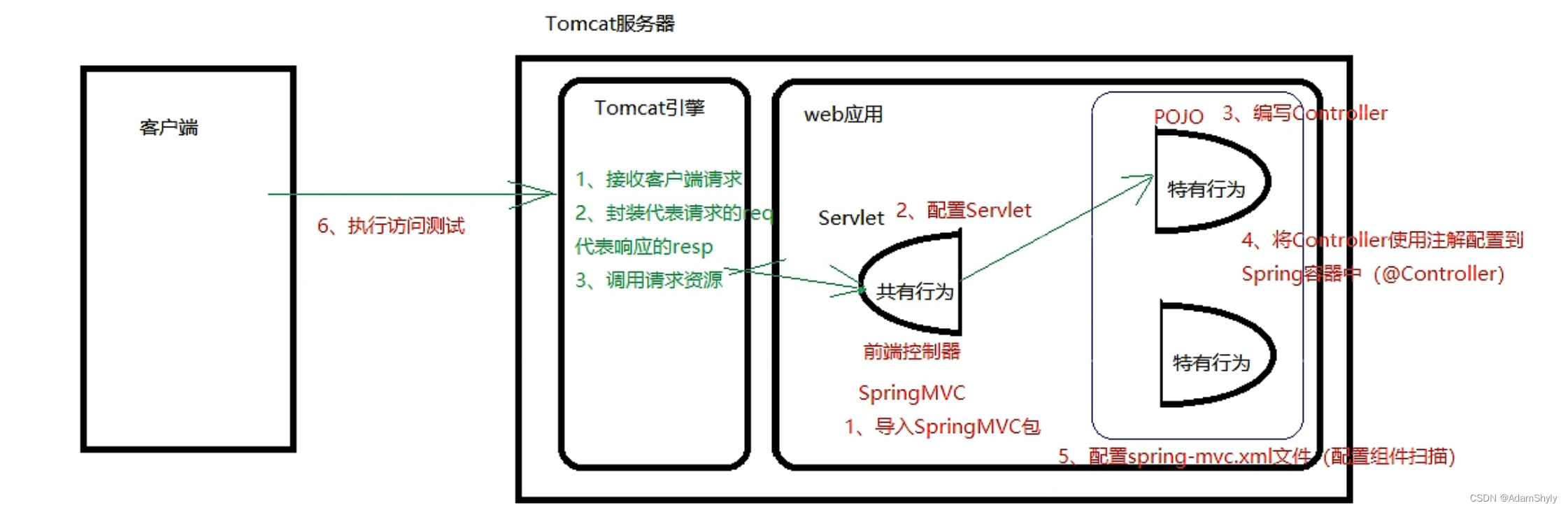
通过引入context命名空间在com.itheima.controller包下进行组件扫描,而其中被@Controller标识的UserController类就来充当MVC架构中controller的角色。而且可以看到UserController的save方法被@RequestMapping标识,并且值为 /quick ,中文直译为请求映射,意思就是当浏览器的URL请求为localhost:8080/quick时,UserController则会调用该save方法,返回success.jsp给前端控制器(DispatcherServlet)处理,实现页面跳转(从index.jsp跳转到success.jsp)。
这里还要注意一个点:如果 @RequestMapping 指定的URL与web.xml中其他servlet指定的URL相同(比如 /userServlet ),在跳转到该URL时不会报错,不过GET请求不会交给DispatcherServlet进行处理,而是交给其他url-pattern为/userServlet的servlet进行处理。所以tomcat服务器会先将请求交给已经被定义的servlet,最后匹配不到相应的servlet再交给缺省值DispatcherServlet进行处理。
package com.itheima.controller;

import org.springframework.stereotype.Controller;
import org.springframework.web.bind.annotation.RequestMapping;

@Controller
public class UserController {

    @RequestMapping("/quick")
    public String save() {
        System.out.println("Controller save running ...");
        return "success.jsp";
    }

}
根据我在软件工程学专业课上学的MVC架构中,controller其中一个功能就是更新view
本人才刚学两天Spring如果内容解释有误望指出





 扫一扫
扫一扫


 968
968

 被折叠的 条评论
为什么被折叠?
被折叠的 条评论
为什么被折叠?
 到【灌水乐园】发言





