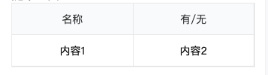
效果
HTML
<View className={styles['table']}>
     <View className={styles['table-tr']}>
           <View className={styles['table-th']}>名称</View>
           <View className={styles['table-th']}>有/无</View>
     </View>
     <View className={styles['table-tr']}>
     		// 这里可以map需求的数据
           <View className={styles['table-td']}>内容1</View>
           <View className={styles['table-td']}>内容2</View>
     </View>
</View>
CSS
 .table {
      border: 1px solid #e8e8e8;
      width: 650px;
      .table-tr {
        display: flex;
        width: 100%;
        justify-content: center;
        height: 85px;
        align-items: center;
        .table-th {
          width: 50%;
          justify-content: center;
          background: #f9fafc;
          color: #323332;
          display: flex;
          height: 85px;
          align-items: center;
          border-bottom: 1px solid #e8e8e8;
          border-right: 1px solid #e8e8e8;
        }
        .table-td {
          width: 50%;
          height: 85px;
          line-height: 85px;
          text-align: center;
          border-bottom: 1px solid #e8e8e8;
          border-right: 1px solid #e8e8e8;
        }
      }
    }




 这篇博客展示了如何使用HTML和CSS来构建一个简单的表格布局。通过定义样式类`table`,`table-tr`,`table-th`和`table-td`,作者创建了一个具有边框、居中对齐和单元格间边框的表格。表格包含两行,第一行为表头,第二行展示数据。CSS部分详细定义了表格元素的样式,包括宽度、高度、内边距、背景色和边框。





 扫一扫
扫一扫


 2453
2453

 被折叠的 条评论
为什么被折叠?
被折叠的 条评论
为什么被折叠?
 到【灌水乐园】发言





