



 本文介绍了解决在使用Git进行push操作时遇到的私人邮箱地址被暴露的问题。提供了两种解决方案:一是取消Blockcommandlinepushesthatexposemyemail选项;二是选择公开邮箱地址。
案发现场
git push 时发生
...
remote: error: GH007: Your push would publish a private email address.
remote: You can make your email public or disable this protection by visiting:
remote: http://github.com/settings/emails
...
解决方案
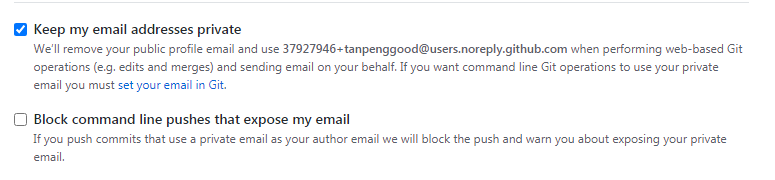
方案一 取消勾选Block command line pushes that expose my email
SettingsEmails-
Block command line pushes that expose my email
-
方案二 取消Keep my email address private,就是将邮箱公开
- Open your GitHub account, and go to
Settings -> Emails - Select the
Keep my email address privatecheck box.





 扫一扫
扫一扫


 1197
1197

 被折叠的 条评论
为什么被折叠?
被折叠的 条评论
为什么被折叠?
 到【灌水乐园】发言





