


项目介绍
项目地址:https://github.com/QuentinFuxa/WhisperLiveKit
本文旨在快速上手,搭建环境,做下模型服务的功能学习和简单主观评测。
- 关键词:转录transcription,说话人分离diarization,机器翻译translation,语音活动检测vad
- 目的:环境搭建,快速上手,主观快速评测
- 难度:中;
WhisperLiveKit是一个实施转录工具,那为什么不直接使用Whisper呢。
从应用场景上先看,会议/直播/在线教育等这些场景,需要实时输出转录结果(就需要对小窗口的录音进行转录),甚至要进行多人说话时,说话人识别,还可能需要实时翻译同传。
而,Whisper 是为完整语句设计的,而不是实时片段。处理小片段会丢失上下文,截断音节中的单词,并产生糟糕的转录。WhisperLiveKit 使用最先进的同步语音研究进行智能缓冲和增量处理。
WhisperLiveKit基于历史上的若干Research的基础上,进行开发设计,包括:
- SimulStreaming (SOTA 2025) - Ultra-low latency transcription using AlignAtt policy
SimulStreaming (SOTA 2025) - 使用 AlignAtt 策略实现超低延迟转录 - NLLB, (distilled) (2024) - Translation to more than 100 languages.
NLLB,(精简版) (2024) - 翻译超过 100 种语言。 - WhisperStreaming (SOTA 2023) - Low latency transcription using LocalAgreement policy
WhisperStreaming (SOTA 2023) - 使用 LocalAgreement 策略的低延迟转录 - Streaming Sortformer (SOTA 2025) - Advanced real-time speaker diarization
流式 Sortformer(SOTA 2025)- 高级实时说话人分割 - Diart (SOTA 2021) - Real-time speaker diarization
Diart(SOTA 2021)- 实时说话人分割 - Silero VAD (2024) - Enterprise-grade Voice Activity Detection
Silero VAD(2024)- 企业级语音活动检测
这是项目的架构图,支持多用户并发
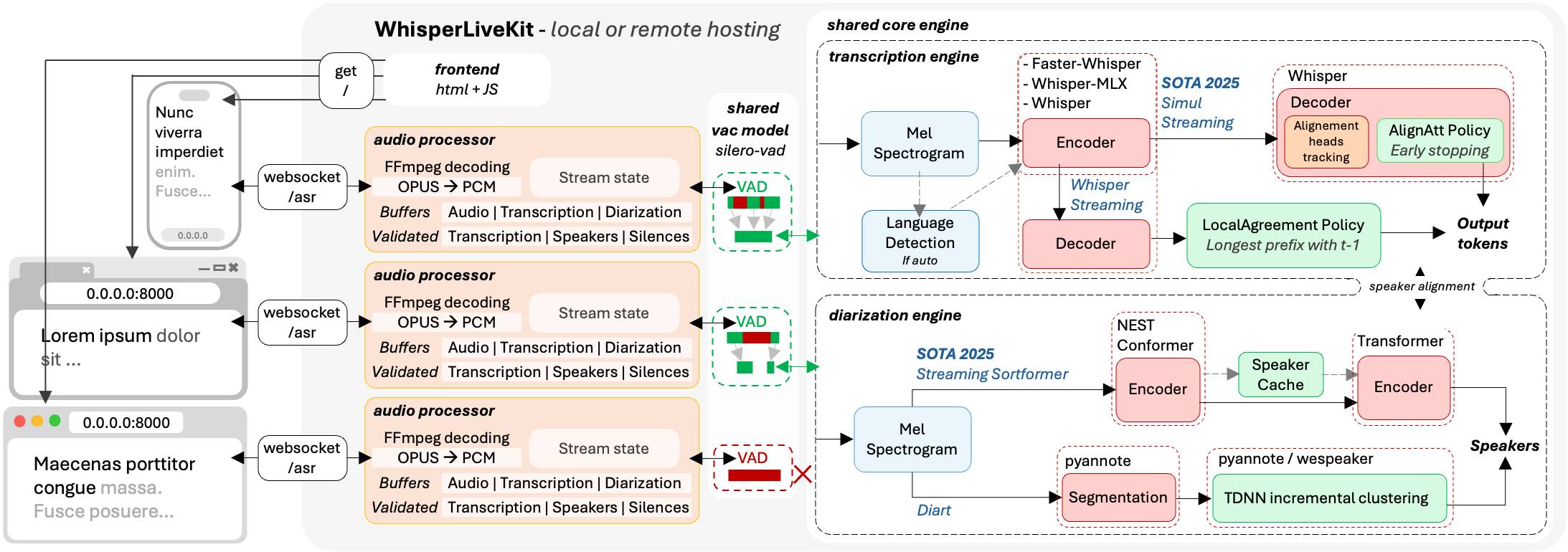
下面我们进行安装部署,作下上手简单评测
安装运行
环境部署
使用conda 创建隔离运行环境。考虑到我这边是RTX5090显卡+匹配的torch版本,我这边还是基于之前的whipser环境进行复制,生成新的conda环境。
(base) PS C:\Users\Jacob> conda env list
# conda environments:
#
base * C:\Users\Jacob\miniconda3
fireredtts C:\Users\Jacob\miniconda3\envs\fireredtts
pytorch_nightly_env C:\Users\Jacob\miniconda3\envs\pytorch_nightly_env
qwen_rtx5090 C:\Users\Jacob\miniconda3\envs\qwen_rtx5090
rtx50_comfyui C:\Users\Jacob\miniconda3\envs\rtx50_comfyui
whisper C:\Users\Jacob\miniconda3\envs\whisper
(base) PS C:\Users\Jacob> conda
usage: conda-script.py [-h] [-v] [--no-plugins] [-V] COMMAND ...
conda is a tool for managing and deploying applications, environments and packages.
options:
-h, --help Show this help message and exit.
-v, --verbose Can be used multiple times. Once for detailed output, twice for INFO logging, thrice for DEBUG
logging, four times for TRACE logging.
--no-plugins Disable all plugins that are not built into conda.
-V, --version Show the conda version number and exit.
commands:
The following built-in and plugins subcommands are available.
COMMAND
activate Activate a conda environment.
clean Remove unused packages and caches.
commands List all available conda subcommands (including those from plugins). Generally only used by
tab-completion.
compare Compare packages between conda environments.
config Modify configuration values in .condarc.
content-trust Signing and verification tools for Conda
create Create a new conda environment from a list of specified packages.
deactivate Deactivate the current active conda environment.
doctor Display a health report for your environment.
env Create and manage conda environments.
export Export a given environment
info Display information about current conda install.
init Initialize conda for shell interaction.
install Install a list of packages into a specified conda environment.
list List installed packages in a conda environment.
notices Retrieve latest channel notifications.
package Create low-level conda packages. (EXPERIMENTAL)
remove (uninstall) Remove a list of packages from a specified conda environment.
rename Rename an existing environment.
repoquery Advanced search for repodata.
run Run an executable in a conda environment.
search Search for packages and display associated information using the MatchSpec format.
tos A subcommand for viewing, accepting, rejecting, and otherwise interacting with a channel's
Terms of Service (ToS). This plugin periodically checks for updated Terms of Service for the
active/selected channels. Channels with a Terms of Service will need to be accepted or
rejected prior to use. Conda will only allow package installation from channels without a
Terms of Service or with an accepted Terms of Service. Attempting to use a channel with a
rejected Terms of Service will result in an error.
update (upgrade) Update conda packages to the latest compatible version.
(base) PS C:\Users\Jacob> conda create -n whisperlivekit --clone whisper
3 channel Terms of Service accepted
Retrieving notices: done
Source: C:\Users\Jacob\miniconda3\envs\whisper
Destination: C:\Users\Jacob\miniconda3\envs\whisperlivekit
Packages: 19
Files: 35845
Downloading and Extracting Packages:
## Package Plan ##
environment location: C:\Users\Jacob\miniconda3\envs\whisperlivekit
added / updated specs:
- conda-forge/noarch::ca-certificates==2025.8.3=h4c7d964_0
- conda-forge/win-64::ffmpeg==4.3.1=ha925a31_0
- conda-forge/win-64::openssl==3.5.2=h725018a_0
- defaults/noarch::pip==25.1=pyhc872135_2
- defaults/noarch::tzdata==2025b=h04d1e81_0
- defaults/win-64::bzip2==1.0.8=h2bbff1b_6
- defaults/win-64::expat==2.7.1=h8ddb27b_0
- defaults/win-64::libffi==3.4.4=hd77b12b_1
- defaults/win-64::python==3.12.11=h716150d_0
- defaults/win-64::setuptools==78.1.1=py312haa95532_0
- defaults/win-64::sqlite==3.50.2=hda9a48d_1
- defaults/win-64::tk==8.6.14=h5e9d12e_1
- defaults/win-64::ucrt==10.0.22621.0=haa95532_0
- defaults/win-64::vc14_runtime==14.44.35208=h4927774_10
- defaults/win-64::vc==14.3=h2df5915_10
- defaults/win-64::vs2015_runtime==14.44.35208=ha6b5a95_10
- defaults/win-64::wheel==0.45.1=py312haa95532_0
- defaults/win-64::xz==5.6.4=h4754444_1
- defaults/win-64::zlib==1.2.13=h8cc25b3_1
done
#
# To activate this environment, use
#
# $ conda activate whisperlivekit
#
# To deactivate an active environment, use
#
# $ conda deactivate
(base) PS C:\Users\Jacob> conda activate whisperlivekit
(whisperlivekit) PS C:\Users\Jacob> pip install whisperlivekit
Collecting whisperlivekit
Downloading whisperlivekit-0.2.9-py3-none-any.whl.metadata (18 kB)
Collecting fastapi (from whisperlivekit)
Downloading fastapi-0.117.1-py3-none-any.whl.metadata (28 kB)
Collecting librosa (from whisperlivekit)
Downloading librosa-0.11.0-py3-none-any.whl.metadata (8.7 kB)
Requirement already satisfied: soundfile in c:\users\jacob\miniconda3\envs\whisperlivekit\lib\site-packages (from whisperlivekit) (0.13.1)
Collecting faster-whisper (from whisperlivekit)
Downloading faster_whisper-1.2.0-py3-none-any.whl.metadata (16 kB)
Collecting uvicorn (from whisperlivekit)
Downloading uvicorn-0.36.0-py3-none-any.whl.metadata (6.6 kB)
Collecting websockets (from whisperlivekit)
Downloading websockets-15.0.1-cp312-cp312-win_amd64.whl.metadata (7.0 kB)
Requirement already satisfied: torchaudio>=2.0.0 in c:\users\jacob\miniconda3\envs\whisperlivekit\lib\site-packages (from whisperlivekit) (2.8.0.dev20250810+cu128)
Requirement already satisfied: torch>=2.0.0 in c:\users\jacob\miniconda3\envs\whisperlivekit\lib\site-packages (from whisperlivekit) (2.9.0.dev20250810+cu128)
Requirement already satisfied: tqdm in c:\users\jacob\miniconda3\envs\whisperlivekit\lib\site-packages (from whisperlivekit) (4.67.1)
Requirement already  最低0.47元/天 解锁文章






 扫一扫
扫一扫


 2505
2505

 被折叠的 条评论
为什么被折叠?
被折叠的 条评论
为什么被折叠?
 到【灌水乐园】发言





