


 该博客介绍了如何在VSCode中通过编辑settings.json文件,自定义代码注释的标签和颜色,例如:‘!’为红色,‘?’为黄色,‘//’保持默认绿色,‘-*’带删除线,‘TODO’为橙色,‘##’为高亮绿色,提升代码阅读体验。
这文章的介绍中有图解: 主要就是 点击 settings --> opensettings(json) 后可以打开settings.json文件。
参考这个文章: https://www.cnblogs.com/suwanbin/p/13263732.html
在settings.json文件中增加如下设置:
"better-comments.tags": [
        {
          "tag": "!",
          "color": "#FF2D00",
          "strikethrough": false,
          "backgroundColor": "transparent"
        },
        {
          "tag": "?",
          "color": "#FFFF00",
          "strikethrough": false,
          "backgroundColor": "transparent"
        },
        {
          "tag": "//",
          "color": "#474747",
          "strikethrough": false,
          "backgroundColor": "transparent"
        },
        {
          "tag": "-*",
          "color": "#474747",
          "strikethrough": true,
          "backgroundColor": "transparent"
        },
        {
          "tag": "TODO",
          "color": "#FF8C00",
          "strikethrough": false,
          "backgroundColor": "transparent"
        },
        {
          "tag": "##",
          "color": "#00FF00",
          "strikethrough": false,
          "backgroundColor": "transparent"
        }
      ]
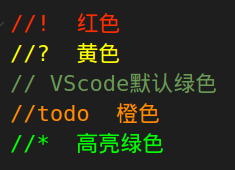
显示效果:
!        红色
?        黄色
//        VScode默认的绿色
-*        带删除线的
todo      橙色
##         高亮绿色





 扫一扫
扫一扫


 5万+
5万+

 被折叠的 条评论
为什么被折叠?
被折叠的 条评论
为什么被折叠?
 到【灌水乐园】发言





