


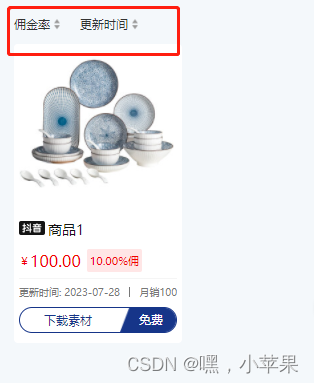
 文章描述了一个使用Vue.js编写的Web应用中,如何通过HTML和JavaScript实现佣金率和更新时间的动态切换,以及使用CSSFlex布局进行美化。组件间的交互通过data和methods属性实现。


html
<view class="u-flex u-m-t-32  u-m-b-24 u-f-s-24">
		<view class="u-flex" @click="navFun(1)">
			<text>佣金率</text>
			<image src="@/static/img/pai1.png" mode="" class="u-w-28 u-h-32" v-if="type1 == 1"></image>
			<image src="@/static/img/pai2.png" mode="" class="u-w-28 u-h-32" v-if="type1 == 2"></image>
			<image src="@/static/img/pai3.png" mode="" class="u-w-28 u-h-32" v-if="type1 == 3"></image>
		</view>
		<view class="u-flex u-m-l-32" @click="navFun(2)">
			<text>更新时间</text>
			<image src="@/static/img/pai1.png" mode="" class="u-w-28 u-h-32" v-if="type2 == 1"></image>
			<image src="@/static/img/pai2.png" mode="" class="u-w-28 u-h-32" v-if="type2 == 2"></image>
			<image src="@/static/img/pai3.png" mode="" class="u-w-28 u-h-32" v-if="type2 == 3"></image>
		</view>
	</view>
js
<script>
	export default {
		components: {},
		data() {
			return {
				type1:1,
				type2:1
			}
		},
		filters:{
			//取截单元,单位
			moneyFormat:function(arg){
				if(arg.toString().length>=4){
					const moneys = arg/10000
					const realVal = parseFloat(moneys).toFixed(2);
					return realVal+"w"
				}else {
					return arg
				}
			},
		},
		methods:{
			// num 1佣金率 2更新时间
			navFun(num){
				if(num == 1){
					this.type2 = 1;
					if(this.type1 == 1){
						this.type1 = 2
					}else if(this.type1 == 2){
						this.type1 = 3
					} else if(this.type1 == 3){
						this.type1 = 2
					}
				} else {
					this.type1 = 1;
					if(this.type2 == 1){
						this.type2 = 2
					}else if(this.type2 == 2){
						this.type2 = 3
					} else if(this.type2 == 3){
						this.type2 = 2
					}
				}
			},

		},
	}
</script>
<style lang='scss' scoped>
	.u-flex-center, .flex_align_center, .u-flex{
		display: flex;
		align-items: center;
	}
	.u-m-t-32{
		margin-top:32rpx;
	}
	.u-m-b-24{
		margin-bottom:32rpx;
	}
	.u-w-28{
		width:28rpx;
	}
	.u-h-28{
		height:28rpx;
	}
	.u-m-l-32{
		margin-left:32rpx;
	}
</style>





 扫一扫
扫一扫


 被折叠的 条评论
为什么被折叠?
被折叠的 条评论
为什么被折叠?
 到【灌水乐园】发言





