



PY自动化工具uiautomator2 的使用
一、adb安装
adb全称Android Debug Bridge,用于与Android设备进行交互,可以使得WINDOWS方便的链接Android设备.
安装链接:
https://blog.youkuaiyun.com/weixin_46932303/article/details/106969799
二、手机环境设置
设置->开发者选项->打开USB调试
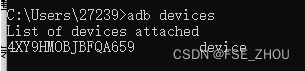
windows中 Win+R 打开终端,输入cmd ,输入adb devices,如下设备连接成功,device前面一串为手机设备的序列号
通过终端输入adb forward --list 查看转发端口

三、连接手机
1.通过USB连接手机(序列号)
连接后需要在终端输入:
# 初始化 uiautomator2
python -m uiautomator2 init

# 导包
import uiautomator2 as u2

# 通过USB连接手机(序列号)
device = u2.connect('4XY9HMOBJBFQA659')

# 输出手机信息
print(device.device_info)
2.app的相关操作
# 导包
from cgitb import text
import uiautomator2 as u2

# 通过USB连接手机(序列号)
device = u2.connect('4XY9HMOBJBFQA659')

# 输出手机信息
print(device.device_info)

# 获取手机当前启动app的包名
current_pak_name = device.app_current()
print(current_pak_name)
# 'com.android.settings'
# com.tencent.qqmusic

# 通过包名启动手机app
device.app_start(current_pak_name['package'],stop=True)
启动/关闭app
# device.app_current() 获取当前手机正在运行的包名
current_pak_name = device.app_current()
# 打印字典 其中package key 对应的就是包名
print(current_pak_name)
# {'package': 'com.miui.home', 'activity': '.launcher.Launcher', 'pid': 19388}

# 通过包名启动手机app
device.app_start("com.tencent.qqmusic",stop=True)

# 通过包名关闭app
device.app_stop('com.tencent.qqmusic')
获取app包名
# 手工获取
	# 获取正在所有运行app的包名
	print(device.app_list_running())
    # 获取正在运行的app包名(手机正打开的app)
    print(device.app_current())
3.设备操作
# 设备信息
print(device.info)

# 屏幕大小(元组)
device.window_size()

# 截屏  存放到电脑中的路径
device.screenshot('test.png')
四、其他操作
链接:
https://blog.youkuaiyun.com/Master724/article/details/107962349
五、weditor安装
weditor是一款基于浏览器的UI查看器,用来帮助我们查看UI元素定位。
因为uiautomator是独占资源,所以当atx运行的时候uiautomatorviewer是不能用的,为了减少atx频繁的启停,就需要用到此工具
使用pip安装
pip install -U weditor
查看安装是否成功
weditor --help
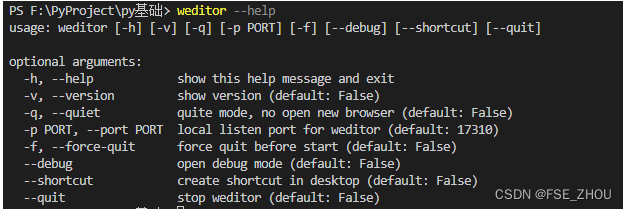
运行weditor
python -m weditor
有关小米手机使用weditor报错问题:
https://blog.youkuaiyun.com/Diana_0411/article/details/123101116
六、滑动操作
操作1:
参数:
    starttx:滑动起始点x
	startty:滑动起始点y
	endx:结束点x
	endy:结束点y
device.swipe()

操作2:
	向左边滑动屏幕的80%(宽度)
device.swipe('left',scale=0.8)
七、输入与清空
# 元素定位,定位输入框
elem = device(resourceId = "xxx")
elem.send_keys('1111')

# 清空数据
elem.clear_text()
elem.send_keys('222')





 扫一扫
扫一扫


 2320
2320

 被折叠的 条评论
为什么被折叠?
被折叠的 条评论
为什么被折叠?
 到【灌水乐园】发言





