


import java.io.File;
import java.io.IOException;
import java.nio.ByteBuffer;
import java.nio.channels.Channels;
import java.nio.channels.FileChannel;
import java.nio.channels.WritableByteChannel;
import java.nio.file.Path;
import java.nio.file.Paths;
import java.nio.file.StandardOpenOption;

//获取图片资源
@RequestMapping("/getResource")
public void getResource(HttpServletResponse response, @NotEmpty String sourceName) {
    if (!StringTools.pathIsOk(sourceName)) {
        throw new BusinessException(ResponseCodeEnum.CODE_600);
    }
    String suffix = StringTools.getFileSuffix(sourceName);
    FileTypeEnum fileTypeEnum = FileTypeEnum.getBySuffix(suffix);
    if (fileTypeEnum == null) {
        throw new BusinessException(ResponseCodeEnum.CODE_600);
    }
    switch (fileTypeEnum) {
        case IMAGE: //".jpeg", ".jpg", ".png", ".gif", ".bmp", ".webp"
            //缓存30天
            response.setHeader("Cache-Control", "max-age=" + 30 * 24 * 60 * 60);
            response.setContentType("image/" + suffix.replace(".", ""));
            break;
    }
    readFile(response, sourceName);
}

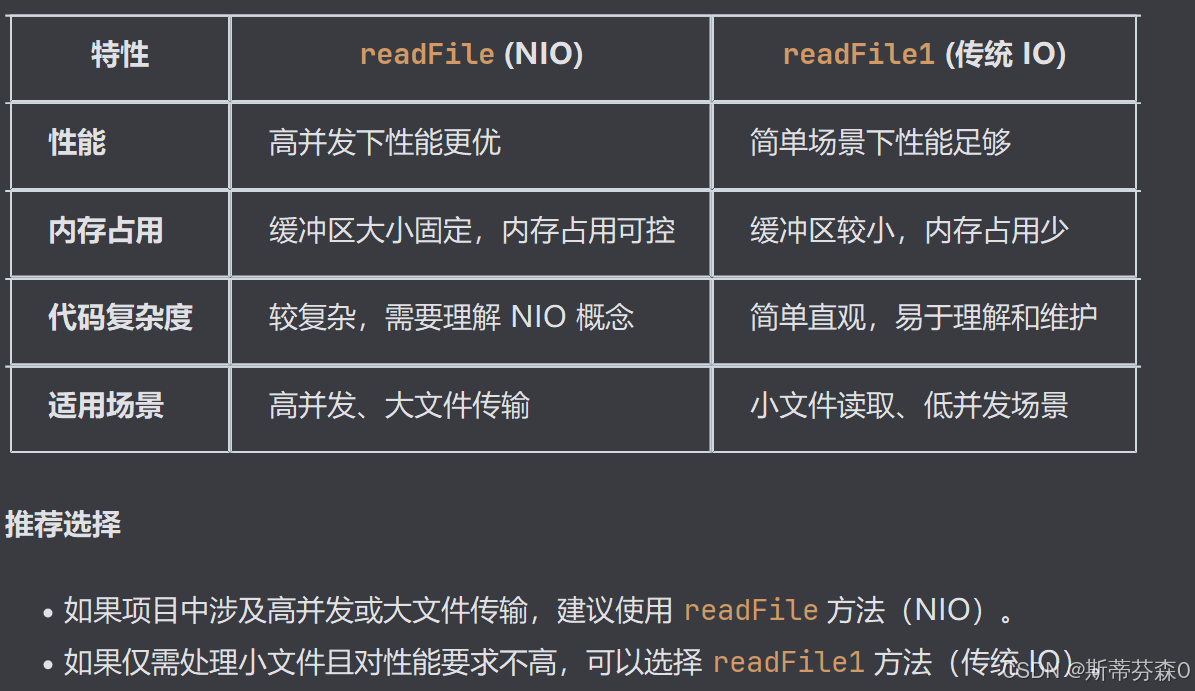
//使用NIO非阻塞来读取字节流的文件
protected void readFile(HttpServletResponse response, String filePath) {
    Path path = Paths.get(appConfig.getProjectFolder() + Constants.FILE_FOLDER + filePath);
    File file = path.toFile();
    if (!file.exists()) {
        return;
    }
    // 使用 Channels.newChannel 将传统IO流 OutputStream 转换为 NIO的通道 WritableByteChannel
    try (FileChannel fileChannel = FileChannel.open(path, StandardOpenOption.READ); //以只读模式打开文件通道。
         WritableByteChannel outChannel = Channels.newChannel(response.getOutputStream())) {
            ByteBuffer buffer = ByteBuffer.allocate(8192); // allocate 分配8192字节(8kb)的缓冲区
            while (fileChannel.read(buffer) != -1) {//从文件通道读取数据到缓冲区,如果返回值为-1表示已经读取到文件末尾。 (写模式)
                buffer.flip(); // 将 写模式(将数据写入缓冲区) 切换到 读模式(从缓冲区中读取数据) ; 将 position 重置为0(表示从缓冲区的开头开始读取)
                outChannel.write(buffer);//将缓冲区中的数据写入响应输出通道。
                buffer.clear(); // 清空缓冲区,准备下一次读取
            }
            response.getOutputStream().flush();//刷新输出流,将缓冲区中的数据发送给客户端。
    } catch (IOException e) {
        log.error("读取文件异常", e);
    }
}
对比普通的字节流读取方式
protected void readFile1(HttpServletResponse response, String filePath) {
    File file = new File(appConfig.getProjectFolder() + Constants.FILE_FOLDER + filePath);
    if (!file.exists()) {
        return;
    }
    try (OutputStream out = response.getOutputStream(); FileInputStream in = new FileInputStream(file)) {
        byte[] byteData = new byte[1024];
        int len = 0;
        while ((len = in.read(byteData)) != -1) {
            out.write(byteData, 0, len);
        }
        out.flush();
    } catch (Exception e) {
        log.error("读取文件异常", e);
    }
}





 扫一扫
扫一扫


 728
728

 被折叠的 条评论
为什么被折叠?
被折叠的 条评论
为什么被折叠?
 到【灌水乐园】发言





