



前言:在现代操作系统中,每个进程都拥有独立的地址空间,进程间通信(IPC)使不同进程能够交换数据、协调工作和共享资源。
什么是进程间通信,为何要又进程间通信?
进程的设计初衷是具有独立性,一个进程崩溃不会影响其他进程,并能精确控制每个进程的资源使用,所以不同进程是相互隔离的
而隔离会带来进程无法直接访问彼此的内存、无法直接调用其他进程的函数等情况。
所以我们需要一种安全、可控的通信机制来解决上述产生的情况,这种通信机制就是进程间通信。
进程间通信的机制有多种,本篇只对管道做介绍。
一 、管道
我们知道,相互独立的进程想要通信,那么就必须看到"同一份资源",但是每个进程所获得的资源都是事先规定好的,是不能把划分给进程A的资源再交给进程B的,所以就该由操作系统(OS)去提供"同一份资源",管道就是"同一份资源"中的一种类型。
- 管道是Unix中最古老的、最基础的进程间通信的形式。
- 我们把从一个进程连接到另一个进程的一个数据流称为一个“管道”
- 管道分为匿名管道和命名管道
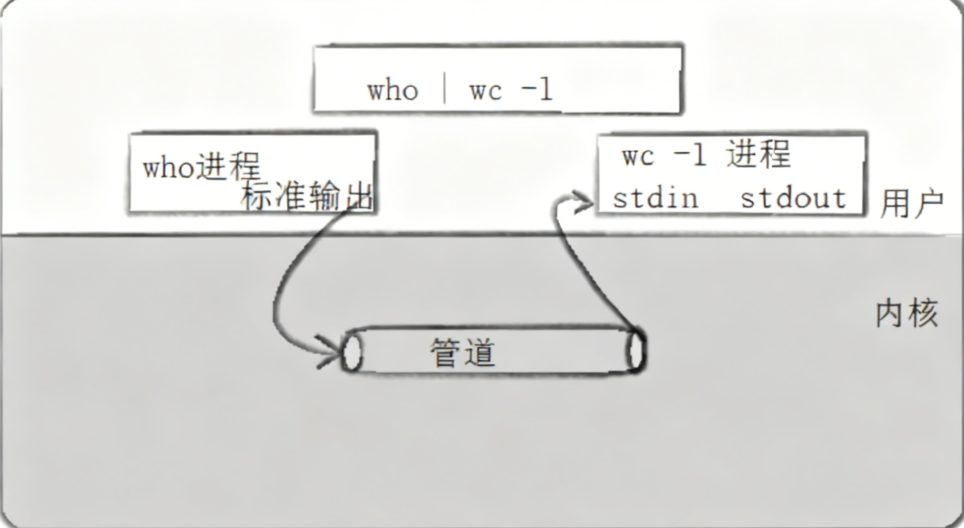
如上图所示,在终端输入命令 who | wc -l,Shell 解析命令,创建两个子进程并分别把 who进程的标准输出(stdout)重定向到管道写端,wc -l进程的标准输入(stdin)重定向到管道读端,who执行并输出登录用户列表到管道,wc -l从管道读取数据并统计行数,最后输出到标准输出上。
由上可知两个进程通过内核中的管道连接,实现了数据的传递。
1. 匿名管道
匿名管道是一种实现内存级的进程通信的方式。
1.1 基本接口
在代码中我们创建管道需要使用pipe接口
#include <unistd.h>
功能:创建⼀⽆名管道
原型
    int pipe(int fd[2]);  //int fd[2] 输出型参数
参数
    fd:⽂件描述符数组,其中fd[0]表⽰读端, fd[1]表⽰写端
    返回值:成功返回0,失败返回错误代码
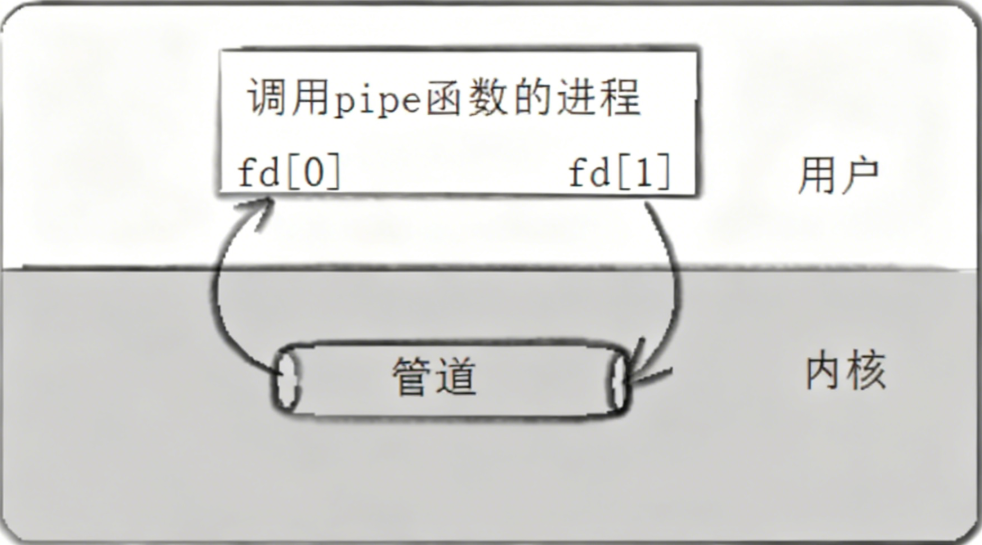
下面通过一个代码实列理解上图的流程
#include <stdio.h>
#include <stdlib.h>
#include <string.h>
#include <unistd.h>

int main(void)
{
    int fds[2];
    char buf[100];
    int len;

    // 创建匿名管道,失败则报错退出
    if (pipe(fds) == -1) {
        perror("make pipe");
        exit(1);
    }

    // 从标准输入读取数据(循环直到 EOF 或错误)
    while (fgets(buf, 100, stdin)) {
        len = strlen(buf);

        // 写入管道(写端 fds[1])
        if (write(fds[1], buf, len) != len) {
            perror("write to pipe");
            break;
        }

        // 清空缓冲区,避免残留数据
        memset(buf, 0x00, sizeof(buf));

        // 从管道读取数据(读端 fds[0])
        if ((len = read(fds[0], buf, 100)) == -1) {
            perror("read from pipe");
            break;
        }

        // 写入标准输出(stdout,文件描述符 1)
        if (write(1, buf, len) != len) {
            perror("write to stdout");
            break;
        }
    }

    // 关闭管道两端文件描述符(规范写法)
    close(fds[0]);
    close(fds[1]);

    return 0;
}
在上述代码中,主要流程是从键盘读取数据,写入管道(fd[1]),读取管道fd[0],输出到屏幕(stdout)。
1.2 用 fork 来共享管道原理
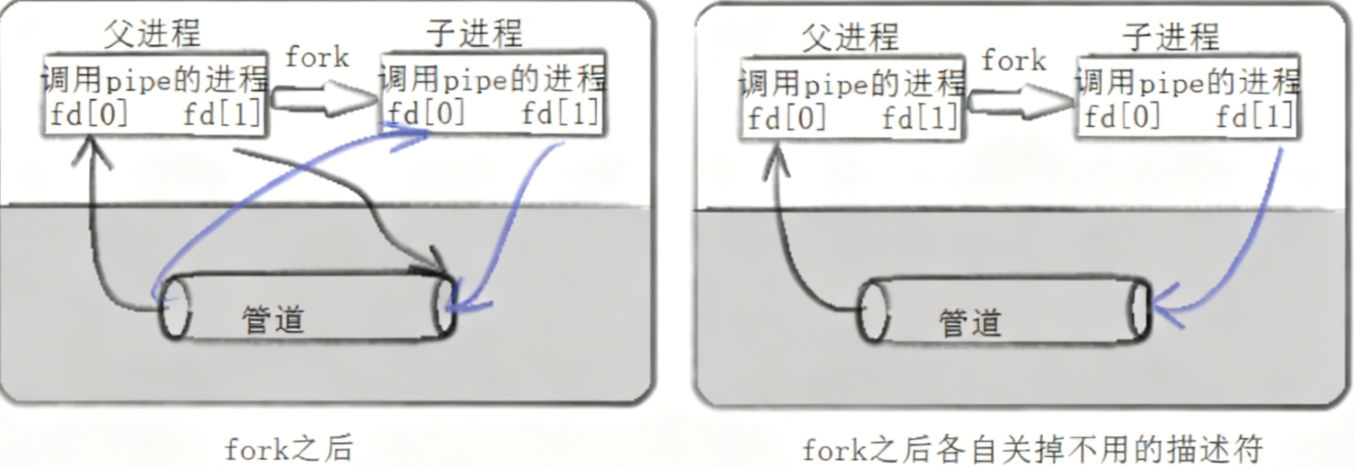
和上图对应的代码示例(测试读写)
#include <unistd.h>
#include <stdlib.h>
#include <stdio.h>
#include <errno.h>
#include <string.h>

// 错误处理宏:打印错误信息并退出
#define ERR_EXIT(m) \
do { \
    perror(m); \
    exit(EXIT_FAILURE); \
} while(0)

int main(int argc, char *argv[])
{
    int pipefd[2];  // 管道文件描述符数组:pipefd[0]读端,pipefd[1]写端

    // 创建匿名管道
    if (pipe(pipefd) == -1)
        ERR_EXIT("pipe error");

    pid_t pid;
    // 创建子进程
    pid = fork();
    if (pid == -1)
        ERR_EXIT("fork error");

    // 子进程逻辑:写管道
    if (pid == 0) {
        close(pipefd[0]);  // 子进程仅写,关闭读端
        write(pipefd[1], "hello", 5);  // 向管道写入5字节数据
        close(pipefd[1]);  // 写完关闭写端
        exit(EXIT_SUCCESS);  // 子进程退出
    }

    // 父进程逻辑:读管道
    close(pipefd[1]);  // 父进程仅读,关闭写端
    char buf[10] = {0};  // 接收缓冲区,初始化为0(避免乱码)
    read(pipefd[0], buf, 10);  // 从管道读取数据(最多10字节)
    printf("buf=%s\n", buf);  // 打印读取结果

    close(pipefd[0]);  // 读完关闭读端
    return 0;
}
由上代码可知,利用匿名管道就完成了父子进程间的通信,也就是说子进程通过匿名管道向父进程发送了一个 “ hello ” 数据。
深度理解管道
站在文件描述符角度
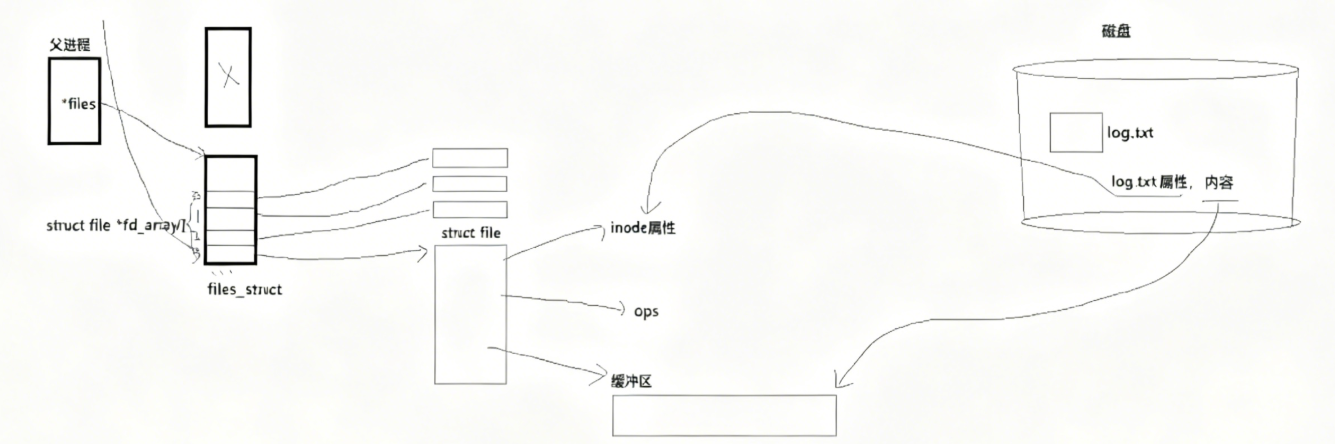
我们知道,在每个进程的task_struct中存在文件描述符表(fd_array[]),当进程打开磁盘文件时,OS会创建用于管理该文件的文件结构体(file),其中包含了该文件的inode属性、操作方法、文件缓存区,并把该结构体存于该进程的文件描述符表中。
而当我们创建子进程时,子进程会拷贝父进程的文件描述符表,子进程文件描述符表fd_array[]中的结构体指针会指向内存中和父进程一样的file结构体,这样父子进程都能对被打开的文件进行访问,也就是说父子进程看到同一份资源了。
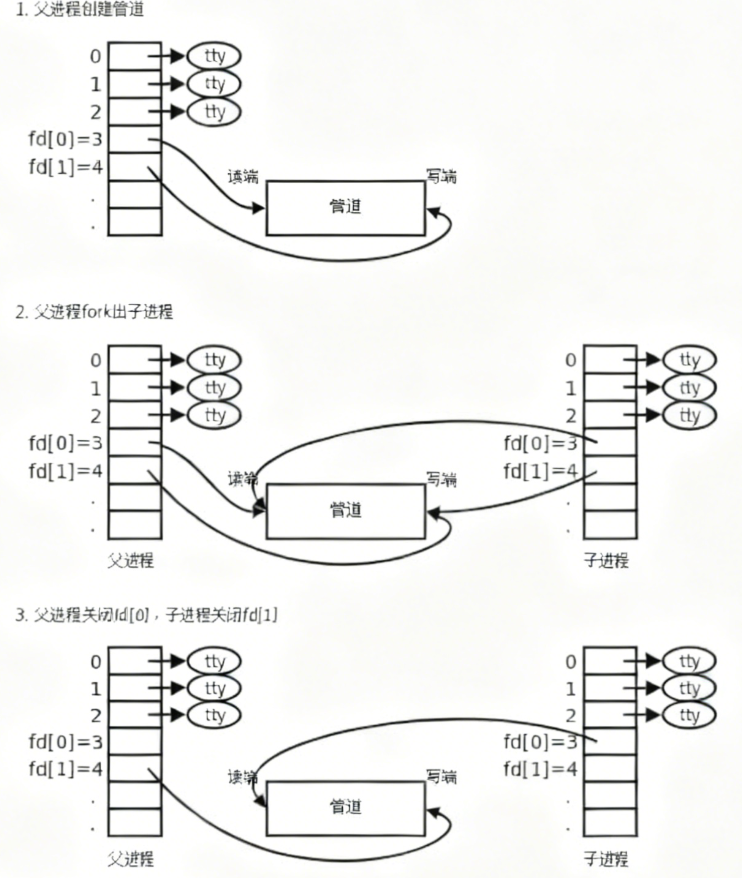
如上图所示,其实管道的实现通信的原理也和上述大致一样,可以把匿名管道理解为一个特殊的文件(内存级的文件),由函数pipe(int fd[2])创建出的匿名管道,其中fd[1]是写端,fd[0]是读端,都是文件描述符,存于进程的文件描述符表中,都指向同一个管道。于是父子进程就能利用该管道去进行通信了。
站在内核角度-管道本质
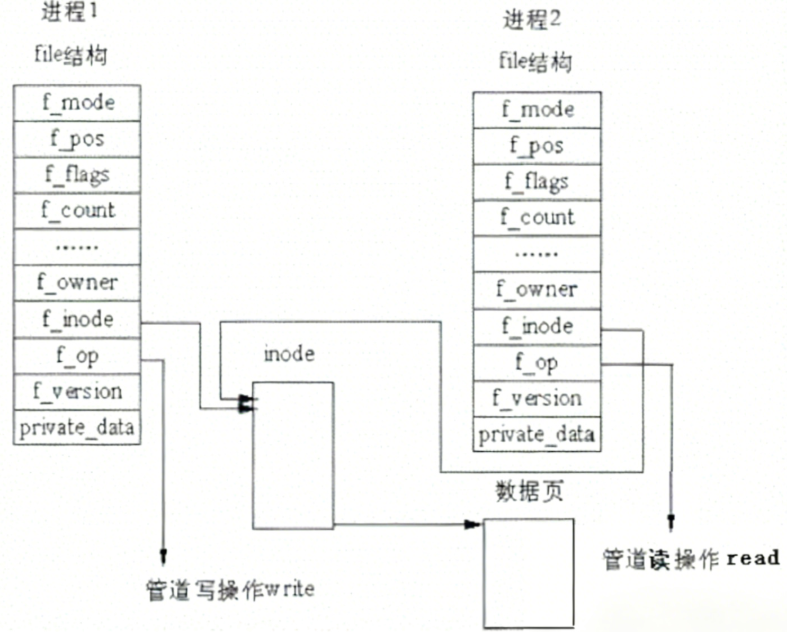
如上图所示,在父子进程的文件描述符表中,file指针指向同一个管道文件(file),而在管道inode中存在数据页,用于存放写入的数据,数据页是有大小的,所以管道所接收的内容也是有大小的。
所以,看待管道,就如同看待文件一样!管道的使用和文件一致,迎合了“Linux一切皆文件思想”。
1.3 管道基本使用(demo)
我们通过一个进程池来理解管道的基本使用。
ProcessPool.hpp
#ifndef __PROCESSPOOL_HPP__
#define __PROCESSPOOL_HPP__

#include <iostream>
#include <sys/types.h>
#include <unistd.h>
#include <cstdlib>
#include <cstdio>
#include <string>
#include <vector>
#include <sstream>
#include <functional>
#include <sys/wait.h>
#include <ctime>
#include "Task.hpp"
using namespace std;
const int gdefault_process_number = 5;
// typedef function<void(int fd)> callback_t;
using callback_t = function<void(int fd)>;

template <typename T>
std::string to_string(T value)
{
    std::ostringstream os;
    os << value;
    return os.str();
}
// describe
class Channel
{
public:
    Channel() {}
    Channel(int fd, const string &name, pid_t id) : _wfd(fd), _name(name), _sub_target(id)
    {
    }
    void DebugPrint()
    {
        cout << "channel name : " << _name << " , write fd : " << _wfd << " , sub process id : " << _sub_target << endl;
    }
    ~Channel() {}

    int FD() { return _wfd; }
    string Name() { return _name; }
    pid_t SubTarget() { return _sub_target; }

    void Close()
    {
        close(_wfd);
    }

    void Wait()
    {
        int status = 0;
        waitpid(_sub_target, &status, 0);
    }

private:
    int _wfd;
    string _name;
    pid_t _sub_target;

    // int _load;
};

class ProcessPool
{
public:
    ProcessPool(int num = gdefault_process_number) : _processnum(num)
    {
        srand((unsigned int)time(nullptr) ^ getpid() ^ 0x777);
    }
    ~ProcessPool() {}

    bool InitProcessPool(callback_t cb)
    {
        for (int i = 0; i < _processnum; i++)
        {
            // 1.create a pipe
            int pipefd[2] = {0};
            int n = pipe(pipefd);
            if (n < 0)
            {
                perror("pipe error");
                return false;
            }

            // 2.fork a child process
            pid_t id = fork();
            if (id == 0)
            {
                // close write end of pipe
                close(pipefd[1]);
                if(_channels.size() > 0)
                {
                    for(auto &ch : _channels)
                    {
                        ch.Close();
                        cout << getpid() << " child close channel : " << ch.FD() << endl;
                    }
                }

                // child do something
                cb(pipefd[0]);

                exit(0);
            }

            close(pipefd[0]);
            string name = "channel-" + to_string(i);
            _channels.emplace_back(pipefd[1], name, id);
        }

        return true;
    }

    void PollingCtrSubProcess()
    {
        int index = 0;
        while (true)
        {
            CtrSubProcess(index);
            index = (index + 1) % _processnum;
        }
    }

    void PollingCtrSubProcess(int count)
    {
        if (count <= 0)
            return;
        int index = 0;
        while (count--)
        {
            CtrSubProcess(index);
            index = (index + 1) % _processnum;
        }
    }

    void RandomCtrSubProcess()
    {
        int index = rand() % _processnum;
        CtrSubProcess(index);
    }

    void LoadCtrSubProcess()
    {
        // TODO
    }

    void WaitSubProcess()
    {
        // for (auto &ch : _channels)
        // {
        //     ch.Close();
        // }
        // for (auto &ch : _channels)
        // {
        //     ch.Wait();
        //     cout << "subprocess : " << ch.SubTarget() << " has exited" << endl;
        // }
        for(auto &ch : _channels)
        {
            ch.Close();
            ch.Wait();
        }
    }

private:
    vector<Channel> _channels; // all channels
    int _processnum;           // process number

    void CtrSubProcess(int &index)
    {
        int who = index;
        int x = rand() % tasks.size();
        cout << "chose channel : " << _channels[who].Name() << " , pid : " << _channels[who].SubTarget() << endl;
        // wake up the child process
        write(_channels[who].FD(), &x, sizeof(x));
        sleep(1);
    }
};
#endif
Task.hpp
#pragma once

#include <iostream>
#include <string>
#include <vector>
#include <functional>
using namespace std;
using task_t = function<void()>;

void Download()
{
    // Simulate a download task
    cout << "Downloading file..." << endl;
    cout << "Please wait for 2 seconds..." << endl;
    cout << "Download complete." << endl;
}

void MySQL()
{
    // Simulate a MySQL database task
    cout << "Connecting to MySQL database..." << endl;
    cout << "Please wait for 2 seconds..." << endl;
    cout << "MySQL task complete." << endl;
}

void SyncFile()
{
    // Simulate a file synchronization task
    cout << "Synchronizing files..." << endl;
    cout << "Please wait for 2 seconds..." << endl;
    cout << "File synchronization complete." << endl;
}

void Log()
{
    // Simulate a logging task
    cout << "Logging data..." << endl;
    cout << "Please wait for 2 seconds..." << endl;
    cout << "Logging complete." << endl;
}
vector<task_t> tasks = {Download, MySQL, SyncFile, Log};
main.cc
#include "processpool.hpp"
#include <memory>

int main()
{
    ProcessPool pp(5);
    pp.InitProcessPool([](int fd)
                       {
        while(true)
        {
            int code = 0;
            // cout << "process blocking : " << getpid() << endl;
            ssize_t n = read(fd, &code, sizeof(code));
            if(n == sizeof(code))
            {
                cout << "Subprocess is awakened : " << getpid() << endl;
                if(code >= 0 && code < (int)tasks.size())
                {
                    tasks[code]();
                }
                else
                {
                    cerr << "invalid task code : " << code << endl;
                }
            }
            else if (n == 0)
            {
                cout << "pipe closed, exiting Subprocess : " << getpid() << endl;
                break;
            }
            else
            {
                perror("read error");
                exit(1);
            }
        } });
    pp.PollingCtrSubProcess(10);
    cout << "parent process : " << getpid() << " exit " << endl;
    pp.WaitSubProcess();
    // for (auto &ch : channels)
    // {
    //     ch.DebugPrint();
    // }
    return 0;
}
该进程池的基本运行流程为
- 父进程构建 ProcessPool,调用 InitProcessPool(cb)。
- 父进程 fork 出 N 个子进程,父保存写端 Channel,子运行 cb 并阻塞等待任务代码。
- 父通过 PollingCtrSubProcess 等方法选择 Channel 并 write(code) 唤醒某子进程。
- 子进程收到 code,执行 taskscode,完成后继续阻塞等待下一任务或父进程关闭管道退出。
- 父进程终止时关闭所有写端并 wait 子进程退出。
1.4 管道的4种情况和5大特性
管道的读写规则
当没有数据可读时
- O_NONBLOCK 禁用:read 调用阻塞,进程暂停执行,直至有数据到达。
- O_NONBLOCK 启用:read 调用返回 -1,errno 错误码设为 EAGAIN。
当管道已满时
- O_NONBLOCK 禁用:write 调用阻塞,直至有进程读走管道中的数据。
- O_NONBLOCK 启用:write 调用返回 -1,errno 错误码设为 EAGAIN。
所有管道写端关闭:read 调用返回 0(表示读到 EOF)。
所有管道读端关闭:write 操作会触发 SIGPIPE 信号,可能导致执行 write 的进程退出。
写入原子性规则
- 写入数据量 ≤ PIPE_BUF:Linux 保证写入操作的原子性(不会被其他进程的写操作打断)。
- 写入数据量 > PIPE_BUF:Linux 不再保证写入的原子性(数据可能被拆分,与其他进程的写数据交织)。
管道的特性
- 常用于具有血缘关系的进程进行通信,常用于父子。
- 单向通信
- 管道的生命周期随进程
- 基于内核缓存区,面向字节流
- 管道自带同步机制
2. 命名管道
管道应用的一个限制就是只能在具有共同祖先(具有亲缘关系)的进程间通信。
如果我们想在不相关的进程之间交换数据,可以使用FIFO文件来做这项工作,它经常被称为命名管道,用于文件级的进程间通信。命名管道是一种特殊类型的文件。
2.1 与匿名管道的区别
| 特性 | 无名管道 | 命名管道 |
|---|---|---|
| 创建方式 | pipe()系统调用 | mkfifo()系统调用 |
| 文件系统 | 无对应文件 | 有文件路径(如/tmp/myfifo) |
| 进程关系 | 常见亲缘进程 | 任意进程 |
| 持久性 | 进程退出即消失 | 持久存在直至删除 |
2.2 创建一个命名管道
命名管道可以从命令行上创建,命令行方法是使用下面这个命令:
$ mkfifo filename
命名管道也可以从程序里创建,相关函数有:
int mkfifo(const char *filename,mode_t mode);
创建命名管道示例:
int main(int argc, char *argv[])
{
    mkfifo("p2", 0644);
    return 0;
}
命名管道由mkfifo函数创建,打开用open,FIFO(命名管道)与pipe(匿名管道)之间唯一的区别在它们创建与打开的方式不同,一但这些工作完成之后,它们具有相同的语义。
2.3 命名管道的打开规则
-
当前打开操作为 “读模式”(O_RDONLY)时
- O_NONBLOCK 禁用:调用阻塞,直至有其他进程以 “写模式” 打开该 FIFO。
- O_NONBLOCK 启用:调用立刻返回成功,无需等待写端进程。
-
当前打开操作为 “写模式”(O_WRONLY)时
- O_NONBLOCK 禁用:调用阻塞,直至有其他进程以 “读模式” 打开该 FIFO。
- O_NONBLOCK 启用:调用立刻返回失败,错误码为 ENXIO。
2.4 使用示例
实例1. 用命名管道实现文件拷贝
读取文件,写入命名管道:
#include <unistd.h>
#include <stdlib.h>
#include <stdio.h>
#include <errno.h>
#include <string.h>
#include <sys/stat.h>   // 包含 mkfifo() 函数声明
#include <fcntl.h>      // 包含 O_RDONLY/O_WRONLY 等打开模式定义

// 错误处理宏:打印错误信息并退出
#define ERR_EXIT(m) \
do { \
    perror(m); \
    exit(EXIT_FAILURE); \
} while(0)

int main(int argc, char *argv[])
{
    // 创建命名管道 FIFO,权限 0644(所有者读/写,其他读)
    if (mkfifo("tp", 0644) == -1) {
        // 若 FIFO 已存在(errno=EEXIST),可忽略错误,否则退出
        if (errno != EEXIST)
            ERR_EXIT("mkfifo");
    }

    // 打开源文件 "abc"(只读模式)
    int infd = open("abc", O_RDONLY);
    if (infd == -1)
        ERR_EXIT("open abc error");

    // 打开 FIFO "tp"(只写模式),默认阻塞等待读端打开
    int outfd = open("tp", O_WRONLY);
    if (outfd == -1)
        ERR_EXIT("open tp error");

    char buf[1024];
    int n;

    // 循环读取源文件数据,写入 FIFO
    while ((n = read(infd, buf, sizeof(buf))) > 0) {
        // 确保数据完全写入(应对 write 未写完的情况)
        if (write(outfd, buf, n) != n) {
            perror("write tp error");
            break;
        }
    }

    // 检查 read 是否出错(n == -1 时)
    if (n == -1)
        ERR_EXIT("read abc error");

    // 关闭文件描述符,释放资源
    close(infd);
    close(outfd);

    return 0;
}
读取管道,写入目标文件:
#include <unistd.h>
#include <stdlib.h>
#include <stdio.h>
#include <errno.h>
#include <string.h>
#include <sys/stat.h>   // 若需操作 FIFO 相关权限,此处保留(可选)
#include <fcntl.h>      // 包含文件打开模式(O_WRONLY/O_CREAT 等)定义

// 错误处理宏:打印错误信息并退出
#define ERR_EXIT(m) \
do { \
    perror(m); \
    exit(EXIT_FAILURE); \
} while(0)

int main(int argc, char *argv[])
{
    // 打开目标文件 abc.bak(只写+创建+截断模式),权限 0644
    // O_CREAT:文件不存在则创建;O_TRUNC:文件存在则清空内容
    int outfd = open("abc.bak", O_WRONLY | O_CREAT | O_TRUNC, 0644);
    if (outfd == -1)
        ERR_EXIT("open abc.bak error");

    // 打开 FIFO "tp"(只读模式),默认阻塞等待写端打开
    int infd = open("tp", O_RDONLY);
    if (infd == -1)  // 修复原代码 bug:原判断 outfd == -1,此处改为判断 infd
        ERR_EXIT("open tp error");

    char buf[1024];
    int n;

    // 循环从 FIFO 读取数据,写入目标文件 abc.bak
    while ((n = read(infd, buf, sizeof(buf))) > 0) {
        // 确保数据完全写入,避免部分写入导致数据丢失
        if (write(outfd, buf, n) != n) {
            perror("write abc.bak error");
            break;
        }
    }

    // 检查 read 是否出错(n == -1 为读错误,需处理)
    if (n == -1)
        ERR_EXIT("read tp error");

    // 关闭文件描述符,释放资源
    close(infd);
    close(outfd);

    // 删除 FIFO 文件(通信完成后清理)
    unlink("tp");

    printf("FIFO 数据传输完成,已生成 abc.bak\n");
    return 0;
}
示例1主要调用原生接口,创建管道文件来实现不同进程间的通信。
实例2. 用命名管道实现server&client通信
Namedpipe.hpp
#pragma once

#include <iostream>
#include <sys/types.h>
#include <sys/stat.h>
#include <fcntl.h>
#include <unistd.h>
#include <string>
#include <cstdio>
using std::string;

const string PIPE_NAME = "fifo";
mode_t mode = 0666;
#define SIZE 128
class NamedPipe
{
public:
    NamedPipe(const std::string &pipe_name, mode_t mode)
        : _pipe_name(pipe_name), _mode(mode), _fd(-1) {}
    ~NamedPipe()
    {
        if (_fd != -1)
        {
            close(_fd);
            _fd = -1;
        }
    }
    bool Create()
    {
        int n = mkfifo(PIPE_NAME.c_str(), mode);
        if (n == 0)
            std::cout << "mkfifo success" << std::endl;
        else
        {
            perror("mkfifo");
            return false;
        }
        return true;
    }
    bool OpenForRead()
    {
        _fd = open(_pipe_name.c_str(), O_RDONLY);
        if (_fd == -1)
        {
            perror("open");
            return false;
        }
        std::cout << "open for read success" << std::endl;
        return true;
    }
    bool OpenForWrite()
    {
        _fd = open(_pipe_name.c_str(), O_WRONLY);
        if (_fd == -1)
        {
            perror("open");
            return false;
        }
        std::cout << "open for write success" << std::endl;
        return true;
    }
    bool Read(std::string *out)
    {
        char buf[SIZE];
        ssize_t s = read(_fd, buf, SIZE - 1);
        if (s > 0)
        {
            buf[s] = 0;
            *out = buf;
        }
        else if (s == 0)
        {
            return false;
        }
        else
        {
            perror("read");
            return false;
        }
        return true;
    }
    bool Write(const std::string &in)
    {
        return write(_fd, in.c_str(), in.size()) != -1;
    }

    void Close()
    {
        if (_fd == -1)
            return;
        close(_fd);
    }

    void Remove()
    {
        unlink(_pipe_name.c_str());
    }

private:
    // string path;
    std::string _pipe_name;
    mode_t _mode;
    int _fd;
};
server.cpp
#include "Namedpipe.hpp"

int main()
{
    NamedPipe named_pipe(PIPE_NAME,0666);
    named_pipe.Create();
    named_pipe.OpenForRead();

    std::string message;
    while(true)
    {
        if(named_pipe.Read(&message))
            std::cout << "server get: " << message << std::endl;
        else
        {
            std::cout << "client quit, server quit too" << std::endl;
            break;
        }
    }

    named_pipe.Close();
    named_pipe.Remove();
    return 0;
}
client.cpp
#include "Namedpipe.hpp"

int main()
{
    NamedPipe named_pipe(PIPE_NAME,0666);
    named_pipe.OpenForWrite();

    std::string message;
    while(true)
    {
        std::cout << "client say: ";
        std::getline(std::cin, message);
        if(!std::cin.good())
            break;
        if(message == "quit")
            break;
        if(named_pipe.Write(message))
            std::cout << "client write " << message.size() << " bytes" << std::endl;
        else
        {
            perror("write");
            break;
        }
    }

    named_pipe.Close();
    return 0;
}
示例2本质就是对一些系统调用进行了封装处理,不难理解。





 扫一扫
扫一扫


 2524
2524

 被折叠的 条评论
为什么被折叠?
被折叠的 条评论
为什么被折叠?
 到【灌水乐园】发言





