



1、事件监听
1)事件监听三要素
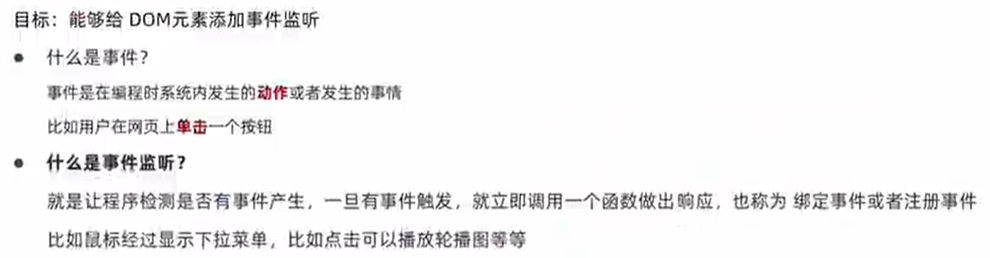
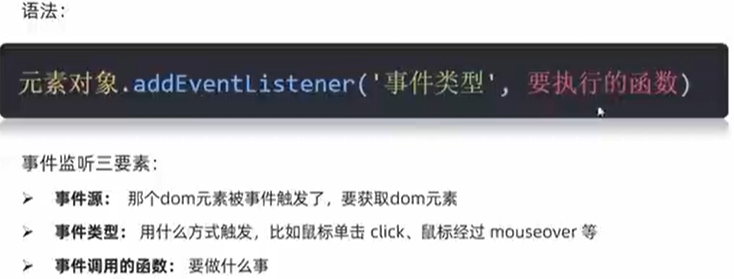
元素对象就是事件源
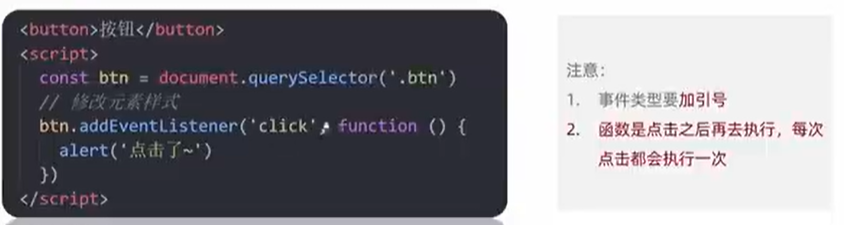
<body>
  <button>点</button>
  <script>
    const btn = document.querySelector('button')
    btn.addEventListener('click', function () {
      alert(`Hello World!`)
    })
  </script>
</body>
2) 案例:关闭广告
<!DOCTYPE html>
<html lang="en">

<head>
  <meta charset="UTF-8">
  <meta name="viewport" content="width=device-width, initial-scale=1.0">
  <title>Document</title>
  <style>
    .box {
      position: relative;
      width: 200px;
      height: 200px;
      background-color: skyblue;
      margin: 100px auto;
      line-height: 200px;
      text-align: center;
    }

    .close {
      position: absolute;
      top: 4px;
      right: 4px;
      width: 20px;
      height: 20px;
      background-color: #fff;
      text-align: center;
      line-height: 20px;
      font-size: 16px;
      cursor: pointer;
    }
  </style>
</head>

<body>
  <div class="box">
    ad
    <div class="close">X</div>
  </div>
  <script>
    const box = document.querySelector('.box')
    const close = document.querySelector('.close')
    close.addEventListener('click', function () {
      box.style.display = 'none'
    })
  </script>
</body>

</html>
3)案例:随机点名
<!DOCTYPE html>
<html lang="en">

<head>
  <meta charset="UTF-8">
  <meta name="viewport" content="width=device-width, initial-scale=1.0">
  <title>Document</title>
  <style>
    * {
      margin: 0;
      padding: 0;
    }

    h2 {
      text-align: center;
    }

    .box {
      width: 600px;
      margin: 50px auto;
      display: flex;
      font-size: 25px;
      line-height: 40px;
    }

    .qs {
      width: 450px;
      height: 40px;
      color: blue;

    }

    .btns {
      text-align: center;
    }

    .btns button {
      width: 120px;
      height: 35px;
      margin: 0 50px;
    }
  </style>
</head>

<body>
  <h2>随机点名</h2>
  <div class="box">
    <span>名字是:</span>
    <div class="qs">这里显示姓名</div>
  </div>
  <div class="btns">
    <button class="start">开始</button>
    <button class="end">结束</button>
  </div>
  <script>
    const arr = ['张三', '李四', '王五', '赵六', '钱七']
    let timerID = 0
    let random = 0
    const qs = document.querySelector('.qs')
    // start模块
    const start = document.querySelector('.start')
    // 添加点击事件
    start.addEventListener('click', function () {
      // 点击开始按钮后,禁用开始按钮,防止多线程问题;结束按钮同理
      start.disabled = true
      end.disabled = false
      timerID = setInterval(function () {
        random = parseInt(Math.random() * arr.length)
        // console.log(arr[random])
        qs.innerHTML = arr[random]
      }, 100)

      // 数组中只有一个值时,禁用按钮
      if (arr.length === 1) {
        start.disabled = true
        end.disabled = true
      }
    })

    // end模块
    const end = document.querySelector('.end')
    end.addEventListener('click', function () {
      start.disabled = false
      end.disabled = true
      clearInterval(timerID)
      arr.splice(random, 1)
    })
  </script>
</body>

</html>
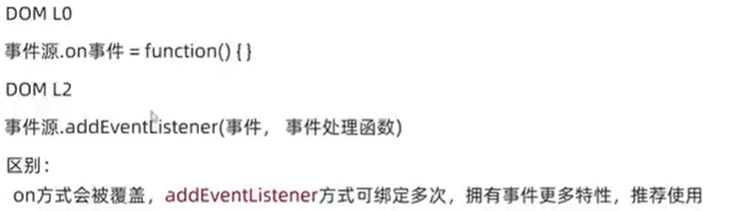
4)事件监听版本
2、事件类型
1)基础
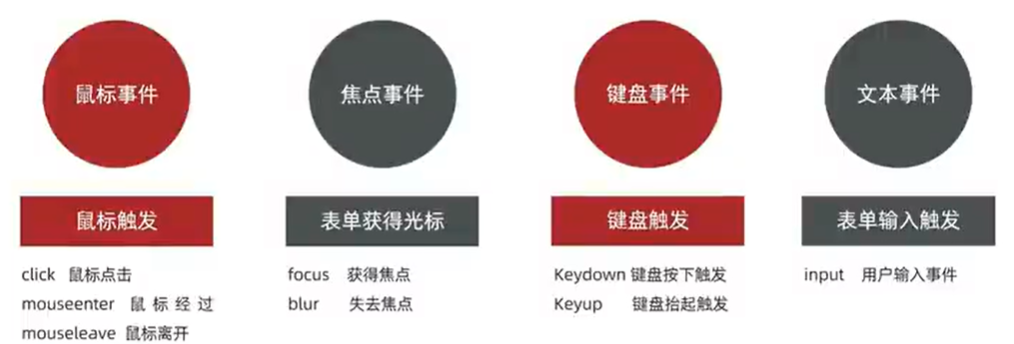
(1)常见的鼠标事件
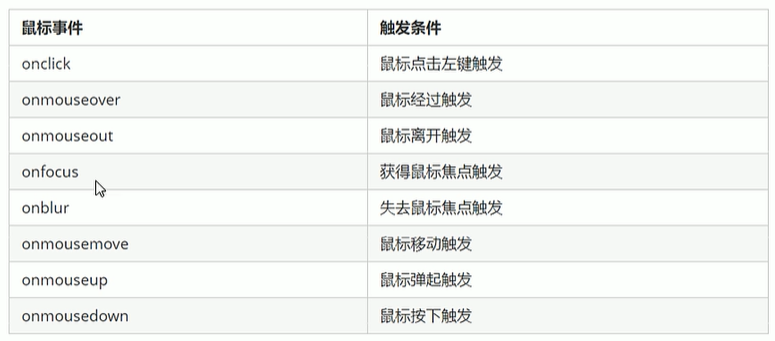
(2)常见的键盘事件
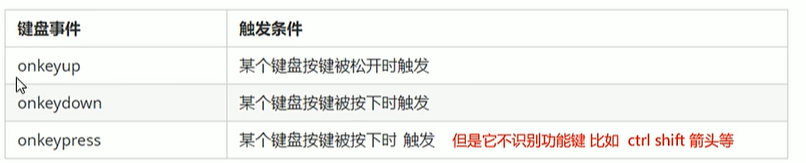
2)案例:完整轮播图
<!DOCTYPE html>
<html lang="en">
<head>
<meta charset="UTF-8">
<meta name="viewport" content="width=device-width, initial-scale=1.0">
<title>Document</title>
<style>
* {
box-sizing: border-box;
}
.slider {
width: 560px;
height: 400px;
overflow: hidden;
}
.slider-wrapper {
width: 100%;
height: 320px;
}
.slider-wrapper img {
width: 100%;
height: 100%;
display: block;
}
.slider-footer {
height: 80px;
background-color: rgb(100, 67, 68);
padding: 12px 12px 0 12px;
position: relative;
}
.slider-footer .toggle {
position: absolute;
right: 0;
top: 12px;
display: flex;
}
.slider-footer .toggle button {
margin-right: 12px;
width: 28px;
height: 28px;
appearance: none;
border: none;
background: rgba(255, 255, 255, 0.1);
color: #fff;
border-radius: 4px;
cursor: pointer;
}
.slider-footer .toggle button:hover {
background: rgba(255, 255, 255, 0.2);
}
.slider-footer p {
margin: 0;
color: #fff;
font-size: 18px;
margin-bottom: 10px;
}
.slider-indicator {
margin: 0;
padding: 0;
list-style: none;
display: flex;
align-items: center;
}
.slider-indicator li {
width: 8px;
height: 8px;
margin: 4px;
border-radius: 50%;
background: #fff;
opacity: 0.4;
cursor: pointer;
}
.slider-indicator li.active {
width: 12px;
height: 12px;
opacity: 1;
}
</style>
</head>
<body>
<div class="slider">
<div class="slider-wrapper">
<img src="/images/slider01.jpg" alt="" />
</div>
<div class="slider-footer">
<p>对人类来说会不会太超前了?</p>
<ul class="slider-indicator">
<li class="active"></li>
<li></li>
<li></li>
<li></li>
<li></li>
<li></li>
<li></li>
<li></li>
</ul>
<div class="toggle">
<button class="prev"><</button>
<button class="next">></button>
</div>
</div>
</div>
<script>
const sliderData = [
{ url: '/images/slider01.jpg', title: '对人类来说会不会太超前了?', color: 'rgb(100, 67, 68)' },
{ url: '/images/slider02.jpg', title: '开启剑与雪的黑暗传说!', color: 'rgb(43, 35, 26)' },
{ url: '/images/slider03.jpg', title: '真正的jo厨出现了!', color: 'rgb(36, 31, 33)' },
{ url: '/images/slider04.jpg', title: '李玉刚:让世界通过B站看到东方大国文化', color: 'rgb(139, 98, 66)' },
{ url: '/images/slider05.jpg', title: '快来分享你的寒假日常吧~', color: 'rgb(67, 90, 92)' },
{ url: '/images/slider06.jpg', title: '哔哩哔哩小年YEAH', color: 'rgb(166, 131, 143)' },
{ url: '/images/slider07.jpg', title: '一站式解决你的电脑配置问题!!!', color: 'rgb(53, 29, 25)' },
{ url: '/images/slider08.jpg', title: '谁不想和小猫咪贴贴呢!', color: 'rgb(99, 72, 114)' },
]
const img = document.querySelector('.slider-wrapper img')
const p = document.querySelector('.slider-footer p')
const footer = document.querySelector('.slider-footer')
let i = 0 // 控制图片播放
// 右侧按钮模块
const next = document.querySelector('.next')
next.addEventListener('click', function () {
i++
if (i >= sliderData.length) i = 0
toggle()
})
//左侧按钮模块
const prev = document.querySelector('.prev')
prev.addEventListener('click', function () {
i--
if (i < 0) i = sliderData.length - 1
toggle()
})
function toggle() {
img.src = sliderData[i].url
p.innerHTML = sliderData[i].title
footer.style.backgroundColor = sliderData[i].color
// 更换小圆点
document.querySelector('.slider-indicator .active').classList.remove('active')
document.querySelector(`.slider-indicator li:nth-child(${i + 1})`).classList.add('active')
}
//自动播放模块
let timerID = setInterval(function () {
// 利用js自动调用点击事件
next.click() //右侧按钮点击事件
}, 1000)
//鼠标经过大盒子,停止定时器
const slider = document.querySelector('.slider')
slider.addEventListener('mouseenter', function () {
clearInterval(timerID)
})
//鼠标离开,打开定时器
slider.addEventListener('mouseleave', function () {
timerID = setInterval(function () {
// 利用js自动调用点击事件
next.click() //右侧按钮点击事件
}, 3000)
})
</script>
</body>
</html>
3)案例:搜素框
<!DOCTYPE html>
<html lang="en">

<head>
  <meta charset="UTF-8">
  <meta name="viewport" content="width=device-width, initial-scale=1.0">
  <title>Document</title>
  <style>
    * {
      margin: 0;
      padding: 0;
      box-sizing: border-box;
    }

    ul {

      list-style: none;
    }

    .mi {
      position: relative;
      width: 223px;
      margin: 100px auto;
    }

    .mi input {
      width: 223px;
      height: 48px;
      padding: 0 10px;
      font-size: 14px;
      line-height: 48px;
      border: 1px solid #e0e0e0;
      outline: none;
    }

    .mi .search {
      border: 1px solid #ff6700;
    }

    .result-list {
      display: none;
      position: absolute;
      left: 0;
      top: 48px;
      width: 223px;
      border: 1px solid #ff6700;
      border-top: 0;
      background: #fff;
    }

    .result-list a {
      display: block;
      padding: 6px 15px;
      font-size: 12px;
      color: #424242;
      text-decoration: none;
    }

    .result-list a:hover {
      background-color: #eee;
    }
  </style>
</head>

<body>
  <div class="mi">
    <input type="search" placeholder="小米笔记本">
    <ul class="result-list">
      <li><a href="#">全部商品</a></li>
      <li><a href="#">小米11</a></li>
      <li><a href="#">小米10S</a></li>
      <li><a href="#">小米笔记本</a></li>
      <li><a href="#">小米手机</a></li>
      <li><a href="#">黑鲨4</a></li>
      <li><a href="#">空调</a></li>
    </ul>
  </div>
  <script>
    // 属性选择器
    const input = document.querySelector('[type=search]')

    const ul = document.querySelector('.result-list')
    // 监听事件 获得焦点
    input.addEventListener('focus', function () {
      ul.style.display = 'block'
      input.classList.add('search')
    })
    input.addEventListener('blur', function () {
      ul.style.display = 'none'
      input.classList.remove('search')
    })


  </script>
</body>

</html>
4)案例:发布评论
CSS小知识:
  <style>
    input {
      width: 200px;
      /* height: 200px; */
      transition: all .3s;
    }

    /* CSS 选择器  focus伪类选择器 获得焦点*/
    input:focus {
      width: 300px;
    }
  </style>

<body>
  <input type="text">
</body>
<!DOCTYPE html>
<html lang="en">

<head>
  <meta charset="UTF-8">
  <meta http-equiv="X-UA-Compatible" content="IE=edge">
  <meta name="viewport" content="width=device-width, initial-scale=1.0">
  <title>评论回车发布</title>
  <style>
    .wrapper {
      min-width: 400px;
      max-width: 800px;
      display: flex;
      justify-content: flex-end;
    }

    .avatar {
      width: 48px;
      height: 48px;
      border-radius: 50%;
      overflow: hidden;
      background: url(./images/avatar.jpg) no-repeat center / cover;
      margin-right: 20px;
    }

    .wrapper textarea {
      outline: none;
      border-color: transparent;
      resize: none;
      background: #f5f5f5;
      border-radius: 4px;
      flex: 1;
      padding: 10px;
      transition: all 0.5s;
      height: 30px;
    }

    .wrapper textarea:focus {
      border-color: #e4e4e4;
      background: #fff;
      height: 50px;
    }

    .wrapper button {
      background: #00aeec;
      color: #fff;
      border: none;
      border-radius: 4px;
      margin-left: 10px;
      width: 70px;
      cursor: pointer;
    }

    .wrapper .total {
      margin-right: 80px;
      color: #999;
      margin-top: 5px;
      opacity: 0;
      transition: all 0.5s;
    }

    .list {
      min-width: 400px;
      max-width: 800px;
      display: flex;
    }

    .list .item {
      width: 100%;
      display: flex;
    }

    .list .item .info {
      flex: 1;
      border-bottom: 1px dashed #e4e4e4;
      padding-bottom: 10px;
    }

    .list .item p {
      margin: 0;
    }

    .list .item .name {
      color: #FB7299;
      font-size: 14px;
      font-weight: bold;
    }

    .list .item .text {
      color: #333;
      padding: 10px 0;
    }

    .list .item .time {
      color: #999;
      font-size: 12px;
    }
  </style>
</head>

<body>
  <div class="wrapper">
    <i class="avatar"></i>
    <textarea id="tx" placeholder="发一条友善的评论" rows="2" maxlength="200"></textarea>
    <button>发布</button>
  </div>
  <div class="wrapper">
    <span class="total">0/200字</span>
  </div>
  <div class="list">
    <div class="item" style="display: none;">
      <i class="avatar"></i>
      <div class="info">
        <p class="name">清风徐来</p>
        <p class="text">大家都辛苦啦,感谢各位大大的努力,能圆满完成真是太好了[笑哭][支持]</p>
        <p class="time">2022-10-10 20:29:21</p>
      </div>
    </div>
  </div>
  <script>
    const tx = document.querySelector('#tx')
    const total = document.querySelector('.total')
    // 文本域获得焦点,total显示
    tx.addEventListener('focus', function () {
      total.style.opacity = 1
    })
    // 文本域失去焦点,total隐藏
    tx.addEventListener('blur', function () {
      total.style.opacity = 0
    })

    //检测用户输入 输入内容长度
    tx.addEventListener('input', function () {
      total.innerHTML = `${tx.value.length}/200字`
    })

  </script>
</body>

</html>
3、事件对象
1)获取事件对象
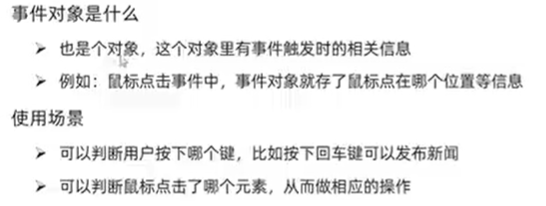
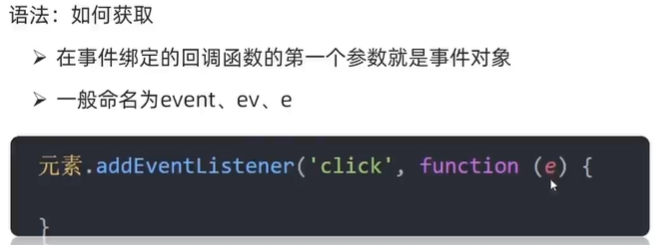
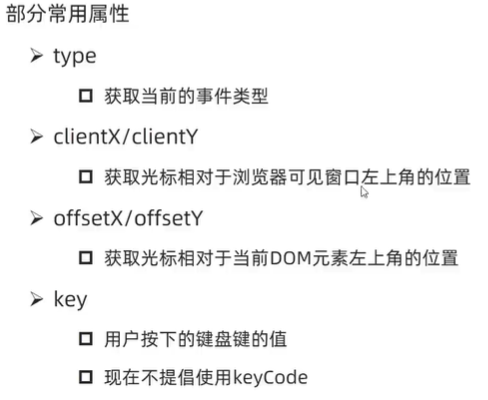
2)事件对象常见属性和方法
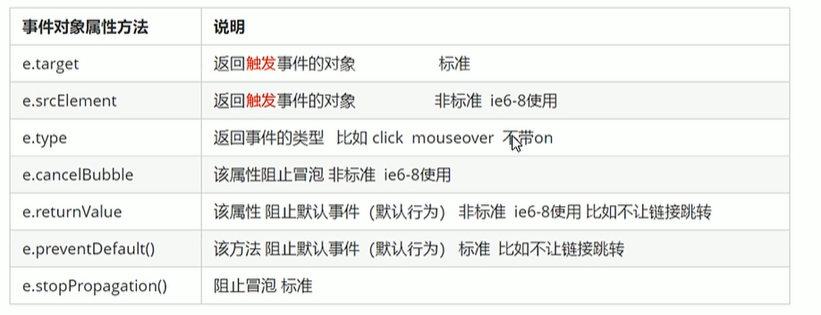
e.target 返回的是触发事件的对象(元素)
this返回的是绑定事件的对象(元素)
3)案例:回车评论
字符串去除左右空格:
<script>
    const str = '         aaa        '
    console.log(str.trim());
</script>
<!DOCTYPE html>
<html lang="en">

<head>
  <meta charset="UTF-8">
  <meta http-equiv="X-UA-Compatible" content="IE=edge">
  <meta name="viewport" content="width=device-width, initial-scale=1.0">
  <title>评论回车发布</title>
  <style>
    .wrapper {
      min-width: 400px;
      max-width: 800px;
      display: flex;
      justify-content: flex-end;
    }

    .avatar {
      width: 48px;
      height: 48px;
      border-radius: 50%;
      overflow: hidden;
      background: url(./images/avatar.jpg) no-repeat center / cover;
      margin-right: 20px;
    }

    .wrapper textarea {
      outline: none;
      border-color: transparent;
      resize: none;
      background: #f5f5f5;
      border-radius: 4px;
      flex: 1;
      padding: 10px;
      transition: all 0.5s;
      height: 30px;
    }

    .wrapper textarea:focus {
      border-color: #e4e4e4;
      background: #fff;
      height: 50px;
    }

    .wrapper button {
      background: #00aeec;
      color: #fff;
      border: none;
      border-radius: 4px;
      margin-left: 10px;
      width: 70px;
      cursor: pointer;
    }

    .wrapper .total {
      margin-right: 80px;
      color: #999;
      margin-top: 5px;
      opacity: 0;
      transition: all 0.5s;
    }

    .list {
      min-width: 400px;
      max-width: 800px;
      display: flex;
    }

    .list .item {
      width: 100%;
      display: flex;
    }

    .list .item .info {
      flex: 1;
      border-bottom: 1px dashed #e4e4e4;
      padding-bottom: 10px;
    }

    .list .item p {
      margin: 0;
    }

    .list .item .name {
      color: #FB7299;
      font-size: 14px;
      font-weight: bold;
    }

    .list .item .text {
      color: #333;
      padding: 10px 0;
    }

    .list .item .time {
      color: #999;
      font-size: 12px;
    }
  </style>
</head>

<body>
  <div class="wrapper">
    <i class="avatar"></i>
    <textarea id="tx" placeholder="发一条友善的评论" rows="2" maxlength="200"></textarea>
    <button>发布</button>
  </div>
  <div class="wrapper">
    <span class="total">0/200字</span>
  </div>
  <div class="list">
    <div class="item" style="display: none;">
      <i class="avatar"></i>
      <div class="info">
        <p class="name">清风徐来</p>
        <p class="text">大家都辛苦啦,感谢各位大大的努力,能圆满完成真是太好了[笑哭][支持]</p>
        <p class="time">2025-9-25 21:29:21</p>
      </div>
    </div>
  </div>
  <script>
    const tx = document.querySelector('#tx')
    const total = document.querySelector('.total')
    const item = document.querySelector('.item')
    const text = document.querySelector('.text')
    // 文本域获得焦点,total显示
    tx.addEventListener('focus', function () {
      total.style.opacity = 1
    })
    // 文本域失去焦点,total隐藏
    tx.addEventListener('blur', function () {
      total.style.opacity = 0
    })

    //检测用户输入 输入内容长度
    tx.addEventListener('input', function () {
      total.innerHTML = `${tx.value.length}/200字`
    })

    // 回车发布评论 键盘事件
    tx.addEventListener('keyup', function (e) {
      // e.key获得具体按键
      if (e.key == 'Enter') {
        if (tx.value.trim() !== '') {
          item.style.display = 'block'
          text.innerHTML = tx.value
        }
        tx.value = ''
        total.innerHTML = `0/200字`
      }
    })
  </script>
</body>

</html>
4、环境对象
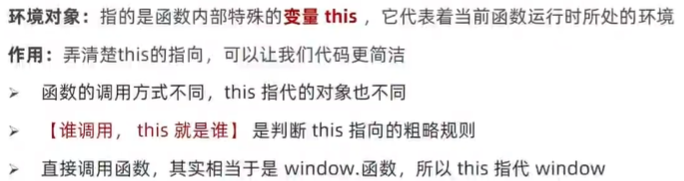
  <script>
    function fn() {
      //每个函数里面都有this 环境对象 普通函数里面this指向的是window
      console.log(this)
    }
    window.fn()
  </script>
  <script>

    const btn=document.querySelector('button')
    btn.addEventListener('click',function(){
          // 事件监听 this指向调用者
          console.log(this)
          // btn.style.color='red'
          this.style.color='red'
    })
  </script>
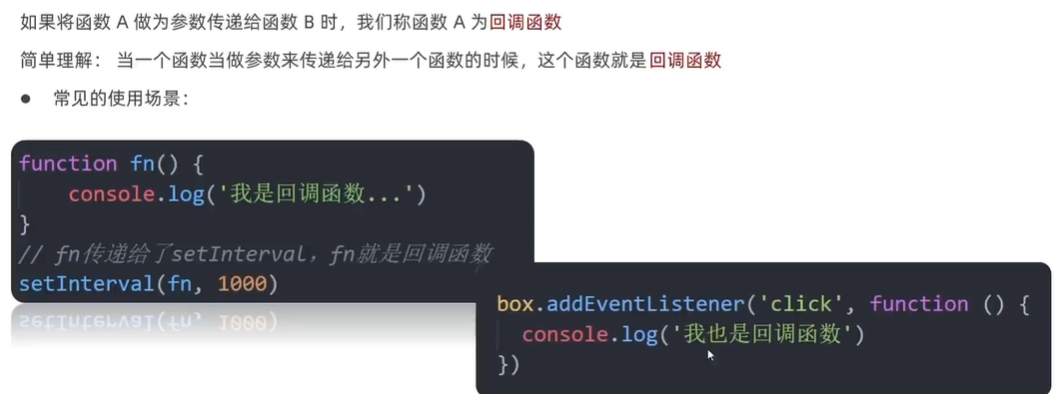
5、回调函数
6、案例:Tab栏切换
<!DOCTYPE html>
<html lang="en">

<head>
  <meta charset="UTF-8">
  <meta name="viewport" content="width=device-width, initial-scale=1.0">
  <title>Tab栏切换</title>
  <style>
    * {
      margin: 0;
      padding: 0;
    }

    .tab {
      width: 590px;
      height: 340px;
      margin: 20px;
      border: 1px solid #e4e4e4;
    }

    .tab-nav {
      width: 100%;
      height: 60px;
      line-height: 60px;
      display: flex;
      justify-content: space-between;
    }

    .tab-nav h3 {
      font-size: 24px;
      font-weight: normal;
      margin-left: 20px;
    }

    .tab-nav ul {
      list-style: none;
      display: flex;
      justify-content: flex-end;
    }

    .tab-nav ul li {
      margin: 0 20px;
      font-size: 14px;
    }

    .tab-nav ul li a {
      text-decoration: none;
      border-bottom: 2px solid transparent;
      color: #333;
    }

    .tab-nav ul li a.active {
      border-color: #e1251b;
      color: #e1251b;
    }

    .tab-content {
      padding: 0 16px;
    }

    .tab-content .item {
      display: none;
    }

    .tab-content .item.active {
      display: block;
    }
  </style>
</head>

<body>
  <div class="tab">
    <div class="tab-nav">
      <h3>每日特价</h3>
      <ul>
        <li><a class="active" href="javascript:;">精选</a></li>
        <li><a href="javascript:;">美食</a></li>
        <li><a href="javascript:;">百货</a></li>
        <li><a href="javascript:;">个护</a></li>
        <li><a href="javascript:;">预告</a></li>
      </ul>
    </div>
    <div class="tab-content">
      <div class="item active"><img src="/images/tab00.png" alt="" /></div>
      <div class="item"><img src="/images/tab01.png" alt="" /></div>
      <div class="item"><img src="/images/tab02.png" alt="" /></div>
      <div class="item"><img src="/images/tab03.png" alt="" /></div>
      <div class="item"><img src="/images/tab04.png" alt="" /></div>
    </div>
  </div>
  <script>
    const as = document.querySelectorAll('.tab-nav a')  //console.log(as) 返回数组

    for (let i = 0; i < as.length; i++) {
      // 绑定鼠标经过事件
      as[i].addEventListener('mouseenter', function () {
        document.querySelector('.tab-nav .active').classList.remove('active')
        this.classList.add('active')

        // 图片更换
        document.querySelector('.tab-content .active').classList.remove('active')
        document.querySelector(`.tab-content .item:nth-child(${i + 1})`).classList.add('active')
      })
    }

  </script>
</body>

</html>





 扫一扫
扫一扫


 1159
1159

 被折叠的 条评论
为什么被折叠?
被折叠的 条评论
为什么被折叠?
 到【灌水乐园】发言





